When we first started our jobs or internships as architects, we must have noticed that most professional practices are serious and diligent when it comes to a few housekeeping rules, the most crucial of which is naming files. Most of us probably have flashbacks to our first day of work, when office supervisors would continuously remind us and check to see if a file was named correctly. Most of us, as young architects or students, use to give our files strange and peculiar names that turn out to be total disasters. What is regarded as a genuine juvenile error, simply because the deadline for submitting a file or job is prioritized over naming or organizing the file, may ultimately result in the expenditure of time, money, and most importantly, labour for a specific task.

At the start of a new project, information management is undoubtedly the most unfamiliar topic. Stakeholders in this scenario, most professional practices may end up adopting a basic naming scheme for their documents and later face serious issues due to a lack of long-term vision. Applying proper document naming standards is extremely lucrative, especially when talking about large projects. We as professionals should ensure that a company has adopted the file naming convention. A systematic method for naming files in a way that explains their contents and connections to other files is called a file naming convention. It guarantees uniformity, enhances organization, and facilitates file management and location.
Typical Errors in File Naming
Confusing labels: Strange labelling is the most frequent error made when naming a file. A third party may become confused about which of the files is the most recent version of the document if strange names like “File 01” or “File 01 New” are used.
Using the default file naming scheme for personal convenience: Random formatting makes it difficult to locate and preserve critical papers. Consider this: every time someone uses a file, they save it under a new name, which is not recommended in a professional atmosphere.
Using special characters: To differentiate one file from another, the most common mistake made by individuals is the use of symbols such as #,$,%, etc., which ends up breaking the link between cloud and drawing, finally leading to file corruption.
Negligence: The basic human mentality where priority is given to the timely completion of work because of workload leading to sometimes ignoring whether a file is properly named or saved. This also leads to the wasting of digital space because of thousands of copies.
Cultural disconnect: Lack of training given to new staff on office standards leads to chaos, inconsistent and ultimately leads to an unmanageable database.
All these factors prevent seamless collaboration and create an atmosphere of high stress and chaos just because of being unable to find files in the absence of a team member and lack of file organization skill leading to loss of precious time and assets.
Best Practices that should be implemented
To transition from a chaotic to a pragmatic working environment, a corporation can implement the following strategies:
Creating a Framework: Planning a framework for file naming acts as a psychological safety precaution. When everyone adopts the same file naming strategy, team members can safely take over a project without missing critical information.
Adopt international filename standards: If you’re not sure which file naming systems to employ, stick to the clear, short, and readily understandable international naming standards.
Continuous cultural reinforcement: After a file name framework has been developed, devote time to training the staff naming system in order to prevent hours of effort that might be utilized for more important activities. Keep just the most relevant and up-to-date files by regularly examining and upgrading them to ensure that out-dated versions are either deleted or archived.
Select the order of the elements based on their importance: Think about how you want to search for and classify your files when determining the order of the information contained in the file name. Decide which information should appear first.
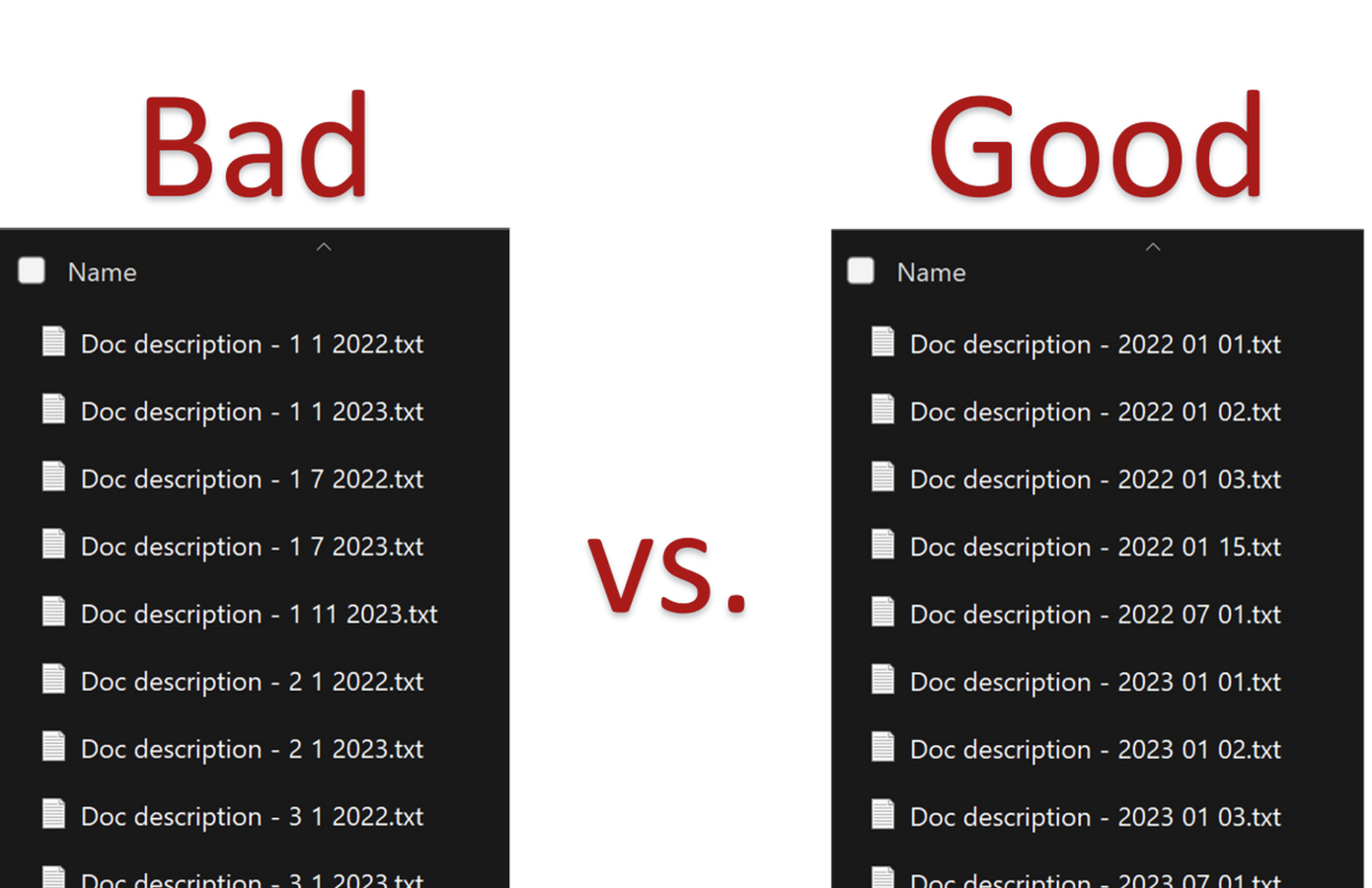
Make use of the default ordering: either chronologically, numerically, or alphabetically Use dates in ISO 8601 format (YYYYMMDD or YYYY-MM-DD).
For instance, YYYYMMDD_ProjectName_TaskName_v01.xxx (Pallotta 2023)
Keep things consistent throughout: Use hyphens and underscores rather than special characters like @, #, $, %, and so on to separate information.
Dashes: file-name.xxx
File name: file_name.xxx.
There is no separation: filename.xxx (Pallotta 2023)
If you prefer elements with more than one word, avoid using spaces to separate elements and instead use them to separate words inside an element.
Utilizing variants: To make sure that one is using a recent and updated version of a file, use versioning. This basically means adding version information to the end of each file name, such as filename_v2.xxx, to keep track of file versions.
Make use of a version number, such as “v01” or “v02.” (Compresto 2025)
Use of Software: The naming process can be made more efficient, user-friendly and consistent by using specialized software exclusively designed to generate automated file naming systems and help in organizing files. By automatically generating file names according to predesigned guidelines, these technologies can lower the probability of human mistakes and ensure that established naming systems are followed. Individuals and organizations can improve their file management system as well using these software’s, increase productivity, and reduce the possibility of confusion and inefficiency can be achieved by recognizing the importance of file naming systems, adopting common practices and using the right software tools is the key.
In order to achieve a streamlined and efficient document management process, it is crucial to have a strong and reliable file naming standard, which should be given priority and not overlooked. This can be achieved by brainstorming at individual organization level and developing a system which is easy to adopt. It is a straightforward yet effective tool that significantly improves productivity, efficiency, and teamwork in any project helping one save hours of hard work from getting lost. Which file naming standards work best, in your opinion and you think should be adopted by your company? Leave a comment below to share your experiences!
REFERENCE LIST:
Website
Pallotta, L. (2024) File naming conventions: Best practices for naming files, Luca Pallotta. Available at: https://www.lucapallotta.com/optimal-file-naming-conventions/ (Accessed: 23 January 2026).
Briney, K.A. (2024) File naming convention worksheet, CaltechAUTHORS. Available at: https://authors.library.caltech.edu/records/mmnpf-cez11 (Accessed: 23 January 2026).
Data Carpentry (2016) File organization: Naming, File Organization: File Organization: Naming. Available at: https://datacarpentry.github.io/rr-organization1/01-file-naming/index.html (Accessed: 23 January 2026).
Sweet, P. (2025) Effective file naming conventions: Best practices for organized Digital assets, Canto. Available at: https://www.canto.com/blog/file-naming-convention-best-practices-beyond-who-what-where-when-why/ (Accessed: 23 January 2026).
Chien, D. (no date) File structure, File Structure : Broad Institute of MIT and Harvard. Available at: https://mitcommlab.mit.edu/broad/commkit/file-structure/ (Accessed: 23 January 2026).
Feineis, R. (2025) Best practices for CAD file naming and Storage, CAD Training Online – Autodesk Authorized Training Center. Available at: https://www.cadtrainingonline.com/best-practices-for-cad-file-naming-and-storage/ (Accessed: 23 January 2026).
Image
Milenkovski, Nikola. Digital document management system dms business information management system virtual screen. 25 Oct. 2023. IwFirstcall, https://iwfirstcall.iwconnect.com/document-management-in-insurance/. Accessed 23 Jan. 2026.