The architectural design process has traditionally required juggling multiple specialized tools—one for sketching concepts, another for rendering, and yet another for creating presentations. This fragmented workflow costs architects valuable time and creates friction at every stage. What if you could handle everything from initial concept visualization to final video presentations in a single platform?
Modern architects face a familiar challenge: tight deadlines, demanding clients, and the pressure to deliver stunning visualizations that communicate ideas clearly. The traditional approach of switching between different software packages for image generation, editing, and animation creates bottlenecks that slow down the creative process. This is where understanding how to use Xole AI for architecture design becomes essential for professionals seeking to improve efficiency.
The Challenge of Fragmented Design Tools
Architects today find themselves managing an overwhelming toolkit. You might use one platform for generating initial concept images, export those to another program for refinement, then move to a third tool for creating presentation videos. Each transition point represents potential quality loss, version control issues, and wasted time.
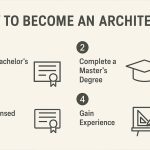
The architecture design process typically spans six distinct phases: conceptualization and pre-design, schematic design, design development, planning and review, construction documentation, and construction administration. Each phase traditionally demanded different software solutions, creating a disjointed workflow that hampers productivity.
The key to improving efficiency lies in consolidation. Rather than maintaining separate subscriptions and learning curves for multiple platforms, architects can now leverage a unified solution that handles the complete visualization pipeline. The most successful architects aren’t necessarily those with the most tools but the ones who can move fastest from idea to presentation without sacrificing quality.
Introducing Xole AI Image Generator: Your Complete Design Companion
Xole AI Image Generator stands out as a comprehensive solution built specifically to address the fragmented workflow challenges architects face daily. Unlike traditional approaches requiring multiple software subscriptions, this platform unifies the entire visualization pipeline into one intuitive interface.
What makes this tool exceptional is its integration of the latest AI models for both image and video generation. Architects benefit from cutting-edge technology that produces high-quality outputs comparable to specialized standalone tools, but without the hassle of managing multiple platforms. The interface is designed for ease of use, allowing professionals to focus on design decisions rather than technical operations.
The platform supports multiple image styles ranging from photorealistic renders to sketch-style conceptual drawings, enabling architects to match their visual output to specific project phases and audience needs. This versatility eliminates the need to export work to different programs for style variations, maintaining quality and consistency throughout the design process.
Perhaps most importantly, the tool offers a true end-to-end solution. From initial image generation through advanced editing capabilities to final video production, every visualization need is addressed within a single environment. This unified approach represents a fundamental shift in architectural workflow efficiency.
Applying AI Visualization Across Design Phases
Let’s examine how to use Xole AI for architecture design throughout the complete project lifecycle, addressing the specific needs of each phase.
Conceptualization and Pre-Design
During early concept development, architects need to explore ideas quickly without committing excessive resources. This phase benefits most from rapid image generation that can translate text descriptions into visual concepts. Instead of spending hours on preliminary sketches, architects can generate dozens of concept variations in minutes.
The ability to quickly iterate on design ideas means you can present clients with more options, gathering feedback earlier in the process when changes are least expensive. This is where learning how to use Xole AI for your architecture design creates immediate value—turning abstract client briefs into concrete visual references.
Schematic Design
Once a general direction is established, schematic design requires more refinement. The initial concepts need development into coherent design proposals. This phase typically involves significant iteration as architects balance aesthetic goals with functional requirements.
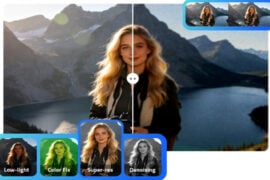
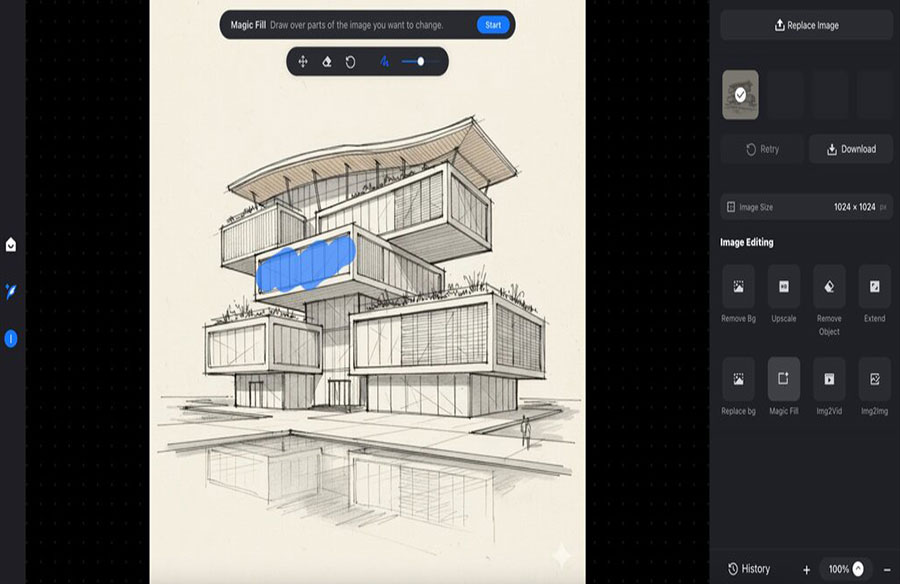
An integrated platform excels here because you’re not starting from scratch—you’re refining existing images. Rather than regenerating entire concepts, you can make targeted edits to specific elements. Need to adjust the facade treatment or modify the entrance approach? Image editing capabilities let you tweak details without recreating the entire visualization.
Design Development
As designs mature, the need for multiple style variations increases. You might need to show the same building in different lighting conditions, seasons, or material palettes. This is where style versatility becomes crucial for architecture design to improve efficiency.
Supporting multiple image styles means architects can quickly generate photorealistic renders for client presentations, sketch-style images for internal reviews, and stylized visualizations for marketing materials—all from the same base model. This flexibility eliminates the need to maintain separate workflows for different output types.
Planning and Review
During review phases, clear communication with stakeholders is paramount. Still images have limitations when conveying spatial experiences and design intentions. This is where video capabilities transform the presentation process.
Converting static architectural renders into animated walkthroughs helps reviewers understand spatial relationships and design intent more completely. Rather than explaining how someone would move through a space, you can show them. This capability represents a significant advancement in how architects can use AI for architecture design presentations.
Construction Documentation and Administration
Even technical phases benefit from efficient visualization tools. When explaining design details to contractors or addressing construction questions, being able to quickly generate explanatory visualizations saves time and reduces misunderstandings.
The ability to rapidly create reference images means architects can respond to field questions without scheduling formal rendering sessions. This responsiveness improves efficiency across the entire project timeline.
Key Capabilities That Transform Architectural Workflows
Understanding how to use Xole AI for architecture design requires recognizing which features create the most value in daily practice.
- Unified Image Generation and Editing: The most significant workflow improvement comes from keeping all visualization work in one environment. Generate an initial concept, refine specific elements through editing, and create presentation materials without ever exporting files or switching platforms. This continuity preserves image quality and maintains version control effortlessly.
- Latest AI Models for Superior Results: Architecture demands high-quality visuals that accurately represent design intent. Access to cutting-edge AI models means your visualizations benefit from the latest advances in image quality, lighting accuracy, and material representation. The difference between outdated and current AI models can be substantial—newer models handle complex architectural elements like glass facades, intricate shadows, and material textures with far greater accuracy.
- Style Flexibility for Different Audiences: Different project stages and audiences require different visualization styles. Early client meetings might benefit from sketch-style images that invite feedback, while investor presentations demand photorealistic quality. Having access to multiple styles within one platform means you can adapt your visual communication strategy without changing tools.
- Image-to-Video Capabilities: Static renders only tell part of the story. The ability to transform architectural images into smooth video sequences adds a dimension to presentations that was previously available only through expensive animation services. This feature alone can justify consolidating your visualization workflow into a single platform.
How Xole AI Streamlines the Complete Design Process
Here’s a practical workflow showing how architects can use Xole AI for architecture design across an actual project:
- Generate Initial Concepts: Input design parameters and style preferences to create multiple concept variations within minutes. The platform interprets detailed text prompts like “contemporary hillside residence with extensive glazing and natural stone accents” and produces diverse options exploring different architectural approaches.
- Refine Through Integrated Editing: Once a promising direction emerges, use the built-in editing tools to make precise modifications without file exports or format conversions. Adjust specific elements like roof pitch, material palette, or landscape integration while preserving the overall composition.
- Create Style Variants: Generate multiple visualization styles from the same base design for different audiences. Produce photorealistic renders for client presentations, watercolor-style images for marketing, and technical sketches for consultant coordination within the same platform.
- Produce Animated Presentations: Transform static renders into compelling video sequences using the image-to-video functionality. Create walkthroughs showing the approach to the building, movement through spaces, or how natural light changes throughout the day.
This streamlined workflow demonstrates how to use Xole AI for architecture design to improve efficiency by eliminating friction points between different tools. Rather than switching platforms for each task, architects maintain creative momentum from concept to final presentation.
Conclusion
Learning how to use Xole AI for your architecture design represents more than adopting a new tool. It’s about rethinking your entire visualization workflow for maximum efficiency. The fragmented approach of using multiple specialized platforms no longer makes sense when a single solution can handle the complete pipeline from image generation through editing to video creation.
Modern architects need to move fast without compromising quality. They need compelling visualizations quickly, efficient iteration based on feedback, and persuasive presentations. Understanding how to use Xole AI for architecture design to improve efficiency removes technical barriers that prevent creativity from flourishing, allowing you to focus on what matters most: exceptional design.