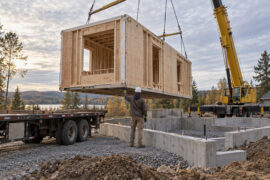
Modern architecture exists at the intersection of creative vision and technical precision. Every building begins as a concept and evolves through countless iterations of design, engineering, and manufacturing documentation. Managing the Bill of Materials has become one of the most challenging aspects of bringing architectural visions to life.
OpenBOM for SOLIDWORKS offers architects and designers a powerful solution to this challenge. The dedicated add-in extracts engineering data directly from assemblies and parts, eliminating the gap between 3D modeling and production-ready documentation.
The Documentation Challenge in Contemporary Architecture
Architecture today demands more than aesthetic excellence:
- Sustainable building practices require precise material tracking
- Prefabrication relies on accurate component lists
- Supply chain management needs real-time cost visibility
- Parametric designs generate thousands of unique components
When an architect modifies a facade system or adjusts structural specifications, that single change may affect hundreds of related components across multiple disciplines.
Key Features of OpenBOM Integration with SOLIDWORKS
| Feature | Benefit for Architects |
|---|---|
| Integrated add-in for assemblies and parts | Create BOMs directly from CAD models without switching applications |
| Multi-level indented BOMs with thumbnails | Visualize complex product structures at a glance |
| Automatic derivative file generation (PDF, STEP, DWG, DXF) | Streamline handoffs to fabricators and contractors |
| Bi-directional property exchange | Send updates back to SOLIDWORKS models |
| Real-time cloud collaboration | Keep distributed teams aligned on evolving designs |
| Cost and mass rollups | See design implications instantly |
How OpenBOM Solves Common Architectural Workflow Problems
Problem 1: Version Control Nightmares
Traditional workflows create multiple spreadsheet versions across team members. OpenBOM maintains a single source of truth in the cloud. When changes occur in the 3D model, they automatically reflect in the shared BOM database.
Problem 2: Disconnected Engineering and Procurement
Engineering BOMs rarely translate directly into purchasing requirements. OpenBOM bridges this gap:
- Add non-modeled items (sealants, fasteners, finishing materials) alongside CAD-extracted data
- Attach vendor information directly to catalog items
- Generate purchase orders with one click from planning BOMs
- Track material lead times within project scheduling
Problem 3: Complex Assembly Management
For prefabricated building systems where each module contains steel framing, insulation, cladding, and finishes, OpenBOM provides:
- Unified documentation across all trades
- Automatic cost accumulation as assemblies develop
- Propagation of engineering changes through dependent components
- Linked derivative files stored directly in BOM structure
Comparison: Traditional vs. OpenBOM Workflow
| Aspect | Traditional Approach | OpenBOM Approach |
|---|---|---|
| Data extraction | Manual export and re-entry | Automatic sync from SOLIDWORKS |
| Version control | Multiple spreadsheet copies | Single cloud-based source |
| Collaboration | Email attachments | Real-time shared access |
| Cost tracking | Separate calculation sheets | Integrated rollups |
| Vendor management | External databases | Built into component records |
| Purchase orders | Manual creation | One-click generation |
Practical Applications for Architectural Practice
Curtain Wall Systems: Track hundreds of unique panel configurations with automatic quantity takeoffs and cost rollups.
Modular Construction: Maintain component catalogs that support mass customization while controlling manufacturing costs.
MEP Equipment Schedules: Link mechanical components to supplier catalogs with current pricing and lead times.
Sustainable Materials Tracking: Document material sources, certifications, and environmental attributes within the same BOM structure.
Core Capabilities That Transform Project Delivery
OpenBOM for SOLIDWORKS includes:
- Support for complex part numbering schemes and custom properties
- Recognition of assembly configurations (Exclude from BOM, Suppress options)
- Weldments, cut lists, sheet metal, and piping support
- “Purchased assemblies” managed as single line items
- Catalog creation from folders of parts
- Property mapping controls for clean, focused BOMs
The ROI of Integrated BOM Management
Teams using cloud-based BOM management report significant improvements:
| Metric | Typical Improvement |
|---|---|
| Time spent on documentation | 40-60% reduction |
| BOM-related errors | 70-80% reduction |
| Design-to-procurement cycle | 30-50% faster |
| Supplier communication efficiency | 2-3x improvement |
Getting Started with OpenBOM
The integration process is straightforward:
- Download and install the SOLIDWORKS add-in
- Connect to your OpenBOM cloud account
- Open any assembly or part file
- Extract BOM data with configured property mappings
- Share with team members and external collaborators
OpenBOM offers a 14-day free trial to evaluate the platform with your actual project data.
Looking Forward
Architecture continues evolving toward greater complexity. Parametric design, mass customization, and sustainability mandates require production systems that traditional spreadsheets cannot support.
Cloud-based BOM management tools designed for SOLIDWORKS integration offer a path forward. By connecting design decisions to material reality from the earliest project stages, architects make informed choices that balance creative ambitions with practical constraints.
The tools exist to transform architectural production. Visit OpenBOM for SOLIDWORKS to explore how integrated BOM management can streamline your next project.