People usually think about the chair, the monitor and maybe the lighting first. But the position of your desks can have just as much impact on how an office actually feels to work in. Put one in the wrong spot and suddenly people are squeezing past chairs, staring into glare or feeling like they’re sitting in the middle of a walkway. Get the layout right and the whole room tends to work better without anyone really noticing why.
That’s the funny thing about office planning. The best setups often don’t look clever. They just feel easy.
Start With the Way People Move
Before placing any furniture, watch how people naturally move through the space.
Where’s the door? Where’s the printer? Is there a meeting room everyone uses? Does the kitchen sit at the far end of the office?
These little things matter because no one wants to spend eight hours sitting beside a constant stream of footsteps.
It sounds obvious, but I’ve seen plenty of offices where someone’s chair is practically blocking the main route to the coffee machine. Every few minutes there’s a shuffle, an apology and someone squeezing past.
Not ideal.
Leave enough room behind chairs so people can move without disturbing whoever is working. And think about busy routes. If everyone walks past one corner twenty times a day, maybe that isn’t the best place for someone who needs to concentrate.
Windows Are Great, Until They Aren’t
Natural light can make an office feel much better.
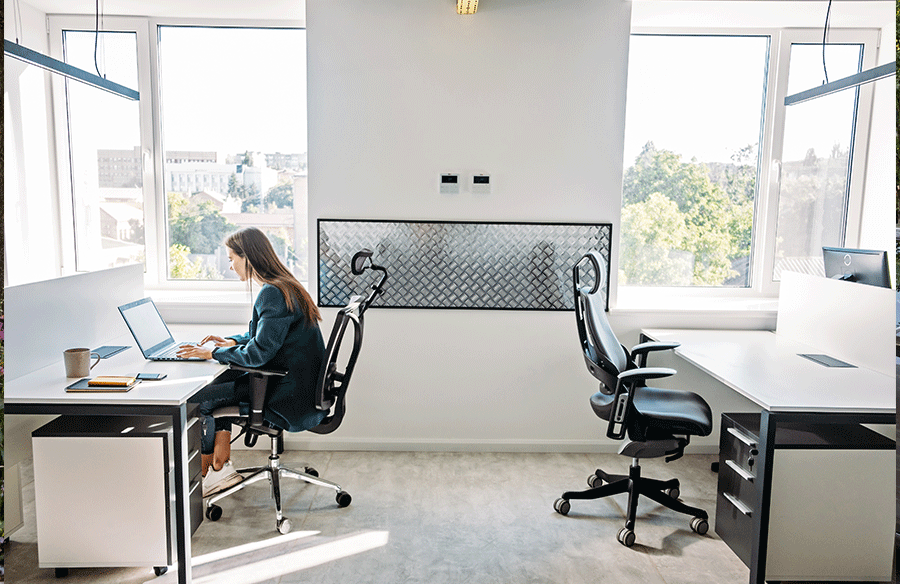
But putting a workstation directly in front of a bright window isn’t always the dream setup it sounds like.
By mid-afternoon, glare can turn a perfectly good monitor into a mirror. People start squinting, lowering blinds and moving screens around. Then the room ends up darker than it was in the first place.
Side-on light often works better.
You still get daylight, but without staring straight into it. It also helps reduce screen reflections.
And if the office gets strong afternoon sun, check the room at that time of day before deciding on the final layout.
Morning light can be lovely. Three o’clock summer sun hitting someone directly in the face? Less lovely.
Give People a Sense of Space
There’s a difference between fitting furniture into a room and making the room comfortable.
You can technically squeeze six workstations into a certain area. That doesn’t mean you should.
People need a bit of breathing room.
If two chairs constantly bump into each other, or someone has to ask a colleague to move every time they want to leave their seat, the layout is too tight.
And this isn’t only about comfort. Crowded spaces can feel noisy even when they’re not particularly loud.
Sometimes removing one workstation improves the whole room.
Actually, scratch that. Sometimes moving one workstation to a better position is enough.
That’s why it helps to test layouts before committing. Use masking tape on the floor if you have to. Mark out the footprint and walk around it.
It’s low-tech, but it works.
Think About What Happens on a Busy Day
A quiet office on Friday afternoon tells you very little.
Picture Tuesday morning instead.
Phones are ringing. Someone’s running a video call. Two people are discussing a project. Someone else is trying to finish a report before lunch.
Where does each activity happen?
Open-plan offices work better when the furniture supports different types of work rather than treating every task the same.
Someone who spends most of the day on calls may need a different position from someone doing detailed design work.
Likewise, teams that collaborate constantly might benefit from sitting closer together. But putting a quiet worker beside a sales team that’s on the phone all day can become annoying fast.
You know the type of thing. Nobody complains at first.
Then six months later everyone has headphones on.
Don’t Ignore What’s Under the Surface
Cable management isn’t the exciting part of office planning.
Still, it matters.
A workstation can look clean on day one and turn into a tangle of chargers, power boards and loose cables by the end of the week.
Think about where power points are before deciding where furniture goes.
If you need extension leads running across walkways, something has probably gone wrong.
You’ll also want to consider how many devices people actually use. It’s rarely just one computer anymore. There might be two screens, a phone charger, docking station and desk lamp all competing for power.
Plan for reality rather than the neat version shown in furniture catalogues.
The Desk Should Match the Job
Not everyone needs the same setup.
A person working mainly from a laptop may be perfectly comfortable with a compact workstation. Someone dealing with large plans, documents or multiple monitors needs more surface area.
And then there are people who somehow manage to spread paperwork across every available centimetre.
We all know one.
The point is that office furniture should reflect what people actually do.
That might mean mixing different sizes or layouts rather than using the exact same setup everywhere.
Consistency looks tidy, sure. But usefulness matters more.
Leave Some Room for Change
Offices rarely stay exactly the same.
Teams grow. Roles change. New equipment appears. Someone suddenly needs an extra monitor. Another person starts working from home three days a week.
So flexibility is worth thinking about from the start.
Furniture that can be moved or rearranged gives you more options later.
A tightly packed layout might work perfectly today and become frustrating when one new employee joins.
Leaving a little spare space can feel inefficient at first.
It usually isn’t.
The Best Layout Is the One You Stop Noticing
A well-planned office doesn’t constantly remind you of its furniture.
You sit down. You can move easily. The screen isn’t full of glare. Your chair doesn’t block anyone and the power cable isn’t stretched across the floor.
Everything just works.
That’s the goal.
So before choosing where everything goes, spend a bit of time thinking about movement, light, noise and how the office behaves on a normal busy day.
The layout doesn’t need to be fancy.
It just needs to make work feel a little easier.