eSIM for the country — South Africa stretches across nearly 1,200 kilometers from Cape Town’s waterfront to the gates of Kruger National Park. Until recently, staying connected across that distance meant hunting for SIM cards at airports, managing roaming fees, or accepting that large portions of your trip would be offline. eSIM technology has changed that calculation. A digital SIM activated before you land gives
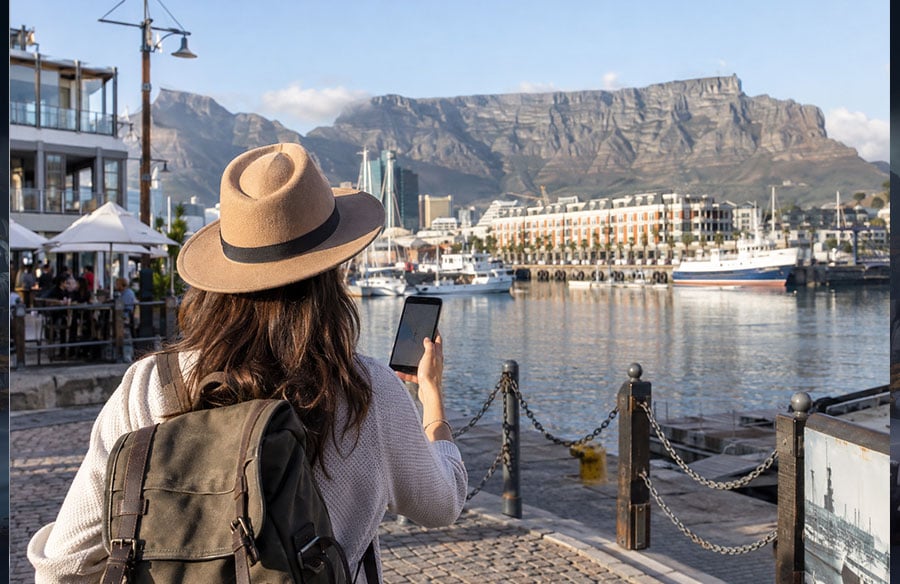
An eSIM keeps travelers connected from Cape Town to remote routes.
you working data the moment you clear customs.
An eSIM works by downloading a mobile network profile directly to your phone. Instead of swapping physical cards, you scan a QR code and choose a plan that matches your trip length. Most travelers pick coverage between 7 and 30 days, with data allowances ranging from 3GB for light use to unlimited plans for those working remotely or streaming navigation throughout a multi-week road trip.
The shift matters because connectivity here is no longer just about checking email. Navigation apps guide you through mountain passes outside Stellenbosch. Translation tools help in multilingual cities like Johannesburg. Restaurant booking platforms show real-time availability. And in places like Kruger, where lodges are hours apart, having active data means you can report your location, share wildlife sightings, and coordinate pickup times without relying on lodge WiFi that may not exist or may cost more per day than a 30-day eSIM plan.
Quick Answer: Do eSIMs Work Here?
Yes. eSIMs work across the country on all three major networks: Vodacom, MTN, and Cell C. Most phones sold after 2019—including recent iPhones, Samsung Galaxy models, and Google Pixels—support the technology.
You install the eSIM profile before you leave home or when you land at Cape Town or Johannesburg airport. The process takes about two minutes:
- Scan a QR code
- Confirm the installation
- Select the new plan as your mobile data source
You keep your primary SIM for calls and texts, and route data through the eSIM. Once you activate the profile, you’re connected immediately—no waiting for physical cards or carrier approvals.
Coverage extends across urban centers, national highways, and most national parks:
- Vodacom and MTN both operate 4G and 5G infrastructure in Cape Town, Johannesburg, Durban, and Pretoria
- Along the N2 coastal route and the N1 toward the Northern Cape, you’ll find signal at towns and rest stops, with predictable gaps between them
Plans typically run from 1GB for short city trips up to 20GB or more for month-long visits across the country:
- A 3GB eSIM covers seven days of navigation, messaging, and occasional photo uploads
- A 10GB plan works for 30 days if you’re streaming music on road trips or uploading video from safari
The practical advantage: you arrive connected. No hunting for a SIM card vendor at the airport, no passport photocopies, no cash-only counters. You walk out with working data and open your maps app, ready to navigate roads and stay online throughout your trip.
Best eSIM Plans Compared by Price and Data
Several eSIM providers now offer coverage here, with plans that range from short city visits to month-long safaris. Most operate on Vodacom, MTN, or Cell C networks, which cover Cape Town, Johannesburg, Durban, and major highways well.
Airalo offers a 3 GB plan for 30 days at around $11, while their 10 GB option runs about $32. Holafly sells unlimited data plans starting at roughly $19 for 5 days, scaling to $99 for 30 days. SafarieSIM provides regional Africa eSIM packages that include South Africa alongside neighboring countries, useful if your trip extends to Botswana or Namibia.
| Provider | Data | Validity | Price |
| Airalo | 3 GB | 30 days | Around $11 |
| SafarieSIM | Unlimited data | 5 days | About $25 |
| Holafly | Unlimited data | 5 days | About $31 |
Example eSIM plans vary by data allowance, validity and price.
For travelers splitting time between cities and national parks, a 5 GB to 10 GB plan typically handles two weeks of navigation, messaging, and occasional photo uploads. If you’re working remotely or streaming video, look at 20 GB or unlimited options. Most providers let you top up mid-trip if you run low.
Price differences come down to data allowances, validity periods, and network access. Some eSIMs throttle speeds after a daily cap even on “unlimited” plans, so read the fine print. If you need help choosing or setting up, check out how to get esim in south africa for setup guides and compatibility details.
Activation is usually instant once you scan the QR code and have an internet connection. Buy before you leave home to avoid hunting for SIM shops at the airport.
How to Choose the Right eSIM for Your Trip
The right eSIM depends less on the label and more on the shape of your itinerary. A five-day Cape Town stay has different requirements from a 30-day journey through Johannesburg, the Panorama Route and Kruger National Park.
Start with compatibility. Check that the phone is unlocked and supports eSIM before buying a plan. Then compare the validity period, data allowance and supported carrier. A traveler using maps, messaging and occasional ride-hailing may need a modest package, while remote professionals should look for more data and confirm whether hotspot use is allowed. Providers like Airalo offer unlimited-data eSIM packages starting at €17.50 for 3 days, while SimCorner lists a 1 GB plan valid for 7 days at AUD 10. “Unlimited” packages also deserve careful reading: providers may apply fair-use limits, reduce speeds after heavy usage or exclude tethering.
For a city-based visit, an Africa eSIM or a local eSIM with a short validity period may be sufficient. For a longer route, choose a plan that covers all travel days, or verify that it can be topped up without replacing the profile. An eSIM should also make activation instructions clear, including when the validity clock begins. Some options start when installed; others start when the phone first connects to service.
Coverage still depends on local network availability, terrain and the specific destination. Before a safari or long drive, download offline maps, park information and important booking details. A useful comparison of travel SIM options, including safari considerations, is available from SafarieSIM.
Finally, keep a physical SIM available if the phone supports dual SIM, and save emergency contacts offline. Connectivity is valuable on the road, but it should support the journey rather than replace basic preparation.
Travel eSIM vs Local SIM Card: Which Is Best for Tourists?
When you land at OR Tambo or Cape Town International, you’ll face a practical choice: buy a local SIM card at the airport or activate an eSIM you set up before departure.
Local SIM cards from Vodacom, MTN, or Cell C are sold at airport kiosks and convenience stores. You’ll need your passport, and activation typically takes 10–20 minutes. Prepaid data bundles start around 149 rand for 1GB valid for 30 days, with larger allocations available. The main advantage is immediate access to a local carrier without needing prior setup.
The tradeoff is logistics. You’ll swap out your home SIM card, which means losing access to your original number unless your phone supports dual SIM. If you’re traveling through multiple countries in Africa, you’ll repeat the process at each border. And if you run out of data halfway between Johannesburg and Kruger, topping up requires finding a retailer or navigating a carrier app in an unfamiliar system.
An eSIM solves most of these friction points. You buy and install the plan before you travel, then activate it when you land. Your original number stays active for voice and texts. Most eSIM packages cover 7, 15, or 30 days with set data allowances, and some offer unlimited data within the validity period. If your itinerary includes Botswana or Namibia, many eSIM providers offer regional Africa offerings that function across borders without additional setup.
The best choice depends on visit length and complexity. For a week-long visit focused on one or two cities, either option succeeds. For multi-country itineraries or travelers who need to stay reachable on their home number, eSIMs remove several layers of hassle.
Coverage and Network Speeds Across the Country
The country’s three main mobile operators—Vodacom, MTN, and Cell C—together cover roughly 95% of the population, but population coverage tells only part of the story. Most eSIM plans connect to Vodacom or MTN, which both offer extensive 4G networks in cities and along major highways.
In Cape Town, Johannesburg, and Durban, you’ll typically see download speeds between 20 and 50 Mbps on 4G, enough for video calls, navigation, and uploading photos without waiting. Vodacom has rolled out 5G in parts of Cape Town’s city center, the V&A Waterfront, and Johannesburg’s Sandton district, where speeds can exceed 100 Mbps.
The rapid expansion of 5G infrastructure in key urban centers like the V&A Waterfront highlights a global trend towards integrating advanced digital connectivity into modern city planning. This evolution influences everything from smart building design and public space activation to the very fabric of how people interact with their built environment, making these areas not just connected, but intelligently responsive.
The Garden Route between Cape Town and Port Elizabeth maintains reliable 4G coverage through towns like Knysna, Plettenberg Bay, and Mossel Bay. You’ll lose signal in stretches between towns, but it returns quickly as you approach the next settlement.
Kruger National Park presents the biggest connectivity gap for most travelers. The main rest camps—Skukuza, Lower Sabie, Satara—have working mobile coverage, but large sections of the park, particularly the remote northern areas and many game drive loops, have no signal at all. Most eSIM data plans include 30 days of validity, which works well for longer trips that combine city time with safari days where you won’t be using data anyway.
If your route takes you through the Eastern Cape or Northern Cape, expect longer gaps between coverage zones and slower speeds in rural towns.
How Much Data Will You Need for 7, 14 or 30 Days?
Data needs vary wildly depending on how you travel. A photographer uploading high-resolution images each evening will burn through more data in three days than a casual Instagram user needs in a month.
For a week-long trip focused on Cape Town and the Winelands, most travelers use between 3GB and 7GB. That covers daily map navigation, social media posts, restaurant searches, and video calls home. If you’re streaming music during drives or watching Netflix at your guesthouse, add another 2–3GB per week.
Two-week itineraries that include a road trip up the Garden Route or across to Kruger typically require 8GB to 15GB. The longer you’re on the move, the more you rely on maps, translation apps, and mobile bookings. travelers who work remotely while traveling should budget at least 1GB per day for video calls and cloud file access.
Month-long stays present a different calculus. Digital nomads settling in Cape Town or Johannesburg for 30 days often need 25GB to 40GB, especially if they’re taking calls over WhatsApp, attending Zoom meetings, or uploading work files. Some eSIM providers offer unlimited data plans for the country, though these typically throttle speeds after a certain threshold—usually 20GB to 30GB of high-speed data per month.
The rise of digital nomadism directly impacts architectural and interior design, driving demand for flexible living-working spaces. Urban planners and developers in cities like Cape Town are increasingly considering how to accommodate this demographic, from designing adaptable residential units to creating vibrant co-working hubs that blend productivity with community, reflecting a shift in how we conceive of ‘home’ and ‘office’.
Safari travel is the exception. Limited network coverage in game reserves means you’ll use far less data than you expect. A 10GB plan easily covers a three-week trip that includes five days in the bush, where connectivity drops to zero and your phone becomes a camera.
How to Install and Activate an eSIM on iPhone or Android
Installing an eSIM is faster than finding a SIM card shop at the airport. Most travelers complete the process in under five minutes, often before their flight lands.
Before You Start
Check that your phone supports eSIM. iPhones from XS onward work globally. Most Samsung Galaxy, Google Pixel, and recent Android flagships released after 2020 support eSIM, but confirm in your phone’s settings under Cellular or Mobile Network.
You’ll need an internet connection to download the eSIM profile. Use airport WiFi or your current data plan before you switch networks.
Installation Steps for iPhone
After purchasing your eSIM plan, you’ll receive a QR code by email. Open Settings → Cellular → Add eSIM, then scan the QR code with your camera. iOS will download the profile and prompt you to label it—choose something like “South Africa 30 Days” if you’re installing multiple plans.
Set your new eSIM as the primary line for mobile data. Your original SIM can stay active for calls and texts if needed.
Installation Steps for Android
The process varies slightly by manufacturer. On most devices, go to Settings → Network & Internet → SIMs → Add eSIM, then scan your QR code. Samsung users navigate through Connections → SIM Manager → Add eSIM.
Once the profile downloads, enable it and select it as your data network. The eSIM typically activates within 30 seconds of connecting to a local network.
Keep your QR code email accessible throughout your trip. If you need to reinstall the profile after a phone reset, you’ll use the same code.
Calls, Texts, WhatsApp and Keeping Your Regular Number
Most travelers arriving in the country don’t realize that a data-only eSIM can handle nearly all their communication needs without changing their phone number or losing access to their regular contacts.
Here’s how this operates: when you install an eSIM, you’re adding a second line to your phone purely for mobile data. Your original SIM card stays active for voice and texts on your home number. The eSIM handles internet—which mean