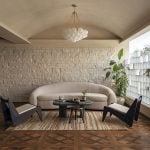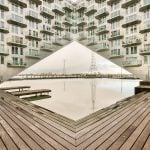
A regular architectural project can begin with very little – a few photos of the site, some client notes from a meeting, specific materials, and a rough idea of how the building should look. The thing is that the next meeting with the client may be tomorrow and that is a problem because the full 3D model of the project will take a lot longer to finish. The client meeting is coming up soon, specifically it could be tomorrow. The full 3D model will take much longer to build.
This is where an AI photo generator comes to the rescue. Instead of designing an entire building, architects and designers can take a few lines of text and turn them into an image, experiment with variations, and have a visual to show the client before spending hours creating a model.
Using Concept Images Before You Commit to a Full Model
At the beginning visualization is not so much about showing things as it’s about making choices. A concept image shares the design idea by thinking about and solving questions, about form, materials, mood and surroundings when everything is still changing.
Testing Form, Material, and Atmosphere Side by Side
Imagine a designer working on a small cultural building. The first set of notes describes exposed concrete, lots of glass, naturalized plants, and a harmonious relationship to the site.
Rather than developing several full-scale models, the designer could use an AI image generator from text, describe and produce images of variations on the design theme. One prompt could focus on a horizontal structure while another envisions a vertical structure. Other prompts could highlight differences in materials, landscaping, lighting, or context.
None of these should be used to replace traditional plans and models. Their value comes from speed. Designers can compare multiple possibilities before deciding which direction deserves more detailed development.
This approach can also reveal unexpected combinations. A material that seems desirable on the page can be too ponderous in reality, whereas a less predictable use of form can generate exciting juxtapositions with the context.
Describing a Building Idea in Text
One of the most useful aspects of an AI image generator from text is that architects can begin with information they already have rather than starting with a blank canvas.
From Site Notes and Style Words to a Visual Read
Architectural site notes can contain plenty of visual information. They might mention orientation, surrounding buildings, vegetation, materials, views, climate, and the atmosphere the client wants.
Those details can become the foundation of a prompt.
For example, instead of writing:
“Modern house on a hillside.”
a more useful description could be:
“Contemporary hillside home with exposed concrete walls, oversized windows, native grasses, tiered terraces, valley views, late afternoon sun, and a paucity of natural materials.”
The second version gives the generator a clearer visual direction.
The same process can be used for architectural styles. You can start with styles like minimalist or industrial or vernacular or biophilic or brutalist or Mid-century. These architectural styles can be the starting point for design.. You also have to think about the materials and the setting and the lighting and the layout. These things can make architectural styles like minimalist or industrial or vernacular or biophilic or brutalist or Mid-century feel more real and add some depth to the design of styles, like minimalist or industrial or vernacular or biophilic or brutalist or Mid-century.
Pushing Speculative or Unusual Forms Safely
Concept development often involves ideas that would be expensive or time-consuming to model repeatedly. An architect may want to experiment with curved elements, unusual cantilevers, floating volumes, biomorphic facades, or new relationships between interior and exterior.
AI generation makes it easier to explore these possibilities at the speculative stage.
A designer can describe a radical form, generate several interpretations, and decide whether any part of the idea deserves further development. If the result doesn’t work, very little time has been lost.
That makes experimentation less risky. The purpose isn’t to prove that an AI-generated building can actually be constructed. It is to ask better design questions before moving into technical development.
Senzia for Visual Experiments Beyond the Studio
Senzia is one option for turning written ideas into images and exploring different visual directions.
Exploring Styles and Compositions from Text
An AI image generator becomes particularly valuable when there is potential for multiple variations of the same design idea.
A designer might ask for the picture of a building to be made in different ways. They could want it to look like a photo or a picture taken at sunset with really bright colors or a simple graphic or a sketch that is just an idea. This can also help people pay attention to the things around the building, not the building itself.
With Senzia, you can take text descriptions and explore various variations to find the right style and composition for your needs. This can be particularly valuable in the early stages of the design process, when the design intent for the project is still evolving.
Start with a short description of the building, then add details about materials, lighting, background, composition, or style. Generate the image and review the result. If the direction is not right, edit the prompt and change the details that need improvement before generating another version.
It can also help crystallize vague design ideas into something tangible. Instead of stating that your project should feel dramatic and organic, you can experiment with these ideas as visual motifs and then further define them based on the generated images.
Turn Early Architectural Ideas Into Something You Can See
Architectural ideas often start with words. When we look at a site we see the materials. We think about what the clients want. We also think about the kind of atmosphere we want to create. We usually write down our thoughts about these things. The problem is finding a way to show all of this information in pictures so that everyone can understand it and share it with others. We need to make sure that people can look at these pictures and know what is going on with the site and the materials and what the clients want.
A free online AI image generator could help visualise this initial concept, making it easier for students and independent professionals to communicate their vision clearly. More advanced workflows can then build on those early experiments as the project becomes more defined.
For architects, the biggest benefit is not replacing modeling or rendering. It is creating a faster feedback loop between an idea and its visual interpretation.
Senzia is one place to keep exploring those visual possibilities, whether the goal is testing an early architectural concept, comparing styles, or developing broader visual assets. When used at the right stage, Senzia and an AI photo generator can help turn rough notes into visual starting points before the more detailed work begins.