Technology has become an integral part of almost everything we do, especially when it comes to driving. From intuitive infotainment systems to safety features that provide real-time assistance, the modern car is smarter than ever.
UVO Connect is the Kia brand’s innovative in-car technology that brings your vehicle closer to your smartphone, making your driving experience more connected, convenient, and secure. UVO Connect offers a range of impressive features, from remote car control to real-time vehicle health monitoring.
This article will dive into what UVO Connect is, its key features, how it enhances safety, and how you can get started using it in your own Kia.
What Is UVO Connect?
At its core, UVO Connect is Kia’s cutting-edge infotainment system that connects your vehicle to your smartphone, providing a range of features that make managing and interacting with your car easier than ever. It allows you to control various functions remotely and access vital vehicle information right at your fingertips. UVO Connect uses a smartphone app to sync with your car’s onboard technology, meaning that whether you’re inside or away from your vehicle, you can monitor and control it with ease.
For example, in the 2024 Kia Sportage, the UVO Connect system can provide real-time information on fuel efficiency, tire pressure, and maintenance needs, allowing you to stay on top of your car’s health. UVO Connect is more than just an infotainment system — it’s a tool designed to make every drive more efficient, safer, and more enjoyable.
What Are the Key Features of UVO Connect?
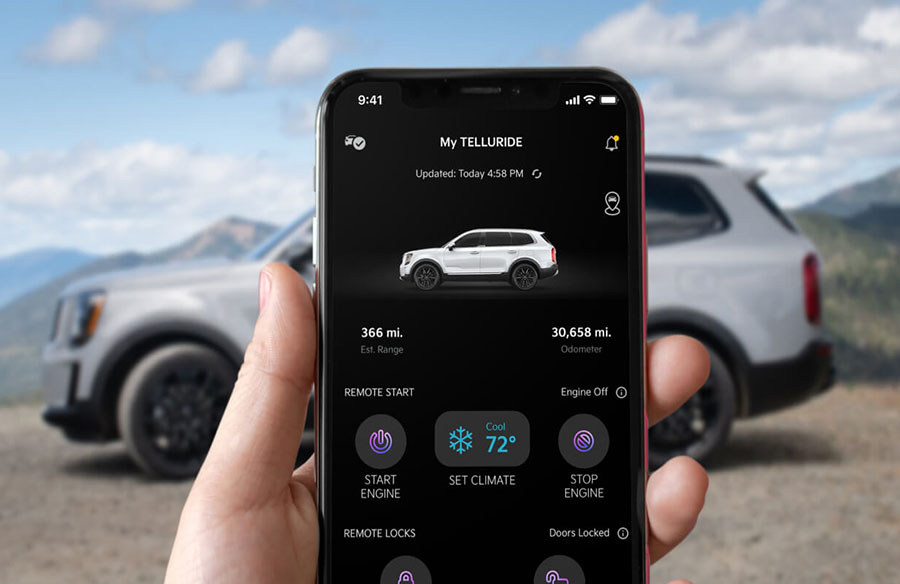
Remote Start and Climate Control are among the most convenient features. The UVO Connect app lets you remotely start your car and set the temperature before stepping inside. This is perfect for those cold mornings when you want the car to warm up or during the summer when you want to cool down before getting in.
Next, there’s Vehicle Health Monitoring, which keeps you informed about your car’s status. It provides real-time alerts for low tire pressure, oil levels, and brake pad wear.
UVO Connect also makes driving easier with Navigation and Route Planning. With real-time traffic updates and the ability to send destinations directly to your car’s navigation system, UVO Connect makes it easier to plan your routes. If there’s an accident or heavy traffic ahead, the system will automatically suggest a detour to keep you on track.
For added convenience, you can also remotely lock and unlock your car. If you’ve ever forgotten to lock your car or need to let someone in but aren’t near your vehicle, UVO Connect allows you to control the locks from your smartphone.
How Does UVO Connect Enhance Safety and Security?
Kia’s UVO Connect also prioritizes your safety and vehicle security. One of the standout safety features is Emergency Assistance, which can automatically alert emergency responders in an accident. If your car is involved in a collision, UVO Connect can send your location directly to the emergency services, making it easier for them to find you quickly and provide assistance.
Another feature that enhances security is Stolen Vehicle Recovery. If your vehicle is stolen, UVO Connect can help track its location, making it easier for authorities to recover it. This system uses GPS technology to pinpoint the car’s whereabouts, allowing you to report the location to law enforcement.
In addition to these features, UVO Connect includes Geofencing and Speed Alerts, which allow you to set specific boundaries for your car and receive notifications if those boundaries are crossed. If you set a maximum speed limit, you’ll be notified if the car exceeds that limit. These features can be especially useful for parents of teen drivers or for anyone who wants a little extra peace of mind.
How Do You Set Up and Use UVO Connect?
To set up UVO Connect, the first step is to download the UVO Connect app from the Apple App Store or Google Play Store. Once the app is installed on your smartphone, you’ll need to create an account, which involves entering basic personal information and linking the app to your Kia vehicle.
The next step is pairing the app with your car by following the on-screen instructions to connect your phone to the car’s Bluetooth system.
Once it’s set up, you can begin customizing the settings to fit your preferences. You can adjust your preferred charging stations and vehicle maintenance reminders and even create custom alerts for tire pressure or oil levels.
Your Car, Your Command
Kia’s UVO Connect system has transformed how we interact with our cars, offering convenience, safety, and control in one easy-to-use package. Whether you’re starting your car remotely on a cold morning, checking in on your car’s health, or ensuring that your vehicle is safe and secure, UVO Connect has you covered.
As more and more drivers embrace connected technology, UVO Connect stands out for its intuitive design, advanced features, and seamless integration with your smartphone. If you’re in the market for a new Kia, UVO Connect is certainly one feature you’ll want to explore to make the most of your driving experience.