When the scale and complexity of design and construction projects increase, it becomes challenging to coordinate BIM models without Revit automation. Also, human-intensive processes inject risks and reduce accuracy and speed of construction projects.
When construction trades like architecture, structure and MEP create their individual BIM models from drawings or sketches, the building components may fail to be spatially aligned or match the level of detail.
Subsequently, after assembly into a federated model, clashes may surface among architectural layouts, structural members and MEP systems. When this happens, the data within these 3D models turns unreliable, but manual checks by BIM coordinators and MEP engineers can often miss these critical issues.
For modern large-scale construction, you can no longer rely on workflows depending on manual coordination. You can neither afford the resources nor the risks. There are many issues that can creep in, including poor model performance, version control problems, bad clash data and higher costs. All of these issues tell us that a different approach is needed.
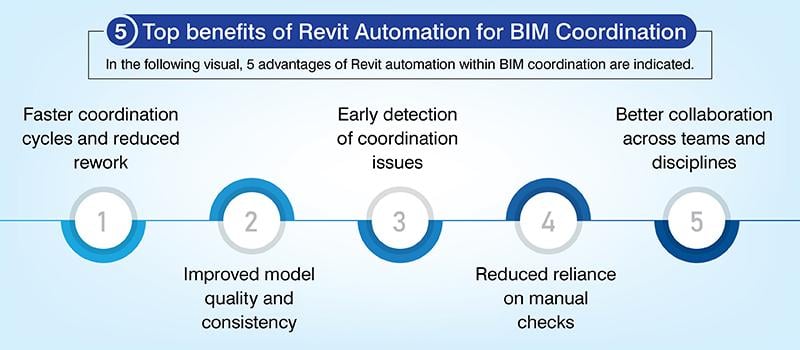
Revit automation is the tool to fix these problems. It reduces repetitive tasks, improves data accuracy and helps projects to be delivered on time.
Understanding Revit automation in modern BIM workflows
HVAC teams and mechanical contractors need to fully grasp how Revit automation fits into modern BIM workflows.
Automation within Autodesk Revit: You can greatly reduce the need for manual work by using Revit automation workflows. And your team can speed up delivery timelines without compromising on complete and accurate data integration.
The role of APIs, add-ins and visual programming tools: These play a central role in Revit automation as they simplify workflows and strengthen software capabilities to boost the overall output.
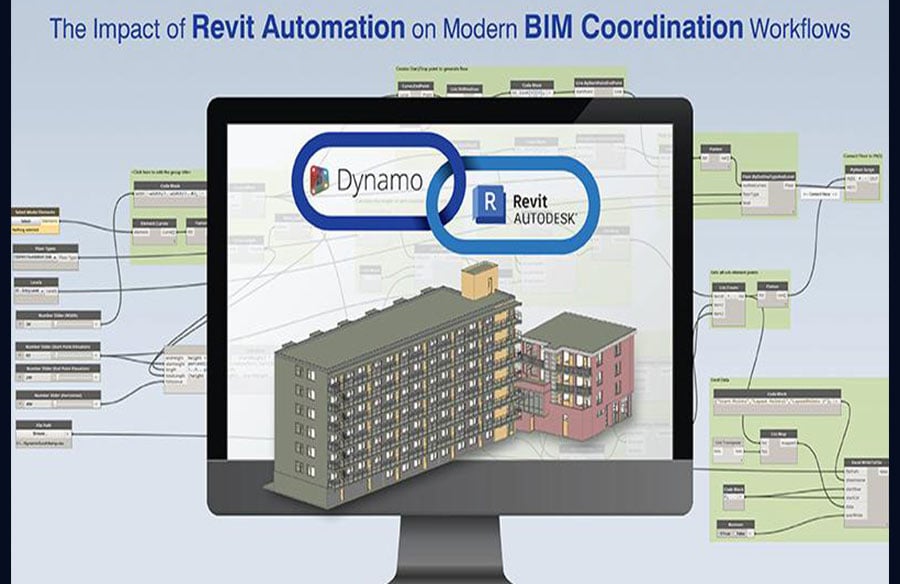
Revit’s visual scripting and automation engine-Dynamo: Dynamo’s visual interface helps people who do not code to create Revit automation scripts. This helps rationalize the management of complex data and improves project efficiency.
Why Dynamo is widely adopted for coordination workflows: Dynamo for BIM coordination makes it easier for cross-discipline information exchange and coordination. This improves the 3D model quality and ensures high performance and consistent results.
 Dynamo: Powering automation inside Revit
Meanwhile, within Revit workflows, Dynamo helps non-programmers like mechanical contractors, HVAC engineers and general contractors use visual programming to bring their experience into play.
What is Dynamo and how does it integrate natively with Revit: Dynamo is a native visual programming engine, used within Revit that uses logic which depends on nodes to help team’s process geometric workflows and complex datasets.
Visual programming vs traditional coding: Non-coders can use visual programming where nodes are used to simplify logic. While text-based coding in Python or C# provides deeper control for complex automation, users also need software development skills and it is harder to troubleshoot.
Key Dynamo capabilities for BIM coordination
Top Dynamo capabilities that improve BIM coordination for architects, engineers, general contractors, BIM coordinators have been given below.
- Model data extraction and validation: Extracting and validating model data ensures information fidelity and helps overcome manual auditing challenges.
- Rule based checks and standard enforcement: These help Revit models reach high quality benchmarks with compliance automation.
- Automated model updates and parameter management: When your data is synchronized faster, it ensures depth and removes manual errors.
Key BIM coordination workflows transformed by Revit automation
BIM coordination improves substantially with Revit automation as it reduces the need for using manual clash detection methods. Teams involved in BIM coordination, particularly on projects where plumbing, HVAC and structural systems compete for the same ceiling and wall cavities, can do fast checks of automated reports to decide where to spend time on manual checking.
- Automated model auditing: With Revit automation you can verify naming conventions, worksets, levels and shared parameters. This protects data integrity and brings consistency across the coordinated 3D model helping in compliance.
- Clash preparation and model readiness: A 3D model is considered ready when it has cleaned and validated geometry and categories are filtered. This preempts interference while saving preprocessing time.
- Cross-discipline data consistency: Consistent data across architecture, structure and MEP models reduces errors and helps unify project data for all stakeholders. This also reduces the need for manual updates.
- Sheet and view coordination: Using consistent naming conventions to prepare coordination views, sheets and legends shortens setup timelines and guarantees documents are standardized.
- Change detection and reporting: Identifying 3D model changes or revisions as they appear helps spot and solve potential coordination problems and reduces need for manual comparisons.
5 Best practices for implementing Revit automation with Dynamo
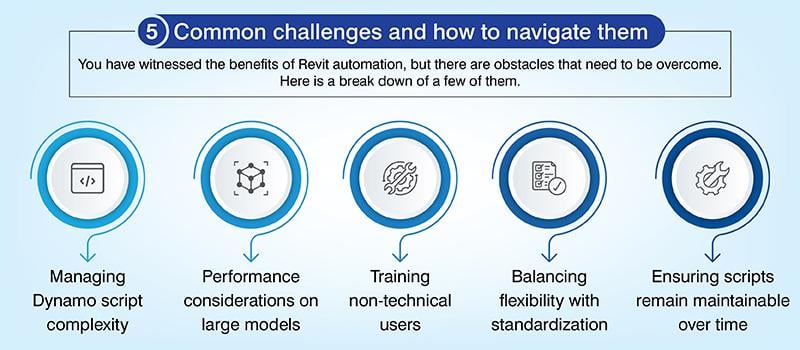
When best practices are implemented for Revit automation, it ensures your project workflows are reliable and scripts are managed correctly.
- Begin with coordination tasks that are repetitive and high-impact: Spot and automate frequent and time-consuming coordination tasks. This will provide tangible value and measurable gains in efficiency.
- Create reusable Dynamo scripts and standardized libraries: Build the Dynamo scripts to be consistent and modular so you can cut down on redundancy and speed up the automation.
- Integrate Dynamo with Revit add-ins and APIs: Extend the capacity to automate by connecting Dynamo workflows to Revit APIs and customized add-ins.
- Include BIM coordinators in preconstruction design: Teams should include BIM coordinators early in the design phase to identify coordination problems and set standards.
- Set clear governance and version control for Dynamo scripts: Script integrity and team accountability is built on clear naming conventions, proper version tracking, reviews and change management.
 The future of BIM coordination with Revit automation
Dynamo acts as a bridge between legacy systems and the new automated coordination processes.
Integration with cloud platforms and model-based analytics: Using cloud platforms for centralized data management will help remote collaboration.
AI-assisted rule checking and coordination: AI algorithms can validate designs against project standards and codes on automation. Machine learning will take it further by conflict prediction and help do more accurate clash detection.
Expanding automation beyond Revit into full project ecosystems: Information exchange across project lifecycles will speed up as automation is used to connect software platforms. This will help in linking design, fabrication and construction into a single workflow.
Conclusion
Revit automation and Dynamo will remain the two foundation blocks for building advanced BIM coordination workflows. As cloud tools mature, Dynamo will open the path to easy computational design with AI-based conflict detection.
Technological efforts are now focused on building smarter automation to reduce manual work bottlenecks. With the pace of development that is happening with the advent of AI, contractors and engineers who adopt these tools early will be able to increase the efficiency of their design and construction workflows ahead of others.
Bhavesh Umraniya
Bhavesh Umraniya is a Mechanical BIM expert with over 10 years of experience, specializing in global MEP projects and technology-driven design optimization. His expertise spans residential, commercial, hospitality, and airport projects, making him a trusted voice in the BIM MEP domain.