Architects and designers work with images every day. Photos, renders, sketches, mood boards, and project references are an important part of the design process. But finding information about an image is not always easy.
You may come across a photo of an interesting building without knowing its name. You might save an interior design reference and later forget where it came from. Or you may want to find similar projects, materials, or architectural details. This is where reverse image search can be useful.
Instead of describing an image with words, you upload the image itself. The search engine then looks for matching or visually similar pictures online.
There are several tools that can do this. Three well-known options are Google Lens, TinEye, and lenso.ai.
Each works slightly differently, so the best one depends on what you want to find.
Why Use Reverse Image Search?
Normal search works well when you already know what you are looking for. For example, searching for “modern concrete house in Japan” may give you useful results.
But what happens when you only have the image?
Maybe you do not know the architect, country, style, or project name. Trying to describe every visual detail can take time and may still lead to the wrong results. Reverse image search makes the process simpler.
You upload a photo and let the search engine analyze it.
For architects and designers, this can help with:
- finding the source of an image
- identifying buildings or places
- discovering similar projects
- building mood boards
- finding different versions of the same image
- checking where your own photographs or renders appear online
Different image search engines are better suited to different tasks.
1. Google Lens
Google Lens is probably the most familiar visual search tool.
It is built around the idea of searching for something you can see instead of having to know its name. Users can search with photos, screenshots, or their camera.
For architects and designers, Google Lens can be useful for quickly identifying objects, buildings, furniture, products, materials, or other elements visible in an image.
For example, you could upload a photograph of a chair from an interior project and try to identify the model or manufacturer.
You can also select only part of an image, which is helpful when you want to focus on one object rather than the entire photograph.
Best for:
- identifying objects
- finding products
- quick visual searches
- searching directly from a phone
- getting general information about something in a photo
Google Lens is a good starting point because it connects visual search with Google’s large search ecosystem.
However, it is designed as a broad visual search tool rather than a dedicated reverse image search platform. For more detailed research into duplicates, sources, or different types of visual matches, other tools may offer more control.
2. TinEye
TinEye is one of the best-known dedicated reverse image search engines.
Its main strength is finding copies and modified versions of an image.
Users upload an image or provide its URL, and TinEye searches its index for matches. Results can also be sorted to help users find the oldest result, newest result, largest image, or the version that has been changed the most.
This makes TinEye particularly useful when you already have an exact image and want to understand where it appears online.
For example, an architecture photographer could upload one of their photographs and look for other websites that have published it.
Best for:
- finding copies of an image
- locating modified versions
- finding larger versions
- checking where an image appears online
- tracing an image’s history
TinEye is simple and focused.
Its limitation is that it is mainly designed around finding matches of the same image rather than exploring a wide range of visually related content.
3. lenso.ai
Lenso.ai takes a broader approach to reverse image search.
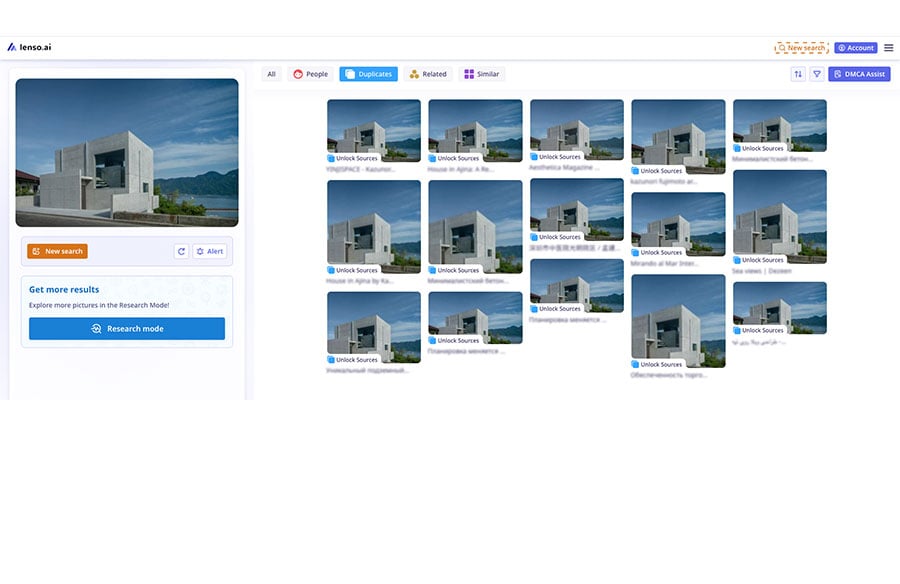
Instead of showing all matches together, it divides results into different categories. Depending on the image and available results, users can search for People, Places, Duplicates, Similar, and Related images.
This makes it especially useful when the goal is not only to find a copy of an image but to research what is shown in it.
The Duplicates category can help locate copies or edited versions of the same photograph.
Meanwhile, Similar and Related results can be useful for finding visual references.
For example, a designer could upload an image of an unusual brick façade and search for projects with comparable visual features.
More Detailed Search Options
Another difference is the amount of control lenso.ai gives users over the results.
The platform offers filtering and sorting tools. Depending on the search mode, users can narrow results using information such as website domain, language, image size, date range, or keywords associated with the page.
This can be helpful during more detailed research.
Imagine you have an architecture photograph and remember seeing it on a particular design website.
Instead of searching through thousands of general results, a domain filter can help focus the search on that website.
Lenso.ai also offers Research Mode, designed to return a larger number of results and provide additional filtering options for deeper searches. According to lenso.ai, Research Mode can return significantly more matches than a normal search.
Another useful feature is Alerts, which can be used to monitor an image for new results over time. This could be useful for photographers, studios, or visualization artists who want to check where their work appears online.
Best for:
- architectural and visual research
- finding buildings and places
- finding duplicates
- discovering similar images
- finding related visual references
- searching for people in images where available
- narrowing results with filters
- deeper searches with Research Mode
- monitoring images with Alerts
Because of these options, lenso.ai is the most complete of the three tools when the goal is detailed reverse image research rather than simply identifying an object or finding one exact copy.
Which Image Search Engine Should You Use?
There is no reason to rely on only one.
A useful approach is to choose the tool based on the task.
Google Lens works well when you want to identify something quickly.
For example, you might want to identify a piece of furniture, a material, a building, or another object shown in a photograph.
TinEye is useful when you are mainly interested in finding copies of the exact image or checking how it has changed over time.
Lenso.ai works particularly well for deeper visual research because it separates different types of results and provides additional filters and search options.
In practice, researchers can also use more than one search engine. The same photograph may produce completely different results depending on the tool.
How Architects Can Use Image Search
Reverse image search can be useful at several stages of architectural work, such as:
– Finding an Unknown Building – You discover an interesting building on social media, but the post does not mention its name. Upload the photograph to an image search engine and look for matching images or websites where the building has appeared. This may eventually lead to the project name, architect, location, or original publication.
– Finding Design References – Imagine you like the façade of a particular project. Instead of searching manually for terms such as modern perforated metal façade, you can use the photograph itself to search for visually similar projects. Tools that focus on visual similarity, such as lenso.ai, can be especially helpful for this type of research.
– Finding the Original Image Source – Architectural images often travel through Pinterest, Instagram, blogs, and other websites. After being reposted several times, information about the photographer or original project may disappear. Searching for duplicate versions can help trace the image back through different websites. Both TinEye and lenso.ai can be useful for this task. TinEye provides sorting options for different versions of a matching image, while lenso.ai has a dedicated Duplicates category and domain filtering.
– Checking Where Your Work Appears – Reverse image search can also work in the opposite direction. An architecture studio could upload its own renders or project photography and check whether those images appear elsewhere online. Photographers, architects, and visualization artists can use this approach to find websites that have reposted their work. With tools that offer monitoring features, the search does not necessarily need to be performed manually every time.
Image Search as Part of the Design Process
Reverse image search will not replace traditional architectural research.
Designers still need books, articles, drawings, technical information, project descriptions, and direct research, but image search adds another useful layer.
Sometimes the best starting point for research is not a keyword, but an image.
Google Lens makes visual search easy and accessible. TinEye remains useful for tracking copies of existing images. Lenso.ai goes further into detailed visual research with separate search categories, advanced filtering, Research Mode, and image monitoring.
For architects and designers who spend a large part of their working day looking at visual references, knowing how to use all three can make online research much easier.
And when a building, interior, object, or photograph is difficult to describe, uploading the image may be much faster than trying to find the perfect search phrase.