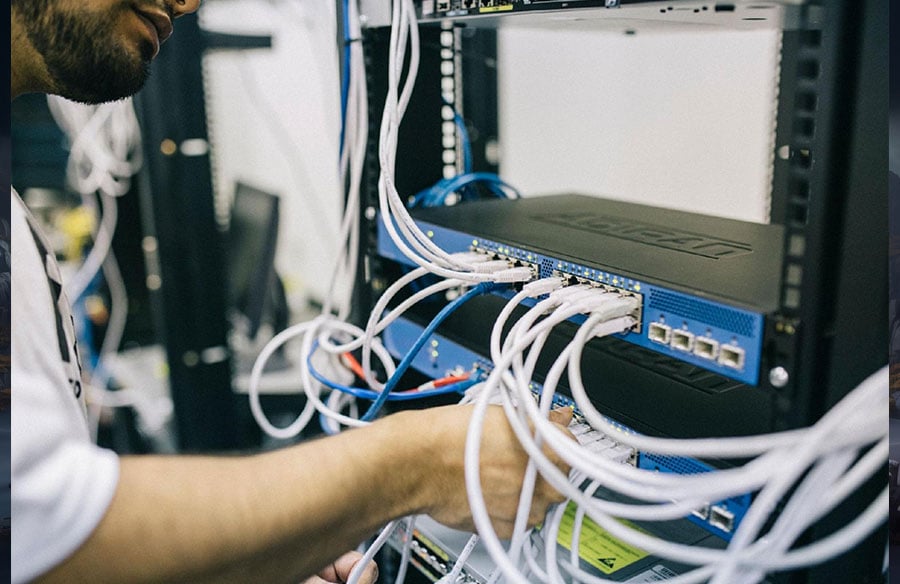
At city scale, planners often bring geographic information systems (GIS) together with building information modeling (BIM). Major urban development projects—like the ongoing rollout of the Virtual Singapore digital twin—show why infrastructure has to be ready before any rollout. Once teams start navigating linked models, shared spatial data, live visualization, and distributed collaboration, IT support for architects goes well beyond what ordinary office applications demand.
IT support for architecture firms keeps that environment running: application management, infrastructure maintenance, and the security controls and recovery systems that keep your studio’s project files safe.
| Name | Pros | Cons | Pricing |
| Low-Latency Network Management |
|
|
Custom infrastructure and support quote |
| Large-File Storage and Synchronization |
|
|
Custom by storage and transfer volume |
| CAD, BIM, and GIS Workstation Management |
|
|
Custom per device or user |
| Cloud Rendering and Compute Management |
|
|
Usage charges plus management |
| Revit, AutoCAD, and BIM Application Support |
|
|
Quote-based support |
| Automated Project Backup and Recovery |
|
|
Custom by volume and recovery target |
| Secure Remote Collaboration |
|
|
Custom per user and environment |
| Cybersecurity and Intellectual Property Protection |
|
|
Bundled or separately quoted |
| Proactive Monitoring and Help Desk Coverage |
|
|
Monthly or custom quote |
| Software Licensing and Vendor Coordination |
|
|
Management fee or bundled service |
| Strategic Planning and Capacity Forecasting |
|
|
Included or separately quoted |
These pricing descriptions explain how you buy, not published rates. Managed IT services for architects almost always need a customized quote. Headcount and office count shape support demand, and security requirements plus service hours drive costs beyond workstation specs and data volume.
How These Capabilities Were Ranked
This ranking rests on five editorial weights: network latency, 30%, because slow links hurt central files, GIS layers, cloud desktops, and interactive model navigation; large-file synchronization, 25%, because projects blend CAD drawings, BIM models, point clouds, imagery, and geospatial datasets; endpoint performance, 20%, covering CPU, GPU, RAM, storage, cooling, and driver stability; remote collaboration, 15%, for controlled access without conflicting copies; and uptime reliability, 10%, for monitoring, redundancy, support, and tested recovery.
These weights gauge operational importance for digital urban planning and IT support for architects; they do not rank software brands or service providers by quality. Treat them as prioritization criteria, not measured benchmark scores.
Networks, storage, and workstations take the heaviest weights because interactive work lives or dies on responsive data access. Cloud compute and application support come next, extending performance and synchronized workflows across the design stack. Backup protects those shared dependencies, and secure remote collaboration builds on them. Security, monitoring, licensing, and capacity planning keep the working environment going. Capabilities overlap across criteria, so the order reflects their combined operational role, not simply the weight of the criterion nearest each section title. Run every capability through your own project environment.
1. Low-Latency Network Management
Advertised internet speed explains few delays. A studio usually first notices the gap between generic office IT and IT support for architects when a linked Revit model crawls through a laggy path. Ask any candidate to measure latency, jitter, and packet loss before you pay for more bandwidth. The slowdown lives in the data path. Fixing it takes someone who knows BIM workloads, not a bigger advertised number on a contract.
Look at switching capacity on its own terms, separate from wireless congestion and VPN overhead. Where workload tests justify it, 10-gigabit Ethernet switching makes sense, paired with compatible adapters and cabling. Local upgrades cannot repair a distant cloud connection. Use wired connections for model-heavy workstations. Add redundant internet where deadlines justify the expense. Test the whole path, including storage throughput at the primary file server.
| Pros | Cons |
|
|
|
|
2. Large-File Storage and Synchronization
A federated BIM project combines linked models, often with DWG files and GIS layers. Aerial imagery and point clouds bring their own storage demands, and visualization adds textures and presentation media. Keep active data near its users: local servers or network-attached storage where that fits, application-aware cloud collaboration where distributed editing demands it.
Never assume consumer folder synchronization is safe for a live central model. Require documented file-locking behavior and controlled check-in and check-out where supported, then test interrupted transfers and conflicting edits. Distributed caching deserves the same scrutiny. Separate active projects from archives, and watch capacity before a growing survey dataset fills the project volume.
| Pros | Cons |
|
|
|
|
3. CAD, BIM, and GIS Workstation Management
Match the workstation to your heaviest application and a representative model size. Ignore the “creative” marketing label. Specify a modern multicore processor with at least 32GB to 64GB of RAM, then choose graphics hardware the software can actually use. Fast solid-state storage and reliable cooling matter as much as drawing displays. Esri’s ArcGIS Pro system requirements draw a useful line between processor and memory considerations on one side and graphics requirements on the other.
The best laptop for architects in 2026 meets current application compatibility requirements and sustains performance during long workloads. Prioritize adequate or upgradeable memory and a suitable discrete GPU where the software calls for it. Test docking connections and plotter drivers, and weigh serviceability against on-site warranty coverage. A short demonstration cannot substitute for thermal testing with your largest working model.
| Pros | Cons |
|
|
|
|
4. Cloud Rendering and Compute Management
Dedicated rendering nodes can absorb uneven visualization demand without permanently expanding studio hardware. GPU virtual machines and virtual desktops follow different operating models, so test the renderer and its plug-ins before selecting an instance. General cloud administration experience says nothing about competence with your rendering workload.
Cloud capacity still needs network planning. Compare regional placement against data-transfer costs and licensing restrictions. Maintain controlled machine images, monitor job completion, and configure idle-resource shutdown. Test the actual project file; a demonstration scene proves little. When you compare cloud services with local rendering, include upload time and failed-job costs in the math.
| Pros | Cons |
|
|
|
|
5. Revit, AutoCAD, and BIM Application Support
Architecture firms need support tuned to Revit, AutoCAD, and BIM workflows, and that tuning runs deep. It starts with application-aware workstation management and low-latency storage. Controlled updates, license administration, and plotter support follow, culminating in secure collaboration and backup you have genuinely tested.
AutoCAD handles precise 2D drafting and 3D design, with desktop software complemented by web and mobile workflows. Revit’s coordinated BIM environment connects model changes with views and schedules, raising the stakes for compatible project versions. Archicad offers Windows and macOS BIM authoring, with Teamwork collaboration supported through Graphisoft’s BIMcloud options.
Support for these tools should include a pilot group for updates and documented plug-in compatibility. Coordinate graphics and printer drivers before deployment, and preserve rollback options. Autodesk and Graphisoft product support complement local troubleshooting; neither vendor will maintain your studio’s plotter configuration or shared content libraries for you.
| Pros | Cons |
|
|
|
|
6. Automated Project Backup and Recovery
Synchronization is not backup. Deletion or corruption can propagate through synchronized folders; an independent backup preserves recoverable versions. Protect central models and cloud repositories, workstation-local files, Microsoft 365 content, and archives, each with its own coverage. CISA’s ransomware guidance recommends protected backups and regular restoration testing.
Set a recovery point objective, meaning the maximum work you can afford to lose, and a recovery time objective for the longest outage you can absorb. Specify retention and offsite copies, including immutable backups that cannot be altered during the configured retention period. Require a documented restore test covering the Revit model and its linked dependencies, plus GIS databases and visualization assets. Record who authorizes restoration and the measured recovery time.
| Pros | Cons |
|
|
|
|
7. Secure Remote Collaboration
Outsourced IT support can suit a distributed design studio when it includes application-aware assistance and remote monitoring, backed by identity administration and onsite escalation where hands-on intervention is needed. Define those responsibilities before granting administrative access.
Require multifactor authentication plus conditional access to evaluate sign-in context before granting entry. Limit consultants to the project folders they need, and use managed devices where policy calls for them. Generic speed tests won’t reveal much; test linked models and high-resolution textures over the actual job-site connection. When a consultant leaves, revoke access and review shared links the same day.
| Pros | Cons |
|
|
|
|
8. Cybersecurity and Intellectual Property Protection
Drawings and client information carry contractual and reputational value. Use endpoint detection and response with email protection, and device encryption for laptops that could be stolen. Managed firewalls and restricted administrator accounts address risks that staff awareness training alone cannot mitigate. The NIST Cybersecurity Framework 2.0 connects risk governance with protection, detection, response, and recovery.
Require security logging and an incident-response procedure covering compromised consultant credentials and ransomware in project directories. No control guarantees breach prevention. If protection software slows a renderer, investigate the affected process before authorizing narrowly defined, documented exclusions. Review every exception against its specific executable or folder path.
| Pros | Cons |
|
|
|
|
9. Proactive Monitoring and Help Desk Coverage
Whoever you hire should monitor endpoint health, server capacity, and backup failures. Alert on storage growth and network degradation, as well as patch failures and recurring application faults. A central-model outage deserves a different escalation path than an isolated display problem.
A ticket acknowledgment proves little. Compare technician assignment times with service restoration times, and request after-hours procedures plus a sample root-cause report. Repeatedly closing the same VPN ticket is reactive support. Require a named owner for permanent correction and a record of the changed configuration.
| Pros | Cons |
|
|
|
|
10. Software Licensing and Vendor Coordination
Maintain a license and dependency register covering named-user assignments and renewal dates. Record old-version requirements separately from cloud entitlements, with clear ownership of plug-in and plotter escalations. Your firm should retain administrator access and purchasing records when changing support vendors.
Which Software Is Best for Architects?
There is no universal winner. AutoCAD suits precision drafting and DWG exchange, and Revit supports coordinated building-information modeling in Windows. Archicad provides BIM authoring on Windows and macOS with BIMcloud collaboration. Choose based on consultant compatibility and required deliverables, then test an actual drawing exchange before approving the purchase.
| Pros | Cons |
|
|
|
|
11. Strategic Planning and Capacity Forecasting
Connect the project pipeline to infrastructure purchasing before a major award increases demand. Forecast storage growth against rendering peaks, then assess office connectivity and backup expansion. Hiring plans should inform workstation orders and support coverage.
Fully managed support delegates most technology operations to an external team. Co-managed arrangements divide responsibilities between that team and your internal IT or BIM leadership, often reserving specialist security operations or infrastructure projects for the outside specialists. Document the division, including who approves cloud budgets and holds emergency account access.
| Pros | Cons |
|
|
|
|
Selecting IT Support for Architects
When selecting IT support for architects, apply the diligence you would bring to any specialist hire, and make the candidates prove their claims in your environment.
- Ask for representative Revit and GIS tests alongside a visualization workflow.
- Request measured latency for each studio’s connection to its cloud region and primary data store.
- Confirm ownership of software accounts and documentation, including encryption keys and administrator credentials.
- Require recovery objectives and evidence of recent restore tests.
- Check support hours and escalation paths, including on-site coverage and third-party vendor responsibility.
- Compare fully managed and co-managed options against your internal skills.
- Demand itemized pricing for users and devices, with storage, cloud usage, and after-hours charges broken out.
Select based on observed performance and clear accountability. A polished service catalog cannot compensate for poor synchronization or an untested recovery plan. Put acceptance criteria into the agreement, including the representative model and restore procedure.
Building a Resilient Digital Studio
Digital urban planning runs on coordinated systems, not on an isolated workstation upgrade or cloud subscription. Align data access and endpoint performance with secure collaboration, backed by monitoring and tested recovery. A resilient studio proves those connections with real project workflows before a city-scale model reaches deadline pressure.