Quick Answer
Woodworking is no longer limited to saws, routers, and other traditional cutting tools. Digital fabrication has made it easier to produce detailed patterns, customized parts, prototypes, and repeatable components directly from digital designs.
Laser woodworking machines are particularly useful for wood cutting and engraving because they can process many flat wood materials without direct contact between the cutting tool and the workpiece. Depending on the machine and material, they can be used for furniture components, decorative panels, signs, crafts, models, prototypes, and customized wood products.
The right machine depends on the type and thickness of wood being processed, the required working area, cutting requirements, production volume, and whether the main goal is cutting, engraving, or both.
Why Use a Laser for Woodworking?
Traditional woodworking remains essential, but some projects become difficult when they involve intricate shapes, repeated patterns, or customized designs.
A laser can follow digital cutting paths with a high level of consistency. This makes it useful when a workshop needs to produce the same shape multiple times or create designs that would take considerably more manual preparation.
For example, a woodworking business may need to produce:
- Decorative wall panels
- Custom signs
- Furniture components
- Wooden boxes
- Puzzles and toys
- Architectural models
- Personalized gifts
- Craft products
- Prototypes
- Small-batch product components
Instead of creating a physical template for every design, the operator can prepare the design digitally and send the cutting or engraving paths to the machine.
This can make design changes much easier. If a customer wants a different pattern, size, or text, the digital file can be modified without rebuilding a physical cutting template.
What Can Laser Woodworking Machines Process?
 Wood is not a single material, and different wood products can behave differently during laser processing.
Common materials used in laser woodworking applications include:
| Wood Material | Typical Applications | Laser Processing |
| Plywood | Furniture parts, models, crafts | Cutting and engraving |
| MDF | Signs, panels, prototypes | Cutting and engraving |
| Veneer | Decorative surfaces, furniture | Engraving and selected cutting applications |
| Bamboo | Crafts, kitchen products, panels | Cutting and engraving |
| Solid wood | Signs, decorative pieces, custom products | Engraving and selected cutting applications |
| Wood sheets | Panels, components, prototypes | Cutting and engraving |
The exact result depends on factors such as material thickness, density, resin or adhesive content, moisture, surface treatment, and machine configuration.
For this reason, material testing should be part of the production process, especially when working with unfamiliar wood products.
Laser Cutting for Wood: Where It Makes the Most Sense
Custom Furniture Components
Furniture manufacturers and independent makers often need components that are different from standard mass-produced parts.
Laser processing can be useful for:
- Decorative furniture panels
- Cabinet components
- Drawer fronts
- Shelving details
- Table decorations
- Interlocking parts
- Custom patterns
A digital workflow also makes customization easier. Different customer requirements can be handled by modifying the design file instead of changing the entire production process.
For small furniture businesses, this can be particularly useful when production involves multiple designs rather than one standardized product.
Decorative Wood Panels
Laser cutting can create repeated openings and patterns across a wood sheet.
These panels can be used for:
- Room dividers
- Wall decoration
- Ceiling features
- Retail displays
- Interior decoration
- Privacy screens
Designers can create geometric patterns, organic shapes, lettering, or other customized elements.
The same approach can also be applied to smaller decorative products, allowing one machine to support different product categories.
Signs and Personalized Products
Wood signs are another common laser application.
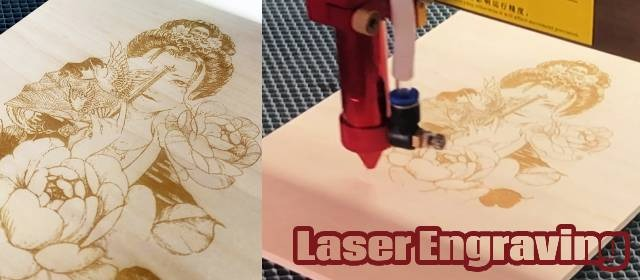
A laser can engrave names, logos, numbers, illustrations, and decorative patterns onto suitable wood surfaces. Cutting and engraving can also be combined within the same project.
This makes the technology useful for businesses producing personalized products, including:
- Wedding signs
- Name plates
- Home decorations
- Business signs
- Gift products
- Wooden packaging
- Promotional items
For these applications, engraving quality can be just as important as cutting capability.
Cutting and Engraving Are Different Requirements
One of the most important points when selecting a woodworking laser is understanding the difference between cutting and engraving.
Cutting requires the laser to pass through the material. The required processing conditions are affected heavily by material thickness and composition.
Engraving removes or marks only part of the material surface. It is commonly used for graphics, text, textures, patterns, and personalization.
A workshop producing wooden signs, for example, may need both functions. A manufacturer producing sheet components may place much more emphasis on cutting performance.
This distinction matters when choosing equipment because a machine optimized around one application may not necessarily be the ideal configuration for another.
How Machine Size Affects Woodworking
The working area is another important consideration.
A compact machine can be practical for small products, signs, crafts, and prototypes. Larger working areas become more useful when processing full-size or larger wood sheets.
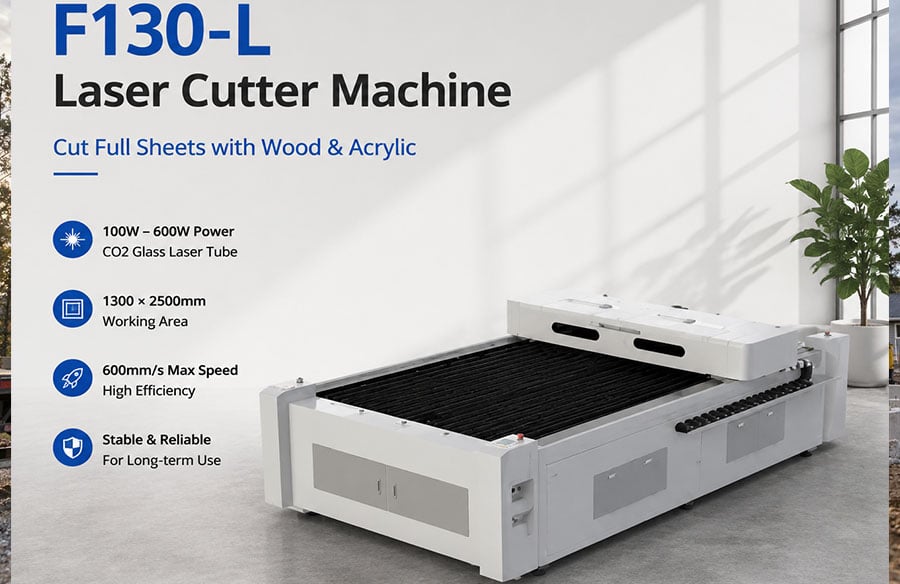
For example, MimoWork’s larger-format F130-L provides a 1300 × 2500 mm working area and is designed for larger-format laser cutting applications. This type of configuration can reduce the need to divide larger designs into multiple sections.
The appropriate size should therefore be based on the materials a workshop normally purchases rather than simply choosing the largest available machine.
What Should You Consider When Choosing a Wood Laser?
There is no single machine configuration that suits every woodworking business.
Several factors deserve attention.
1. Material Thickness
The thickness of the wood affects cutting requirements.
A workshop mainly processing thin plywood for crafts may have very different needs from a business cutting thicker wood sheets.
2. Working Area
Consider the largest material or component that will regularly be processed.
If most work involves small signs and decorative products, an oversized working area may not provide much practical benefit. For larger furniture components and sheet materials, it can become much more important.
3. Cutting and Engraving Requirements
Determine whether the machine will primarily:
- Cut wood
- Engrave wood
- Perform both operations
- Produce repeated components
- Process customized designs
This helps narrow down the appropriate configuration.
4. Production Volume
A hobbyist, small business, and production workshop may have completely different equipment requirements.
For occasional projects, flexibility may be more important than production speed. For commercial production, consistency, working area, workflow efficiency, and machine uptime become increasingly important.
5. Fume Extraction
Laser processing of wood produces smoke and airborne particles.
An appropriate fume extraction system should therefore be considered as part of the complete setup rather than as an optional afterthought.
Good extraction can help maintain a cleaner machine environment and improve workshop air management.
6. Digital File Compatibility
The machine should fit naturally into the existing design workflow.
A typical process may look like:
Design → File Preparation → Material Setup → Test → Cutting/Engraving → Inspection → Assembly
For businesses handling many customized orders, an efficient digital workflow can save considerable preparation time.
Laser Woodworking vs. CNC Routing
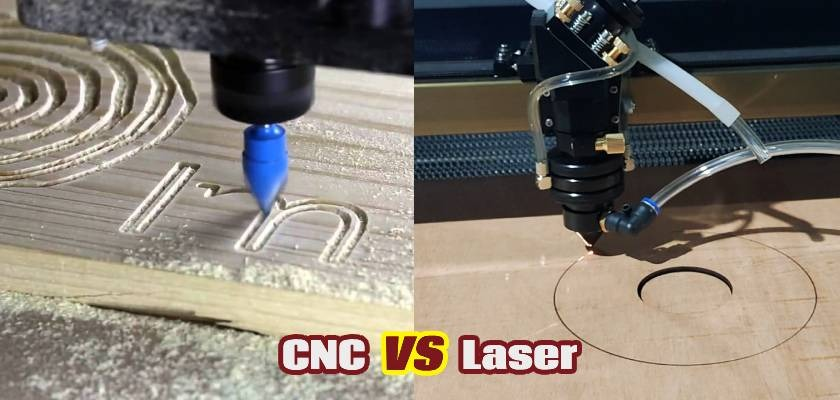 Laser processing and CNC routing both have important roles in woodworking.
The better choice depends on the material, thickness, geometry, and intended result.
| Factor | Laser Woodworking | CNC Routing |
| Fine decorative patterns | Well suited | Suitable depending on tooling |
| Engraving | Well suited | Suitable |
| Non-contact processing | Yes | No |
| Small detailed parts | Often suitable | Depends on tool size |
| Thick solid wood | Machine-dependent | Often suitable |
| Digital workflow | Yes | Yes |
| Tool wear | No cutting bit | Cutting tools require maintenance |
| Complex sheet patterns | Well suited | Well suited |
| Large woodworking projects | Depends on machine | Depends on machine |
This does not mean one technology replaces the other.
A workshop may use laser processing for detailed sheet components and engraving while using CNC equipment for thicker materials or applications requiring mechanical cutting.
The important question is not which technology is universally better, but which process fits the specific job.
How Laser Technology Supports Small Woodworking Businesses
For small businesses, one of the biggest advantages of digital fabrication is flexibility.
A workshop may not produce thousands of identical products. Instead, it may receive many smaller orders with different dimensions, patterns, names, or designs.
This is where a digitally controlled machine can become useful.
A business could produce a standard product line while also accepting customized orders. The same equipment may be used to produce signs in the morning, decorative panels in the afternoon, and prototype components later in the day.
This flexibility can help small manufacturers avoid relying entirely on one product category.
It can also make product development easier.
A new design can be tested at a smaller scale before the business invests in a larger production run.
Designing Wood Products for Laser Cutting
Good results start with good design preparation.
Keep Small Details Practical
Extremely small openings or narrow connections may become fragile after cutting, particularly when working with thin materials.
Designers should consider the actual material thickness rather than judging the design only on screen.
Consider the Grain
Wood grain can affect both appearance and strength.
For visible products, the direction of the grain may need to be considered when arranging components on a sheet.
Plan for Assembly
If several laser-cut pieces need to fit together, dimensions and joints should be considered before cutting.
Slots, tabs, holes, and interlocking structures can reduce assembly work when they are designed correctly.
Test Before Production
A small material test can reveal:
- Whether the material cuts completely
- Whether the edge is acceptable
- Whether engraving is too deep or too light
- Whether small details remain intact
- Whether parts fit correctly
Testing is especially important when switching between different wood types or suppliers.
Where Laser Woodworking Can Expand Beyond Traditional Products
One reason digital woodworking is attractive is that the same equipment can support many different applications.
A workshop that begins with wooden signs may eventually expand into decorative panels, furniture components, custom packaging, models, or personalized products.
This flexibility comes from the digital nature of the process.
The machine does not need a completely different mechanical setup for every new design. In many cases, the major change is the digital file and the processing parameters.
That makes laser fabrication particularly interesting for businesses that compete through customization rather than simply producing standardized products.
A Practical Workflow for Laser Woodworking
A simple production workflow can help maintain consistent results.
Step 1: Prepare the design
Create the cutting or engraving file according to the required dimensions.
Step 2: Select the material
Choose the appropriate wood type and thickness for the product.
Step 3: Test the settings
Run a small test to determine suitable processing conditions.
Step 4: Prepare the machine
Position the material and make sure the machine is properly focused and ready for operation.
Step 5: Cut or engrave
Process the design according to the selected settings.
Step 6: Inspect the result
Check dimensions, edges, engraving quality, and overall appearance.
Step 7: Assemble or finish
Depending on the product, additional steps may include sanding, assembly, staining, painting, or coating.
This workflow can be adapted for everything from one-off products to repeat production.
The Role of Laser Woodworking in Modern Design
Laser fabrication is not replacing traditional woodworking. Instead, it gives designers and manufacturers another way to approach wood products.
Its greatest advantage is the connection between digital design and physical production.
A designer can create a pattern digitally, test it on a small piece of material, adjust the design, and then produce the final component. A small business can use the same workflow to move between standard products and customized orders.
Even architecture can benefit from this approach through physical models and customized interior components, but the applications extend much further into furniture, crafts, retail products, signage, and small-scale manufacturing.
As digital fabrication becomes more accessible, woodworking businesses can use laser technology not only to cut material but also to experiment with new product ideas and more customized production methods.
Frequently Asked Questions
1. What are laser woodworking machines used for?
They are used for cutting and engraving compatible wood materials for products such as furniture components, signs, decorative panels, models, crafts, prototypes, packaging, and customized products.
2. Can a laser cut plywood and MDF?
Yes. Plywood and MDF can be processed with suitable laser systems, although the actual cutting performance depends on material composition, thickness, machine configuration, and processing settings. Testing is recommended before production.
3. Is laser cutting suitable for a small woodworking business?
It can be particularly useful for businesses producing customized products, small batches, decorative components, signs, crafts, and prototypes. The appropriate machine size and configuration depend on the business’s typical materials, product dimensions, and production volume.
Conclusion
The growing use of digital fabrication is giving woodworking businesses more ways to turn digital designs into physical products.
Laser woodworking machines can be useful across a wide range of applications, from cutting plywood components and engraving wooden signs to producing decorative panels, furniture parts, prototypes, and customized products.
The most important consideration is not simply choosing a machine with more power or a larger working area. The better starting point is to understand the materials, product dimensions, cutting requirements, production volume, and level of customization involved in the actual workflow.
For businesses that need a dedicated CO2 Laser Cutter, MimoWork offers laser cutting systems designed for different working areas and production requirements, including wood cutting and engraving applications.