Introduction
When you’re shopping for a home security system, the cost conversation usually starts with the equipment price. But here’s what most people discover too late: the real expense isn’t the alarm sitting on your nightstand. It’s the monthly subscription bill that keeps climbing year after year.
This comparison digs into what actually matters when choosing between two popular DIY systems: the Elder 13-Piece Alarm System and Ring Alarm. We’ll look past the marketing and focus on what impacts your wallet, your home’s flexibility, and your peace of mind over the long term.
Key Takeaways
- Elder offers true no-subscription flexibility with WiFi and 4G GSM connectivity, while Ring’s advanced features depend on paid monthly plans
- The Elder system ships with 13 pieces of hardware including water leak sensor, indoor siren, doorbell button, and touch-screen panel; Ring requires separate purchases for many functions
- Over five years, Elder’s independent operation can save $600-$1,200 compared to Ring’s recurring subscription costs
- Both systems integrate with Alexa and Google, but Elder’s architecture doesn’t force you into a proprietary cloud ecosystem
- DIY installation is straightforward with both, but Elder’s wireless setup and Canadian engineering give it an edge for customization
Hardware: What You Actually Get in the Box
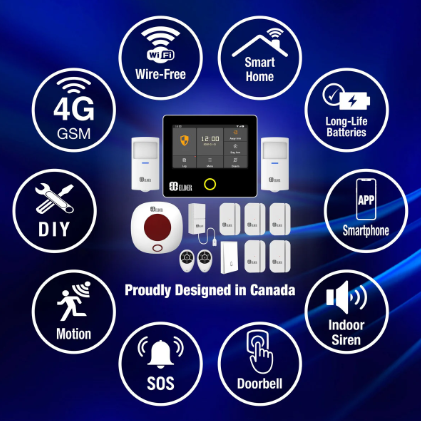
The first major difference shows up before you even power anything on. The Elder system arrives as a complete 13-piece package: central touch-screen panel, water leak sensor, indoor siren with flasher, wireless doorbell button, multiple remote controls, door and window sensors, and a motion detector.
Ring, by contrast, positions itself as a starter system. The base package includes the keypad, a contact sensor or two, and maybe a motion detector depending on which tier you choose. Want a siren? That’s an extra purchase. Need a water leak sensor? Also separate. This modular approach means flexibility, but it also means budget creep.
For households where security is already the priority, Elder’s upfront hardware abundance makes financial sense. You’re not buying components piecemeal over months or years. You get a functioning, multi-zone system on day one.
The Subscription Cost Reality: Where Ring Gets Expensive
Here’s where the story shifts dramatically. Ring’s basic local alarm functionality works without a subscription, which sounds great until you explore what that actually means.
Without a Ring Protect plan, you can arm and disarm your system, trigger an alarm, and receive notifications. But the moment you want video recording from Ring cameras, intelligent home automation, or integration with professional monitoring services, you’re paying monthly. Most households end up investing in Protect Plus at roughly $10-$20 monthly just to get the features they expect.
Elder operates differently. The system supports optional professional monitoring if you want it, but everything core to the alarm’s function works independently. WiFi and 4G GSM connectivity are both native to the Elder hardware, meaning you’re never locked out if your internet drops. The rechargeable backup battery keeps the system armed and monitoring even during power outages. These aren’t premium add-ons; they’re built in.
Over five years of typical household use, Ring’s subscription structure could cost you $600-$1,200 more than Elder. That’s not a small number when you’re already investing in security hardware.
Sensor Capacity and System Expansion
Both systems scale well, but they scale differently. The Elder 13-Piece system supports between 99 and 199 sensors depending on configuration and how you pair devices. That’s enterprise-grade sensor capacity for a residential system. If you want to monitor every door, every window, every corner of your basement, and your entire exterior perimeter, Elder accommodates it without a hitch.
Ring’s sensor expansion depends on your subscription tier and the Z-Wave or WiFi devices you’re willing to integrate. You won’t hit a hard limit quickly with Ring, but the system feels more cautious about expansion. Layer on the subscription costs for each tier, and Elder’s scalability becomes even more attractive for larger homes or security-conscious users.
Smart Home Integration: Freedom vs Ecosystem Lock-In
Both systems play well with the smart home heavyweights. Elder’s touch-screen panel supports Alexa and Google voice commands. Ring does the same. You can arm and disarm either system using your phone, control automations, and create routines that trigger multiple devices.
But here’s the important distinction: Elder’s architecture doesn’t push you toward a proprietary ecosystem in the way Ring does. Ring wants you buying Ring cameras, Ring doorbells, Ring lights, and Ring entertainment devices. The ecosystem integration is designed to deepen your investment with Amazon services.
Elder’s independence means you can choose the smartest components from any brand. Prefer a Nest camera? Use it. Want to trigger Philips Hue lights when the alarm arms? No problem. Your security system enhances your home automation instead of trying to own it.
Real-World Installation and DIY Setup
Both systems genuinely live up to the DIY promise. Installation takes 1-2 hours for most households, and neither requires professional installation or wiring expertise.
Elder’s wireless setup is particularly frictionless. Sensors pair to the central panel using standard wireless protocols. The touch-screen interface walks you through configuration, zone naming, and automation setup. The system includes rechargeable remote controls that feel premium and responsive.
Ring’s installation is equally straightforward, though you’re more likely to encounter the “I need another part” moment partway through setup. The keypad works well, but the learning curve for full automation requires more menu navigation than Elder’s touch interface provides.
For someone unfamiliar with security systems, Elder’s design philosophy shows through: build the product to be intuitive first, sell subscriptions second. Proudly designed in Canada, the system prioritizes ease of use and independence.
Security Performance: What Actually Protects Your Home
Both systems offer solid security fundamentals: door and window sensors, motion detection, loud sirens, and the ability to contact emergency services or a professional monitoring center if you choose.
The Elder system’s SOS panic mode offers a dedicated emergency button on the remote controls and central panel. Press it, and immediate alarm sounds trigger throughout your home. The system also supports partial arm mode, allowing you to secure specific zones while leaving others accessible for movement through your home. Ring offers similar panic functionality through the app, though a dedicated physical button is sometimes easier in an actual emergency situation.
The water leak sensor is where Elder differentiates meaningfully. Burst pipes, washing machine failures, and water heater breakdowns destroy homes. That Elder includes this sensor in the base package, while Ring charges extra, reflects different philosophies. Elder anticipates the threats that actually damage houses. Ring sells you threat detection incrementally.
Long-Term Ownership: The Math That Matters
Let’s build a realistic five-year scenario. You buy Elder today for approximately $400-$500 depending on sales and promotions. Monthly costs hover around $10-$15 if you opt for professional monitoring, or zero if you prefer self-monitoring through the app.
Five-year Elder cost: roughly $600-$1,400 depending on monitoring choices.
Ring’s entry-level system starts around $200-$300, which sounds cheaper. Add Ring Protect Plus at $15/month for meaningful functionality, and your five-year cost climbs to $1,100-$1,400 before any additional sensors or cameras.
But Ring’s ecosystem pull is real. Most households end up adding a doorbell camera ($100+), possibly exterior cameras ($100-$200 each), and the associated storage subscriptions. Suddenly you’re looking at $2,500-$3,500 over five years for comparable coverage.
Elder’s upfront investment buys you genuine independence. You control whether you pay for monitoring. You control whether you add external cameras or integrate other brands. Your security system remains yours.
Why SecoMart’s Elder System Makes the Difference
When you’re evaluating home alarm systems, the Elder offering stands apart because it refuses to trap you in a subscription dependency that security companies rely on to maintain margins.
The system works for DIY installers who want plug-and-play setup. It works for tech enthusiasts who appreciate flexibility. And it works for budget-conscious households that are tired of monthly fees for features they don’t use.
 Choosing Your System: The Questions That Matter
Before deciding between these two systems, ask yourself these core questions. First, how many years do you plan to stay in your home? If the answer is less than three years, Ring’s lower entry cost might make sense. If you’re thinking five years or longer, Elder’s subscription-free model becomes financially superior.
Second, how much automation do you want? If you’re building a comprehensive smart home where security is just one piece, Ring’s integration with other Amazon devices might feel natural. If you want your security system to be independent and play nice with any brand, Elder’s open architecture is more appealing.
Third, how much hardware do you need right now? If you want a complete system that covers doors, windows, water intrusion, and panic alerts immediately, Elder delivers. If you prefer to build your system gradually as needs emerge, Ring’s modular approach offers flexibility.
Making Your DIY Security System Actually Work
Here’s what both systems get right: they move security control from companies to homeowners. You’re not depending on an installer showing up tomorrow. You’re not negotiating with service reps about upgrade prices. You own the hardware, you set the rules, and you choose the level of professional support you want.
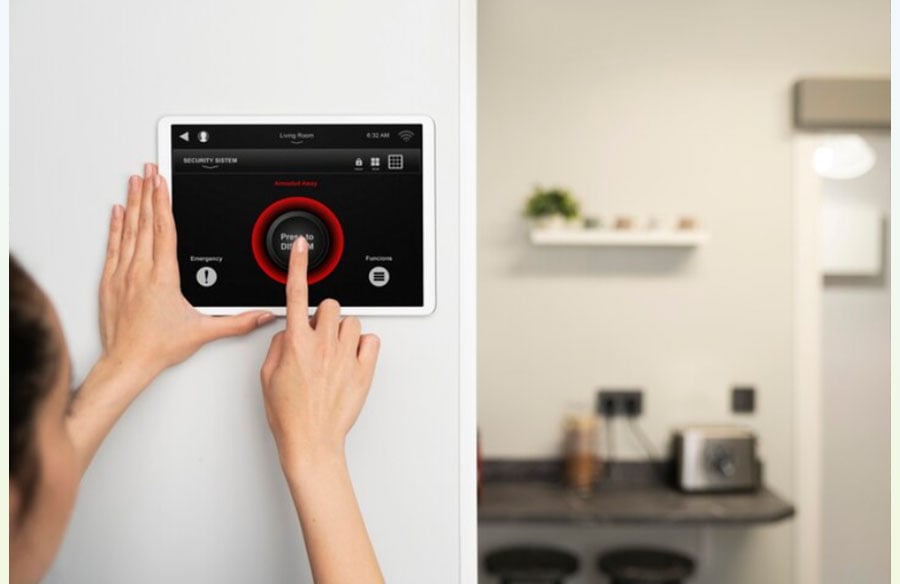
The Elder system’s touchscreen panel, voice assistant compatibility, and mobile app access keep you connected to your home whether you’re at work, on vacation, or sleeping downstairs. The same connectivity works for small business owners monitoring a retail storefront or office space, where wireless installation and app-based alerts are just as valuable as they are at home. The same applies to Ring. Where they diverge is in the philosophy of what happens after you buy.
Elder asks: How can we build the most complete system upfront and then get out of your way?
Ring asks: How can we build a system that leads you toward more Amazon services and subscriptions?
Both are legitimate business models. Elder’s approach just costs you less money over time.
FAQ: Your Elder vs Ring Questions Answered
Q: Do both systems work without internet?
A: Partially. Elder maintains local alarm functionality even without internet because of its 4G GSM connectivity option. Ring’s basic functionality persists without internet, but many automated features and camera integrations require a connection.
Q: Can I use Elder or Ring if I rent my home?
A: Absolutely. Both systems are wireless and designed for renters. Elder’s wall-mounted sensors and portable components mean you’re not drilling into walls. Ring offers the same flexibility. Neither system requires a lease modification or landlord approval beyond standard security deposits.
Q: What happens if I want professional monitoring with Elder?
A: The system integrates with professional monitoring centers through its WiFi or 4G connection. Monitoring plans are optional and run approximately $10-$15 monthly. You maintain full app control regardless of whether you choose professional monitoring.
Q: How often do sensors need replacement?
A: Door and window sensors typically run 2-3 years on standard batteries with Elder. Ring sensors have similar battery life. Motion detectors vary by usage. Neither system has a hidden battery replacement cost that surprises people; it’s a predictable, minimal expense.
Q: Can I upgrade or expand either system later?
A: Yes. Both systems support additional sensors purchased separately. Elder’s 99-199 sensor capacity means you’re not hitting a ceiling anytime soon. Ring’s expansion depends on your subscription tier, but upgrades are available if you’re willing to pay.
Q: Which system integrates better with Alexa and Google?
A: Both integrate smoothly with voice commands for arming, disarming, and status checks. Elder’s integration feels equally polished as Ring’s. The deciding factor is whether you want that voice control to push you deeper into an Amazon or Google ecosystem or remain independent.
Q: What’s the learning curve for setting up automations?
A: Elder’s touch-screen interface is more intuitive for most users. Ring requires more app navigation. If you’re comfortable with smartphone interfaces, both are manageable. If you prefer physical buttons and straightforward menus, Elder has the advantage.
Q: Does Elder work with existing Ring devices I already own?
A: The systems operate independently. You won’t be able to merge a Ring video camera into an Elder security ecosystem. However, many homes run both systems simultaneously (Ring for video/doorbell, Elder for alarm monitoring) without conflict, provided they’re on the same network and don’t share Z-Wave hardware.
Q: What’s the warranty coverage for each system?
A: Both systems offer standard one to two-year manufacturer warranties covering hardware defects. Elder’s Canadian engineering typically backs this with responsive customer support. Ring’s warranty is solid but support is handled through Amazon, which adds a layer of abstraction.
Q: How much does professional monitoring actually cost?
A: Elder’s monitoring runs $10-$15 monthly with optional professional dispatch. Ring’s monitoring is bundled into higher-tier subscription plans. Over five years, the difference is material: Elder could cost you $600 in monitoring fees, while Ring might cost $900-$1,200 depending on your tier.
Final Thoughts: Your Security, Your Rules
The choice between Elder and Ring ultimately reflects your philosophy about home ownership. Do you want maximum control and minimal long-term expenses, or do you prefer an ecosystem that makes assumptions about what you need?
If you’re weighing these options seriously, the Elder 13-Piece system from SecoMart offers genuine independence alongside complete hardware support. No mandatory subscriptions. No pressure to buy camera bundles. No ecosystem lock-in. Just solid security that you control.
Ring remains a perfectly viable choice if you’re building a broader Amazon smart home or want a camera-centric security approach. If you’re already considering camera integration as part of your security strategy, understanding when and how to upgrade your security cameras can help you make smarter long-term choices about your entire system. But if you want the most economical, flexible, and user-empowering DIY security system, Elder makes the math and the philosophy align.
Your home’s security deserves both: the right technology and the freedom to define what “right” means for your household.