Visualizing architectural concepts quickly and accurately has become a critical challenge for architects, designers, and marketing teams in the built environment. From initial sketches and CAD drawings to fully rendered presentations, transforming ideas into compelling visuals often requires significant time and technical expertise.
Nano Banana 2, powered by Gemini 3.1 Flash Image, addresses this challenge by enabling rapid and precise architectural visualization. The platform allows designers to convert sketches, plans, and text prompts into high-quality visuals while maintaining scale, texture fidelity, and realistic lighting. By leveraging global knowledge and advanced instruction-following capabilities, Nano Banana 2 supports consistent and contextually accurate imagery, making it an ideal tool for everything from client presentations to social media promotion of architectural projects.
Nano Banana 2 Enhances Architectural Concept Visualization Speed
From Sketch to Render
With Nano Banana 2, architects and designers can quickly transform hand-drawn or CAD sketches into high-quality architectural renders. Leveraging the Flash series technology, the tool accelerates rendering and iteration, allowing concepts to become visualized forms in a fraction of the time traditionally required.
Maintaining Accuracy in Quick Turnarounds
Even under tight deadlines, Nano Banana 2 ensures that proportions, materials, and lighting remain accurate. By combining speed with precise instruction-following, designers can generate visuals rapidly without compromising on architectural accuracy or realism, making it ideal for marketing presentations, client approvals, or early-stage design explorations.
Maintaining Consistency and Visual Fidelity in Architecture Projects
Consistency is critical when dealing with complex architectural projects involving multiple structures, objects, and details. Nano Banana 2 maintains up to 5 character likenesses and 14 object fidelities across a single workflow, ensuring visual fidelity in multi-object or multi-scene projects.
This capability is particularly valuable for large-scale urban designs, architectural presentations, or branded material campaigns. Designers and marketing teams can deliver cohesive visuals across all assets, saving time on revisions while maintaining high-quality, professional results.
Advanced Text Rendering and Multilingual Support for Architectural Design
Precise Text Integration
Annotations, labels, and explanatory text are essential in architectural visuals. Nano Banana 2 ensures that text rendering is accurate and legible, preserving design clarity in both internal presentations and client-facing deliverables.
Multilingual Localization for Global Projects
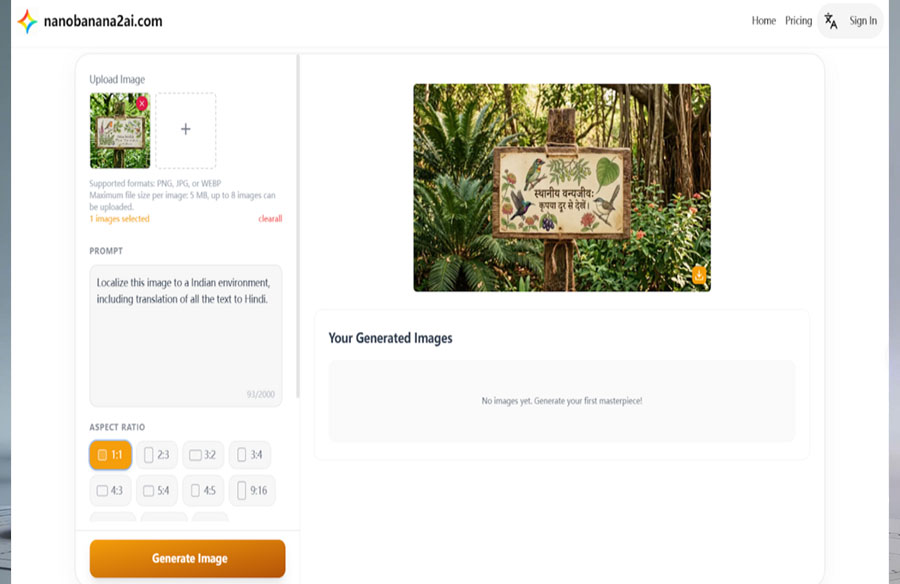
With integrated Google Nano Banana features, designers can generate text in multiple languages directly within images. This ensures international design consistency for projects spanning different regions, making Nano Banana 2 an efficient solution for global architectural visualization and cross-market presentations.
Precise Instruction Following for Architectural Visualization
Accurate Execution of Design Prompts
In architectural design, even small deviations from the intended plan can impact the overall presentation. Nano Banana 2 excels at precise instruction following, accurately interpreting complex prompts to generate visuals exactly as envisioned. Whether you’re specifying material finishes, lighting conditions, or spatial arrangements, the AI ensures the output aligns with your instructions, reducing the need for multiple revisions.
Streamlined Workflow for Designers and Architects
By following design prompts with high fidelity, Nano Banana 2 allows architects and visualization specialists to maintain control over every element of a project. From adjusting textures and shadows to fine-tuning perspective and object placement, designers can rely on the tool to translate their conceptual instructions into professional-quality renders. This precision improves efficiency, particularly for multi-scene projects or client presentations, where consistency and accuracy are critical.
How to Start Using Nano Banana 2 for Architecture Visualization
Step 1: Sign Up for a Free Account on NanoBanana2AI.com
Begin by visiting NanoBanana2AI.com and creating a free account. This provides access to the capabilities of Nano Banana 2, including Gemini 3.1 Flash Image technology for fast and precise architectural visualization.
Step 2: Upload Your Architectural Sketches or CAD Files
After registering, you can upload hand-drawn sketches, CAD plans, or initial 3D models. Nano Banana 2 AI image generator/editor interprets these inputs and converts them into high-quality, contextually accurate visualizations. Whether for concept studies, client presentations, or campaign materials, the AI ensures your architectural ideas are accurately represented.
Step 3: Customize and Refine Visuals
Use the editing tools to fine-tune your visuals. Adjust lighting, textures, colors, perspectives to match your architectural project needs. Precise instruction-following ensures that even complex prompts—like material finishes, shadow placement, or spatial alignment—are faithfully executed, saving time while maintaining professional fidelity.
Step 4: Export and Integrate Visuals
Once satisfied with your design, download the images. These visuals can then be integrated into client presentations, portfolios, architectural proposals, or marketing campaigns, with high visual fidelity across multiple platforms and media.
Advancing Architectural Design Workflows with Nano Banana 2
Nano Banana 2 demonstrates how AI can change architectural design workflows by combining speed, precision, and visual fidelity. From rapid concept visualization to fully polished presentations, it enables architects and designers to translate sketches, CAD files, and text prompts into high-quality visuals efficiently. Features such as advanced instruction-following, multilingual text rendering, and flexible resolution options ensure that each project maintains consistency and accuracy across multiple scenes and platforms.
By integrating Gemini 3.1 Flash Image, Nano Banana 2 allows design teams to focus on creativity and concept development rather than repetitive technical tasks. Whether producing client presentations, campaign visuals, or multi-scene storyboards, this AI tool supports seamless collaboration and accelerated output, making it a practical choice for modern architectural practices seeking both speed and professional-quality results.