Want to make AI text sound human and pass AI detection? ChatGPT and other similar tools help us generate blog posts, edit, rewrite, and proofread reports or college assignments. While they can produce polished and grammatically correct writing, the output may still sound robotic or include factual mistakes. Luckily, there is a way around that. We’ll now outline six simple methods that, in our experience, have proven to work best for making AI text sound authentic.
Why ChatGPT Text Often Sounds Unnatural
Before we proceed with how to humanize AI content, we want to first talk about the core problem with AI-generated text. At first glance, AI-generated text looks perfect. It’s grammatically correct and well-structured. Yet when you read closely, something feels off. One reason lies in how large language models generate text. They don’t think or reason about meaning. Instead, they predict which words are statistically most likely to appear next, based on patterns in their training data. This approach works well for grammar and surface-level flow, but it creates several problems.
There are some signs that may indicate the text was generated by AI:
- Generic introductions like “In today’s fast-paced world” or “As technology continues to advance” appear again and again. They sound safe but lack originality. Readers usually notice them pretty quickly, so you need to be careful with similar phrases if you want your content to appear human.
- Overly polite, academic tone is another big giveaway. ChatGPT tends to overexplain and use stock phrases such as “It is important to note” or “Moreover, it is crucial to recognize”. A human writer would be more direct.
- Balanced but shallow arguments are also a problem. It depends on the model you are using, however without a good prompt and additional information on the topic, AI most likely won’t be able to generate a nuanced text. It also loves to present “both sides” without taking a clear stance. This produces neutral but unconvincing content.
- Heavy use of transitions and empty filler statements. Words like furthermore, moreover, additionally and on the other hand appear too frequently for a human writing. Sentences such as “This underscores the importance of…” or “It goes without saying that…” add bulk but little value.
- Formulaic structure is also typical for AI writing. Paragraphs of similar length with evenly distributed arguments are often a sign of AI. Human writing, by contrast, varies in pacing and emphasis.
- Lack of voice and emotion. ChatGPT can mimic tone, but it cannot inject real opinions, humor, or spontaneity. The result feels generic, like a placeholder rather than a personal statement.
Of course, some human writers may occasionally use these same habits, as pointed out in this Reddit post, where the author vents about people mistaking overly polished writing for AI. But when a text consistently shows several of these patterns at once, it’s a strong indicator that the content was generated by AI rather than written by a person.
These very patterns are exactly what so-called AI detectors look for. They have become a popular way to combat the spread of machine-written text. They don’t actually “understand” meaning; they score the text against models of language use. That’s why you need to humanize your text first if you need to pass AI detection.
How to Humanize ChatGPT Text for Free
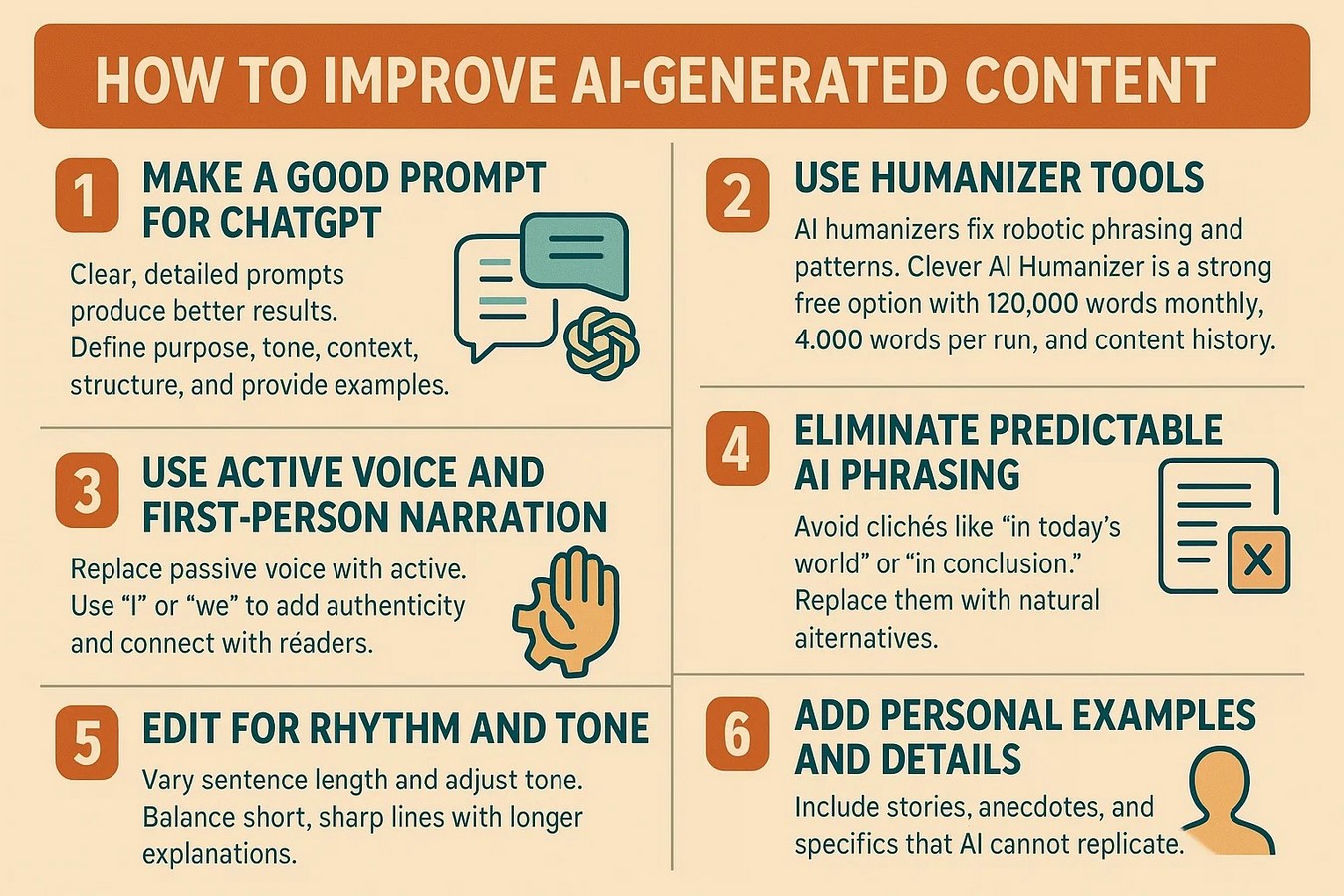 Alright, that’s enough theory. Let’s get to the practical steps.
1. Make a good prompt for ChatGPT
The quality of your AI-generated text depends heavily on the quality of the prompt you give ChatGPT. Think of the prompt as your set of instructions. If it’s vague, the AI will return generic, surface-level results. If it’s detailed and well-structured, you’ll get output that’s closer to your goals and easier to humanize later.
To make a good prompt you should:
- Define the purpose. Be explicit about what you want. For example: “Write a blog introduction about digital marketing trends in 2025 for startup founders.” If it’s an article, give it a name or at least specify the topic.
- Set the tone and style. Indicate whether you want it formal, conversational, persuasive, or informative. Tell AI for what audience it should write and how advanced the vocabulary should be.
- Add context or constraints. Include specific keywords or a word count. Example: “Explain blockchain to high school students in under 200 words, using simple analogies.”
- Request structure. If you need sections, bullet points, tables, infographics or step-by-step instructions, say so.
- Provide examples. Share a sentence or style sample to guide the AI’s “voice.”
For example:
“Write a 500-word blog post about digital marketing strategies for small businesses in 2025. Use a conversational tone, avoid jargon, and organize the article into an introduction, three key strategies with examples, and a short conclusion. Include keywords like ‘digital marketing for small businesses’ and ‘marketing trends 2025’ naturally in the text.”
The more precise your instructions, the less editing you’ll need later. Think of prompts as a blueprint: the stronger the blueprint, the more natural and useful the AI-generated draft will sound. Don’t forget to test your prompt first to achieve a more desirable outcome.
2. Use Humanizer Tools
Even if you use a carefully crafted prompt, AI still can sound pretty stiff. In the majority of cases, a non-edited AI-generated text won’t bypass AI detector. This is where you can use a free AI tool to humanize ChatGPT text. AI humanizers are designed to fix robotic phrasing and symmetrical sentence patterns that typically give AI writing away. They can rework the text into natural language AI writing, varied, and reader-friendly.
One of the most notable options is Clever AI Humanizer, a free platform that helps writers convert AI text into human-like content. Unlike many alternatives that introduce awkward phrasing or break the natural flow, Clever AI Humanizer focuses on producing polished results that feel authentic to the reader.
Clever AI Humanizer offers a free plan with 120,000 words per month and supports up to 4,000 words per run. It also keeps a content history.
Here is how to humanize ChatGPT:
- Go to aihumanizer.net in your web browser.
- Copy the text you generated with ChatGPT (or another AI tool) and paste it into the input box on the site.
- Press the Humanize AI button. The tool will analyze your draft, looking for robotic phrasing, repetitive transitions, and unnatural sentence structures.
- Humanized text will appear on the right. Read through it to make sure it matches your style, and adjust details if necessary for tone or brand voice.
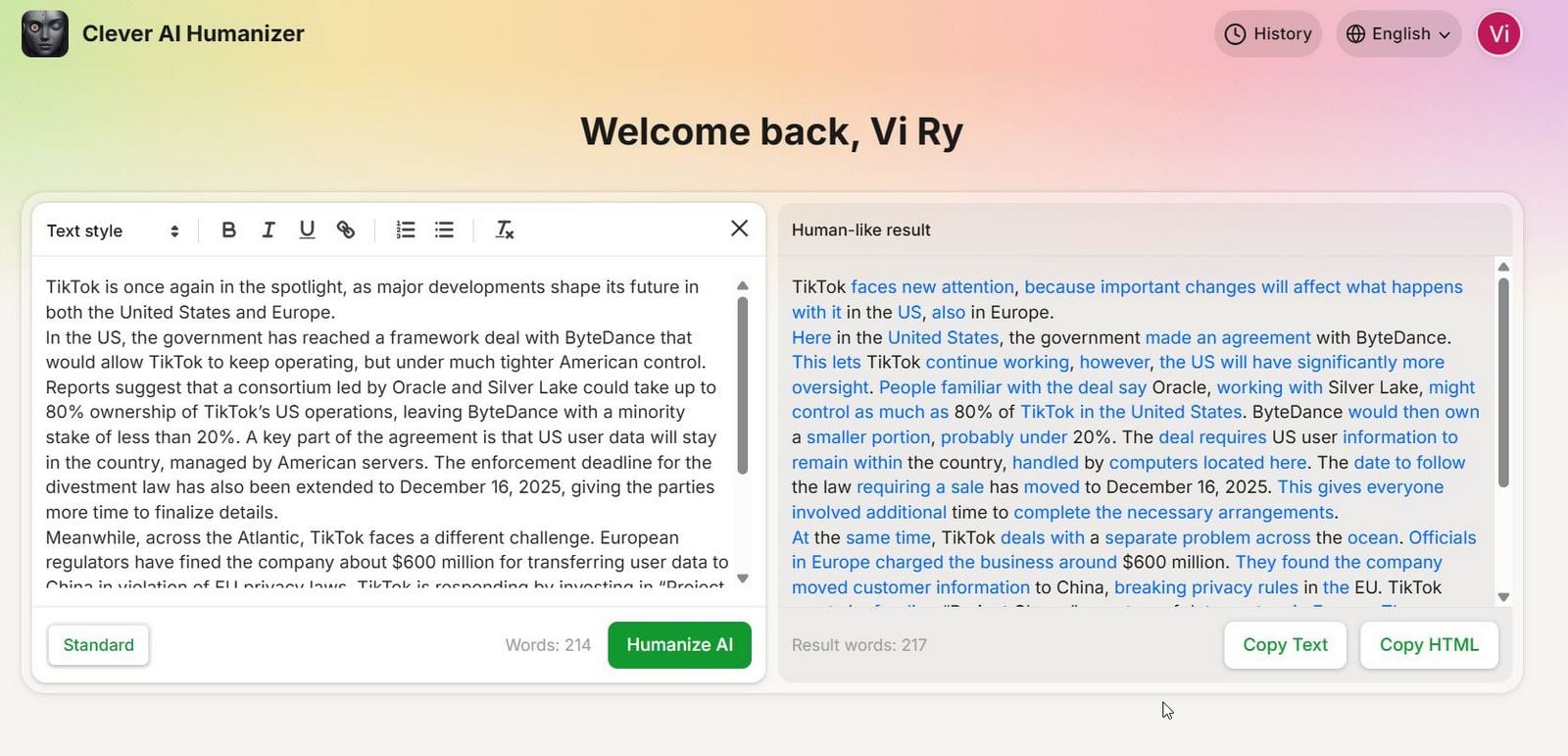 You can use the site to humanize ChatGPT texts. This process only takes a few minutes, but it helps transform rigid AI drafts into content that passes AI detection while sounding natural and reader-friendly. If you need an undetectable AI humanizer, it is a great option.
3. Use Active Voice and First-Person Narration
AI-generated text often uses passive voice, which makes prose sound distant and mechanical. To fix this, use active voice where possible. You need to rewrite AI text to sound real.
Start with sentences like “The report was completed by the team.” Instead do something like “Our team completed the report” to sound more natural. To speed up the process you can ask AI to do it for you or at least to suggest some variants you can improve your text.
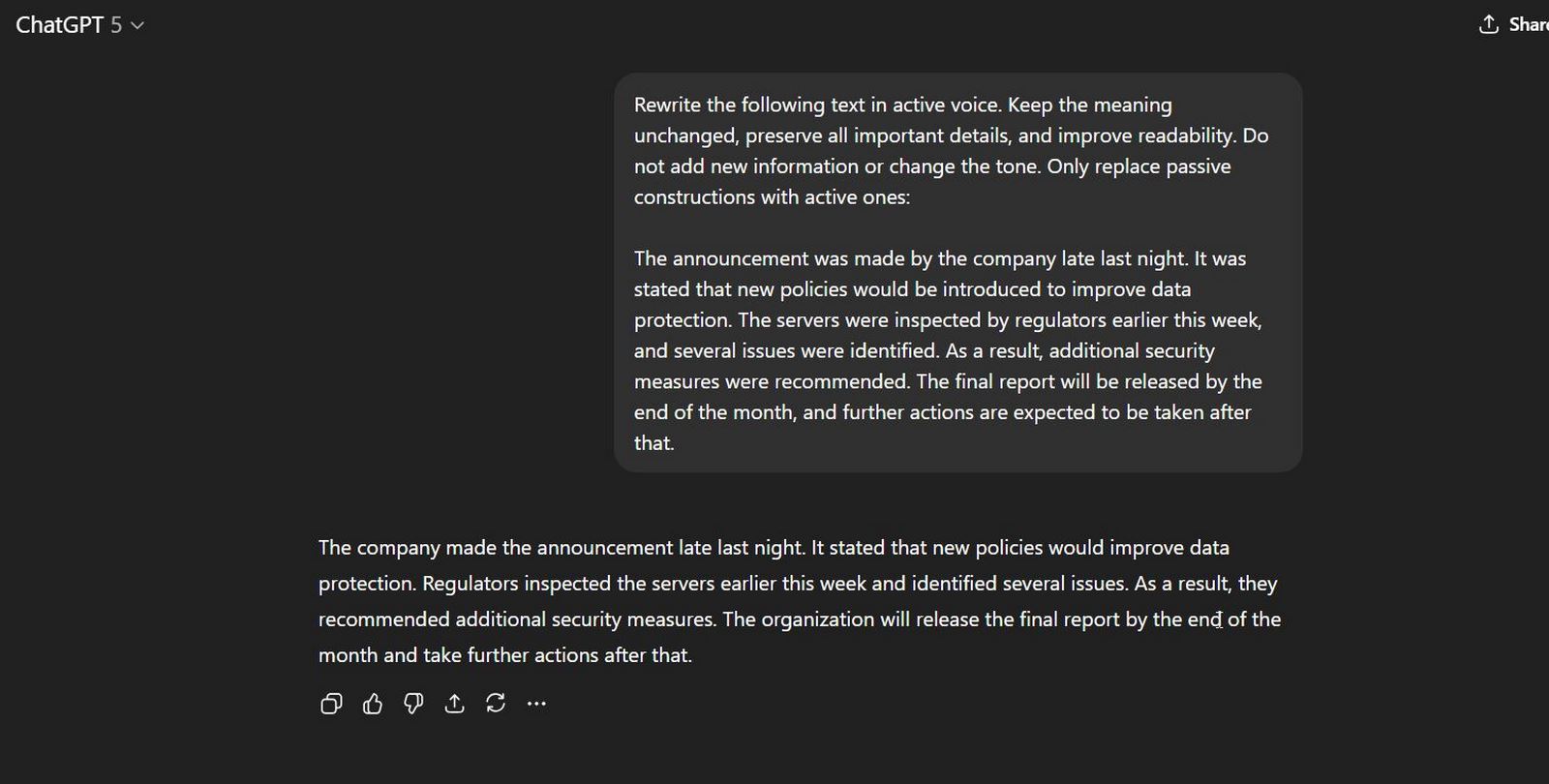 First-person narration also increases authenticity. Say, “I tested this tool and found it useful,” so readers hear a real voice. That choice shows direct involvement and personal accountability, two elements AI alone cannot replicate. Use “I” or “we” where it fits; that choice aligns the text with your brand voice and turns a generic article into genuine communication with your audience.
4. Eliminate Predictable AI Phrasing
Certain phrases instantly betray AI authorship. Expressions like “in today’s world,” “delve into,” “moreover,” “furthermore,” or “in conclusion” appear far too frequently in AI drafts. For more phrases, check this Reddit thread. Readers notice these patterns because they are repetitive, formulaic, and overused.
Scan for such clichés and replace them with alternatives that sound natural. For example, instead of “in today’s world,” you might say “right now” or “at the moment.” Instead of “delve into,” write “take a closer look at.” These small adjustments break the robotic rhythm and restore a sense of originality.
5. Edit for Rhythm and Tone
AI text often reads like a series of uniform blocks: sentences of the same length and a tone that rarely shifts. Human writing, on the other hand, has a natural rhythm. It balances short, sharp statements with longer, flowing explanations. This mix keeps readers engaged and mirrors how people actually speak.
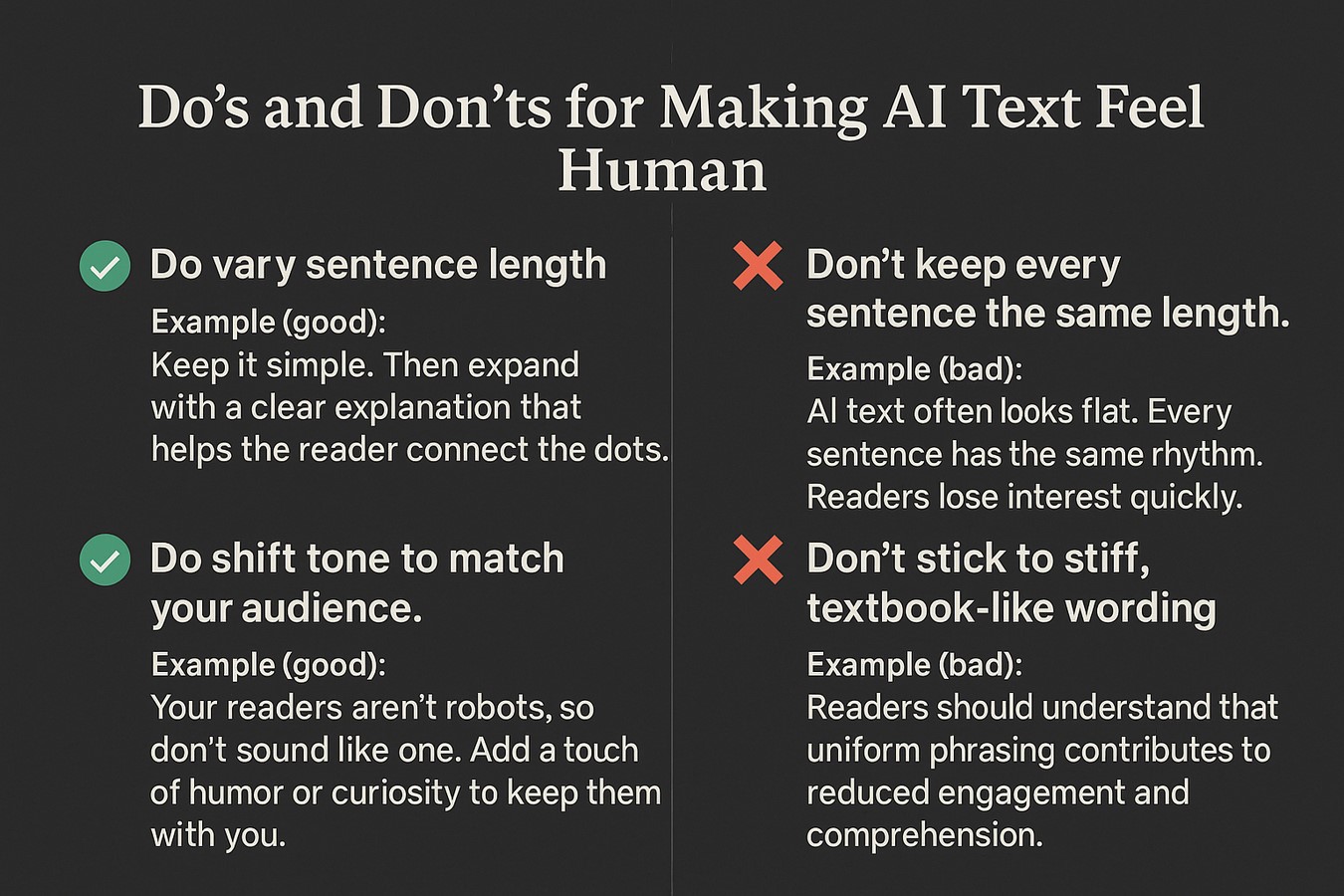 Drop in a short line to emphasize a point. Follow it with a longer sentence that adds context or detail. Adjusting tone is equally important. If your audience expects a casual style, don’t let AI produce stiff, textbook-like wording. Add warmth, humor, or curiosity to match your readers’ expectations.
6. Add Personal Examples and Details
AI lacks lived experience, which is why its drafts often feel hollow. To counter this, weave in personal examples, stories, anecdotes, or specific details that an algorithm could never provide. For example, instead of writing “Exercise improves productivity,” you might say, “When I started taking short walks between meetings, I noticed my focus improved almost immediately.”
These additions build authenticity and trust. Readers respond better when they see content grounded in real experiences or relatable scenarios. Even small details can transform flat AI text into something that feels personal and credible.
End Note
Now, you know how to humanize ChatGPT content and pass AI detectors. Use this advice to improve your writing. When you work with AI-generated text, treat it as a starting point rather than the finished product. Never publish it without review, and always check accuracy and voice before you share it with your audience. Readers trust content that feels authentic and informed, so bring in your own perspective and accountability.
Think of AI as an assistant that saves time, while you remain the author who provides value and credibility.
FAQ
What does it mean to humanize AI text?
It means to take content generated by tools like ChatGPT and refine it so it sounds natural and engaging. To do this, you should edit your text for tone and voice, remove robotic phrasing and overused AI words, add some personal touches and use AI humanizer tools for free. It can turn machine-like drafts into content that resonates with human readers instead of feeling stiff or formulaic.
Can humanized AI content pass AI detectors?
Well-edited and humanized AI content often passes many detectors, but no tool today can guarantee a 0% detection rate across every system. The reliability of AI detectors remains a gray zone, and results vary widely depending on the platform being used. Discussions across forums and research articles (for example, this discussion on Reddit) point out how inconsistent and often unreliable these detectors can be. Because of this, the safest approach is to combine tool support with personal editing.
How to humanize ChatGPT text for academic or professional use?
You can certainly use a free AI tool to humanize ChatGPT text for academic or professional purposes, but you must be cautious. AI humanizers improve readability and flow, but academic and professional contexts demand accuracy and originality. After you paste your text and humanize it, always fact-check, provide citations, proofread, and make sure the text aligns with ethical standards and company or college policy.