Viewing and printing documents can be done from anywhere – computer drive, web browser or mobile device. Those who frequently use PDF files are likely familiar with the SwifDoo PDF software. What are its capabilities and how does it differ from the paid Adobe Acrobat?
SwifDoo PDF Capabilities
SwifDoo PDF offers a much broader range of PDF file management options than the free Adobe Reader. It offers access to all the features available in the free program,
Plus:
- Commenting on the text and annotating it;
- Converting PDF files to other formats;
- Editing texts, images and document content;
- Combining several PDF documents into one and separating them.
The capabilities offered by SwifDoo PDF can be easily utilized within the company. The “Digital Signature” function simplifies the transfer of documents between employees. At the same time, the program offers file protection against unauthorized modifications. This protection can involve entering a password, as well as restricting copying or editing of content. Convenient file sharing options allow companies to streamline business processes and increase their efficiency.
Main Features of SwifDoo PDF
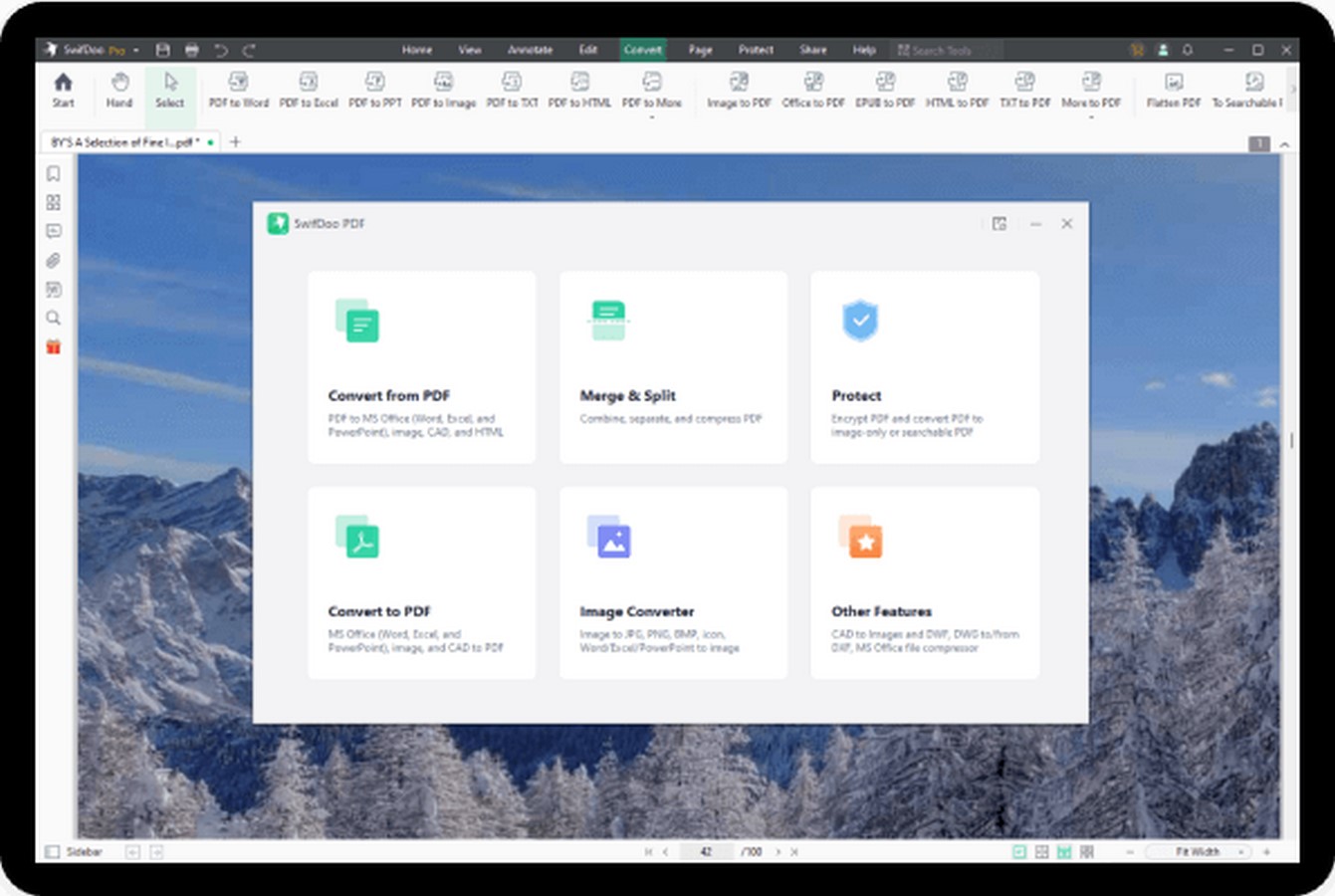 SwifDoo PDF offers almost all the features you need to process and manage PDF documents. Create PDF files from scratch, various PDF editing modes, electronic signature solutions, file export and PDF printing. This program will help you through all stages of working with PDF files – from creating individual elements to presenting finished materials.
- PDF Creation – The program allows you to create PDF files from all popular formats, text files, and scans. The tool also allows you to split and combine documents.
- File Conversion – Convert PDF files to a variety of other formats, including HTML, TXT, Microsoft Word DOC (e.g. PDF to Word), and CAD (e.g. PDF to DWG). Export individual document pages as JPG and PNG images. Convert Microsoft Office files and image files to PDF.
- Editing and Annotations – The user can use advanced tools to edit PDF documents, adding or removing links, managing annotations, managing watermarks and document backgrounds. Tools are available for cropping, resizing, rotating, pasting, replacing, and deleting document pages. Users can also use the advanced OCR (Optical Character Recognition) feature.
- PDF Export and Image Extraction – Tools makes it easy to export PDF files to other formats, such as text files, MS Excel spreadsheets, MS PowerPoint presentations, or MS Word documents. Users can also extract images from a document, saving them in one of the popular image formats.
- Secure PDF Files – Security tools allow you to secure PDF files. Users can use digital signatures or timestamps to verify document content, and configure password-based access to documents.
- Bookmark Tools – The SwifDoo PDF program allows you to conveniently create and manage bookmarks in PDF documents. Users can generate an automatic table of contents based on existing bookmarks.
- Network Drive Support – PDF-Tools lets you save and read documents stored in cloud storage. The program supports solutions such as Email, Dropbox and Google Drive.
What Makes SwifDoo PDF Stand Out?
SwifDoo PDF Pro is equipped with advanced functions and tools enabling comprehensive handling and management of PDF file content, such as comparing the content of two file versions to find differences, editing to remove confidential information.
The software is equipped with OCR (Optical Character Recognition) algorithms, allowing scanned documents or photos to be converted into editable files with searchable content.
Another important aspect of SwifDoo PDF is its intuitive user interface, which makes working with the program easy and enjoyable. For both beginners and advanced users, the program offers a clear layout and easily accessible tools, speeding up the process of editing and modifying PDF documents.
SwifDoo PDF is a versatile and powerful PDF editing tool that allows full control over content and formatting. With this program, you can create professional documents, make changes, and customize PDF files to suit your needs. Whether you’re a student, professional, or everyday user, it makes working with PDF files easier and more efficient.
SwifDoo PDF – Which One is Worth Choosing?
When choosing between the versions, consider their individual features and your needs. For those who need a program with basic editing features and don’t want to spend a lot of money, SwifDoo PDF may be the perfect choice.
SwifDoo PDF Pro allows you to edit PDF files to much scalable extent. If full control over document content and maximum ease of use are priorities, it’s worth investing in a SwifDoo PDF Pro.
In Closing
When it comes to editing PDF files, there’s a wide range of tools to choose from, from free to advanced paid solutions. SwifDoo PDF Pro is among one of the most comprehensive options, offering a full range of features. For users looking for more affordable solutions, SwifDoo PDF is also a good choice.
The final choice should be based on individual needs, budget, and the functionalities necessary for everyday tasks.