The architect’s new power tool: AI image editors that save your sanity
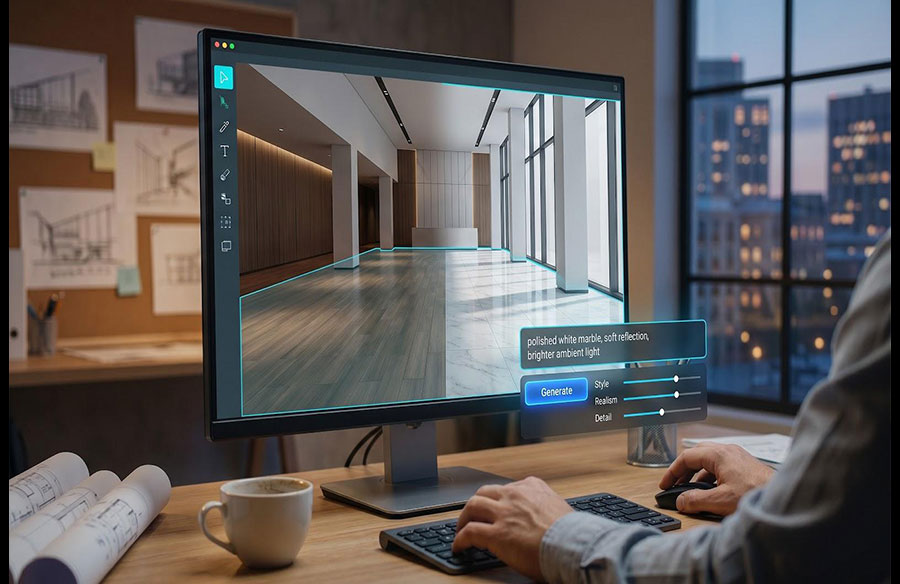
It’s 7 pm, the client wants the lobby brighter and the walnut swapped for white marble, and your render farm still says “3 hours left.” Instead of nursing Photoshop layers all night, open an AI image editor and finish in minutes.
AI isn’t fringe anymore: 46 percent of architects already use it for concept imagery, according to the 2025 Chaos × Architizer survey.
But speed shouldn’t bend mullions or warp façades. In the next few minutes we’ll spotlight seven tools that respect your geometry, plug into BIM or Photoshop, and slash revision time.
Ready to reclaim your evening? Let’s start.
Why architects need design-savvy AI, not just any image generator
Generic AI art apps are fun until a window drifts, a door duplicates, or a façade ripples like taffy. That kind of structural wobble is harmless on social media but lethal in a client meeting, according to a PromeAI analysis of AI photo editors.
You and I work in a world where perspective lines, mullion spacing, and code-mandated hand-rail heights matter. We can’t show hallucinations; we need edits that lock the geometry we spent days modelling.
There is another hurdle. Our deliverables travel through Revit, SketchUp, Photoshop, and half a dozen approval loops. An AI tool that refuses to integrate, or forces us to re-export and retouch every time, adds friction instead of saving hours.
Risk matters too. Clients assume anything we hand over is legally safe to publish. Tools that train on unknown libraries or hide their licence terms can put the firm’s reputation on the line, as the American Institute of Architects noted in its 2025 practice report.
In short, architects and interior designers need AI editors built for precision, workflow harmony, and transparent usage rights. The next sections profile seven platforms that meet those needs.
How we picked the seven stand-out platforms
We didn’t start with a blank page. We opened a spreadsheet, 15 columns wide and 43 tools deep, and set a goal to surface only the options that truly save architects time.
First, we stress-tested every contender on a live project: a mid-rise housing scheme with fussy façade grids and an interior fit-out that demanded on-the-fly material swaps. Any tool that warped mullions or kept its licence terms hidden went straight to the reject pile.
Next, we graded the survivors against six criteria that match daily studio life:
- Image fidelity and respect for geometry
- Plug-in or export path to BIM, CAD, or PSD
- Speed from prompt to pixel
- Total cost of ownership, and clear commercial rights
- Extra firepower: batch runs, AR, and 3D exports
- Learning curve backed by a community or solid documentation
Scores set the micro-ranking you’ll see in each segment. The result: seven tools you can drop into Monday’s deadline without a gamble.
Leonardo AI: best overall image editor for architects
Leonardo’s AI photo editor gives you real creative control, combining prompt-based Omni Editing, one-click object removal, and built-in upscaling so you can swap materials or refine details without exporting a single pixel. Load a render, mask the lobby floor, and type “polished white marble, soft reflection.” Seconds later the change snaps into place, perspective intact and lighting ready for the final board.
Why it works comes down to two moves. First, Leonardo treats image generation and editing as one canvas; you can create a concept view and tweak the same pixels without an export. Second, you can feed it sketches or partial renders, so the AI understands your design’s structure before adding detail. That workflow cut our material-swap time from 60 minutes to under five.
Control is the headline benefit. Negative prompts keep distractions out, sliders balance style, realism, and one-click 4K upscaling delivers print-ready boards without a third-party step. The free tier also grants commercial use, so you can test a new pipeline without legal wrangling.
Leonardo has limits. It runs outside Revit or SketchUp, so you still export a frame to start. Highly specific styles may need several prompt passes or a custom model. Even so, for daily tweaks like extending a façade, relighting a dusk shot, or swapping cladding textures, it remains the quickest way to win back your evening.
Midjourney: best for jaw-dropping concept visuals
Open Discord, enter a prompt, and Midjourney returns images that feel lifted from an architectural magazine: suspended bridges glowing at blue hour or interiors washed in cinematic haze. When you need to wow a client or enliven a design review deck, its visual punch is hard to beat.
That power brings trade-offs. Midjourney behaves like an artist, not a draftsperson. Ask for a five-bay curtain wall and you may receive six; request precise mullion spacing, and it invents its own rhythm. The new web interface helps, but every iteration appears on a public feed unless you pay for a Pro plan with stealth mode, so early concepts can leak.
For mood boards and first-round ideation, the speed and quality mix is unrivaled. Power users stack style cues such as “photo real, Leica SL2-S, dusk, volumetric fog” to guide results, then export high-resolution outputs for polish in Photoshop or Veras. Treat it as a spark generator, not final documentation, and Midjourney will amplify the creative phase without derailing technical accuracy later on.
OpenAI DALL·E 3: best for pin-point text control
Type exactly what you want, for example “loft living room, one red armchair by the north-facing window, circular skylight overhead,” and DALL·E 3 follows the brief like a junior designer who never sleeps. Thanks to its language-model roots, the AI parses complex spatial instructions and places objects where you asked, not where it feels artistic.
That obedience turns it into a quiet asset for option studies. Need three furniture layouts before the 10 am check-in? Enter variant prompts, download the outputs, and your client sees clear, side-by-side choices. The built-in inpainting flow helps too: upload a finished render, lasso a blotchy sofa, and prompt “tufted velvet, forest green.” The edit blends so neatly you forget the original blemish.
Limits remain. Base resolution peaks at 1,024 pixels, so large boards still need an upscaler. Community prompt libraries for architecture are also thinner than Midjourney’s, so you will craft your own vocabulary at first. Even so, for surgical edits and instruction-heavy scenes, where geometry truth matters more than painterly flair, DALL·E 3 brings clarity at speed.
Adobe Photoshop with Firefly generative fill: best for seamless workflow integration
If you already open Photoshop for every render pass, Firefly’s Generative Fill feels less like a new tool and more like the upgrade you have been waiting for. Highlight a patch of cloudy sky, type “clear blue morning,” and the edit appears on its own layer, ready for a quick opacity tweak or mask.
Familiarity is the real win. You keep your layer stack, adjustment curves, and Smart Objects. Firefly slips AI into the shortcuts you use each day, so there is no exporting, round-tripping, or relearning a new interface just to erase a crane or extend a façade by ten meters (about 33 feet).
Adobe also addressed licensing. Because the model trains on Adobe Stock and public-domain imagery, the company guarantees commercial rights, according to its 2025 Firefly usage terms.
Quality still needs an eye. Early generations can look a bit softer than Midjourney’s photo-real frames, so most teams run a second pass with Photoshop sharpening or color-grading tools. Even with that extra polish, swapping a material texture or widening a hero shot now takes minutes, not an afternoon of clone stamping.
Chaos Veras: best for BIM-native AI renders
Veras lives inside the software you already model with: Revit, SketchUp, Rhino, and Archicad. Click the Veras tab, pick a style, and your current 3D view blossoms into a polished concept image without an export dialog.
Its standout control is Geometry Override. Set the slider low and the AI colors inside the lines, honoring every mullion, sill, and setback in your model. Push it higher and Veras takes tasteful liberties for early-stage exploration. That flexibility helps architects trust the output in client meetings.
Because Veras reads live BIM data, iterations feel instant. Change a material in Revit, press Render Seed, and a fresh façade study appears before the coffee cools. Batch a dozen camera views and every slide in the deck shares the same lighting mood. That consistency once required a V-Ray overnight render farm.
Pricing starts at $29 a month, a fraction of one outsourced visualization. Yes, Nano Banana Pro renders draw from a quota, and you will spend an hour learning prompt nuance. Once it clicks, Veras becomes the quickest bridge between schematic massing and presentation-ready imagery.
Interior AI: best for rapid room restyling and virtual staging
Upload a photo of a living room, pick “Scandinavian minimal,” and Interior AI returns a fully restyled scene before your espresso cools. Wall color, pendant lights, and artwork update while the room’s proportions stay true, which helps when a client says, “Show it to me in a different vibe, fast.”
The workflow stays friction free. No prompt gymnastics. Choose from more than 30 style presets such as Japandi, Industrial, and Mid-century, and the AI handles the rest. Real-estate teams lean on the virtual staging mode to furnish empty listings; designers favor Sketch to Render, where a quick floor-plan sketch grows into a photoreal mock-up ready for a mood board.
Pricing is straightforward. The Pro plan costs $49 a month for about 1,000 renders. Higher tiers add 4K upscales, VR walkthroughs, and batch processing. For busy studios, the speed to visual usually covers the subscription within a project or two.
Limitations exist. Interior AI works on interiors only, and complex bespoke briefs can outgrow the preset system, pushing you back to Photoshop for fine-tuning. For day-one concept pitches or high-volume staging jobs, however, it turns static rooms into decision-ready visuals in minutes, not days.
Archsynth: best all-in-one tool from sketch to CAD
Think of Archsynth as a flexible helper for early design. Snap a phone photo of a napkin sketch, wait about 14 seconds, and you receive both a concept render and a downloadable SketchUp massing model. Few platforms jump that fast from loose idea to editable 3D.
Its signature feature is the image-to-CAD pipeline. Feed the AI a reference façade and it returns a simplified DXF you can refine in Revit. Upload a 2D floor plan and it blooms into a textured 3D interior you can orbit in the browser. For small studios or student teams, that shortcut replaces hours of redrawing.
Pricing adapts to workflow. The free tier offers a trial run, the student plan costs $10 a month for 200 renders, and pay-per-use credits start near five cents, so you can scale output without locking into a long subscription when project flow is uneven.
Outputs still need vetting. Complex roof geometry can confuse the converter, and the base render style feels functional rather than artistic. If you need high-gloss visuals, you may finish in Photoshop. When you want one platform to spark concepts, create mood boards, and hand back real geometry you can build on, Archsynth stands alone today.
Which one fits your workflow?
Here is the simplest playbook.
If you spend most of the day in BIM and need geometry-faithful visuals fast, start with Veras. It plugs into Revit or SketchUp and lets you set how closely the AI follows your model geometry, with no exporting and no guesswork.
When the brief calls for visually striking concept art or social-ready mood images, Midjourney still leads. Use it early, then move to Photoshop or Leonardo for precision edits.
For text-heavy briefs where object placement must be exact—think furniture layouts or signage studies—DALL·E 3 wins on prompt obedience. Pair its outputs with a quick upscale, and you are meeting ready.
Need to swap materials on an approved render? Firefly inside Photoshop is the least disruptive path; every change stays on familiar layers with enterprise-safe licensing.
If you stage real-estate photos or show renovation styles at scale, Interior AI’s preset pipeline saves hours, and Archsynth provides the rare sketch-to-CAD jump for teams that need editable 3D.
Mix and match; many firms do. Start with the tool that clears today’s bottleneck, then add others as your confidence—and deadlines—grow.