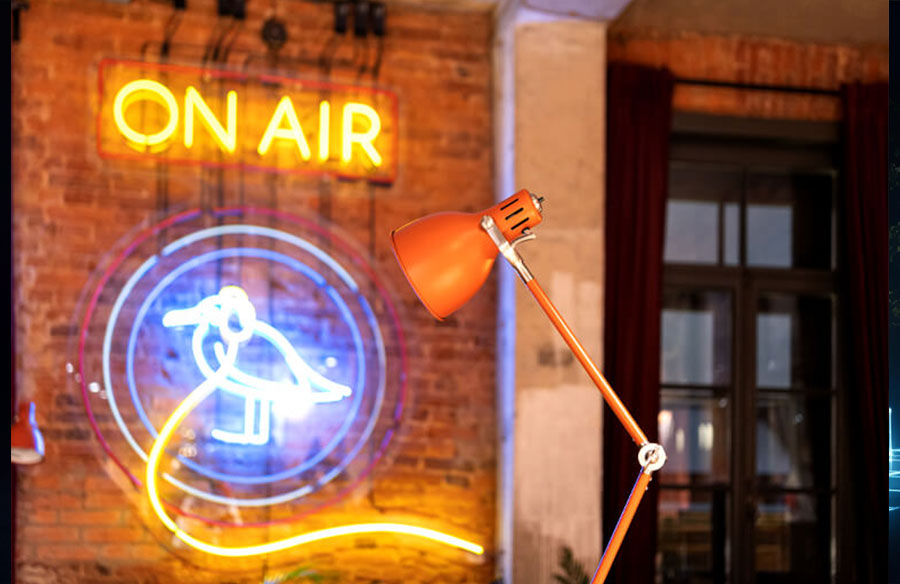
Your home studio looks fine, with a good camera, decent lighting, and a functional desk. But when you watch your own clips back, the ones shared on TikTok or clipped for YouTube, something feels off. The setup looks like a setup. Not like a place.
That’s where a custom neon sign comes in. It’s become the visual shorthand for creators who’ve actually invested time in their craft. Streamers, YouTubers, podcasters, they’re all using it the same way traditional broadcasters do. A glowing sign in the right spot does more for your presence than most people realize.
The custom neon sign market is worth $1.54 billion today and is projected to reach $3.11 billion by 2033. Here’s what matters: creators with professional-looking backdrops see 23% higher viewer retention. When your clip gets shared, that glow travels with it. It becomes instantly recognizable.
This guide covers what actually matters: choosing the right type, selecting colors that match your brand, positioning it so your camera captures it properly, and avoiding setup mistakes that make creators regret their purchase.
Why Custom Neon Signs Work as Professional Home Studio Backdrops
Over 7.39 million people are streaming right now. Your competition isn’t just good, it’s massive. A plain wall gets scrolled past instantly.
Your brain processes visuals 60,000 times faster than text. Before anyone hears a word you say, your backdrop has already communicated professionalism and intentionality.
Neon sign cuts through noise because it works on a psychological level. Brightly colored lighting changes how viewers feel in your space. Warm glows (around 3200K) make streams feel intimate.
Cooler tones (closer to 5600K) feel sharper and energized. Follow a top streamer; their setup is instantly recognizable. That recognition comes from a visual anchor that remains consistent across every clip and platform. Your neon sign becomes that anchor for your brand.
From a business angle? Brands partner with creators who look established. A polished setup signals you’re serious. When sponsorship conversations happen, your backdrop has already done half the work.
Glass vs LED Neon Signs: Which Is Right for Your Home Studio?
This choice determines everything else. You have two completely different options.
An LED neon sign is what modern creators actually use. Costs range from $100 to $500, depending on size and complexity. A simple username sign costs around $100 to $150. The tubes are made from flame-retardant PVC and won’t shatter if you bump them.
LED is significantly brighter: 210 lumens per meter versus traditional glass at 197 lumens. On camera, in mixed lighting, that difference shows. Energy consumption is negligible. A medium
LED signs running eight hours daily adds less than $2 to your monthly electric bill. The lifespan is 50,000 to 100,000 hours, or 5 to 10 years of regular streaming. No buzzing sound, no WiFi interference, and the tubes stay cool to the touch.
LED signs also do something glass can’t: color changes. RGB signs shift colors in real time, and some creators sync these with their streaming software, so they flash when donations come in. Glass neon signs can’t do that.
Traditional glass neon is impractical for home setups. The voltage is extreme (3KV to 18KV compared to LED’s safe 24V/120V), the tubes get hot and pose safety risks, and they’re fragile. For almost every creator scenario, LED wins. Safer, cheaper, more durable, more flexible, and it looks just as good on camera.
The Color Psychology of Neon: Choosing the Right Hue for Your Brand
Your neon color isn’t just decoration. It shapes how your audience feels about your content.
Warm colors, red, orange, and yellow, trigger energy and excitement. Red demands attention. Orange inspires creativity and social vibes. Yellow radiates optimism. High-energy gaming streams, chaotic content, or party-focused material? Warm colors align perfectly.
Cool colors, blue, green, and purple, promote calm and sophistication. Blue signals reliability. Green signifies wellness and growth. Purple conveys creativity and luxury.
For streamers specifically, neon pink feels modern and fun for younger audiences. Neon green taps into gaming and tech vibes. Blue maintains trustworthiness while feeling sleek. Orange sparks excitement for action-focused content.
Here’s what matters: your color should match the actual mood of your content. A chill lo-fi music stream with a bright neon pink sign is a visual mismatch. Your color needs to reinforce the feeling you’re creating. About 90% of first impressions come from color alone.
Match your sign to the temperature and tone of your existing setup. Dark wood desk with warm lighting? A cool blue neon might feel jarring. It should feel like it belongs, not like an afterthought.
Position Your Neon Sign for Maximum On-Camera Visual Impact
Most creators place their neon sign somewhere that looks good in person, then discover on camera it’s barely visible or completely cut off.
Optimal size is about 15–25% of your background. Larger, and it steals focus from your face. Smaller and viewers won’t register it’s there. In seated desk setups, your camera is most likely positioned slightly above eye level and tilted downward. That angle hides a lot.
Test with your actual camera position and zoom before mounting anything permanently. Use OBS preview or your phone camera to test different positions.
For wall height, center your sign around 1.6 to 1.8 meters (roughly 5’3″ to 5’11”) for standing environments. For seated setups, lower it slightly for a more intimate frame.
Cable management matters for how professional your setup looks. Visible power cords look sloppy. Use adhesive cable covers or raceway channels to hide wires along wall corners or under your desk. Map out the location of your nearest outlet before finalizing placement. You don’t want cables stretched too far or dimly lit because of voltage drop.
Camera Exposure Settings: Make Your Neon Sign Pop on Video
Here’s the technical challenge: a bright neon sign makes your face dark. The problem is dynamic range. Your camera sensor can only capture a certain brightness range at once. A neon sign is a bright light source. Your face is not. Your camera has to choose which one to expose correctly.
The best solution is to add light to your subject instead of dimming the neon sign. A key light positioned in front of you and slightly to one side, combined with a fill light on the opposite side, balances exposure across your face. This is the classic 3-point lighting professionals use.
No budget for more lights? Try these workarounds:
Use exposure compensation. Set it to -1 or -2 stops when auto-metering. This underexposes slightly, preserving neon sign detail while keeping your face darker. You can then lift shadows in post-processing.
Add a dimmer. Analog dimmers (not PWM electronic ones, which flicker on camera) reduce the neon’s output without affecting its color.
For white balance, warm light (3200K) is generally more flattering, but the color temperature of a neon sign varies. Adjust your camera or OBS white balance until your face looks natural and the neon stays vibrant. Save different OBS color profiles for different streaming scenarios.
If you’re using a green screen, avoid neon green signs. Green screens remove that specific color, so a neon green sign will blend right into your backdrop and disappear. Choose red or blue neon instead.
Neon Sign vs. Other Studio Backdrops: Why Neon Wins (And When It Doesn’t)
You could use printed backdrops, plain painted walls, or physical props. Where does a neon sign fit?
Against printed or fabric backdrops, the neon sign offers dynamic visual interest. Static backdrops look fine, but viewers’ eyes adjust. Neon signs glow and shifts with camera exposure and movement. It catches attention in ways flat backdrops can’t. Plus, neon doesn’t wrinkle, fade, or need replacement. Downside: Neon sign only works in dim or controlled lighting. Bright daylight washes it out.
Against plain walls or solid colors: A blank wall is clean but forgettable. Neon immediately signals investment in your setup and automatically reinforces your brand.
Against other RGB lighting: LED strip lights or smart bulbs offer flexibility, but they’re not as visually striking as neon. The neon sign feels more intentional and professional. Where neon loses is cost-effectiveness of experimentation; you can’t easily change what a neon sign displays, whereas LED strips let you adjust color in real time.
When a neon sign doesn’t win: If you’re filming in very bright natural light, neon will be nearly invisible. If your content is minimalist, a glowing sign might feel out of place. If you’re constantly changing your setup, permanent installation doesn’t make sense. And if budget is the absolute constraint, basic LED strip lighting costs $20–$50, whereas a neon sign costs $100+ or more.
For most home creators, streamers, podcasters, and YouTubers, controlled lighting neon wins on practical and psychological grounds.
Neon Sign Backdrop Mistakes: What Creators Miss and How to Avoid Them
Positioning errors. Mounting too high or low, only to discover during a live stream that it’s chopped off or barely visible. Always test with your actual camera angle and zoom level before mounting. Use OBS preview to see exactly what viewers see.
Font readability disasters. Choosing fancy, thin, or intricate fonts that look sharp in person but become unreadable on stream. At 720p resolution, fonts become illegible. At 1080p, mobile viewers see it on a small screen where tiny lettering becomes invisible. Use sans-serif, bold fonts, and test at different resolutions.
Color spill issues. Using neon green with a green-screen backdrop causes the sign to blend into the keyed-out background and disappear. If you’re using a green screen, choose red, blue, or other neon colors instead.
Lighting and exposure problems. Not accounting for how bright the neon sign is compared to your face. Adjusting for the sign makes you dark; adjusting for your face makes the sign blow out. Add fill lights, use a dimmer, or adjust exposure compensation. Test before going live.
Cable management neglect. Leaving power cords hanging visibly behind or next to your sign. Professional setups hide all cables. Use adhesive cable covers, raceway channels, or clips to hide wires. Plan cable routing before mounting.
The Bottom Line: Using Neon Signs in Your Home Studio
The real value is what it does for your brand. Viewers stick around longer. When your clip gets shared on TikTok, YouTube Shorts, or social media, your sign goes with it. It becomes the visual identifier that makes people remember your channel.
Over 7.39 million creators are competing for attention. Visual distinctiveness matters. A good neon sign pays for itself in subscriber retention and brand recognition, often within 20 months. After that, every day it runs, passive branding is working for you.
Three things matter: choose an LED neon sign, pick colors that align with your brand mood, and place it where your camera frames it properly. Nail your exposure settings. Do those things, and your home studio backdrop will look genuinely professional. The kind of setup that keeps viewers sticking around, subscribing, and feeling like they’re watching a channel that’s seriously invested in quality.