Fire is one of the oldest tools used by humans. For thousands of years, we have used it to cook food, keep warm, and forge metals. Today, combustion is still the main source of energy for the world. It powers our cars, flies our planes, and generates our electricity. However, fire is also dangerous and very hard to control.
In the past, engineers had to build expensive prototypes to test engines or furnaces. They had to burn real fuel and risk explosions to see if a design worked. This was slow, costly, and dangerous. Today, we have a better way. We use computers to create a digital version of the fire. This is called Combustion CFD Simulation.
Combustion CFD Simulation allows engineers to see inside the flame. It uses mathematics and physics to predict how fuel burns, how heat moves, and what gases are produced. At CFDLAND, by using software like ANSYS Fluent, we can design systems that are more efficient and less polluting. We can solve problems before they ever happen in the real world.
Why Combustion Simulation is Difficult
Simulating fluids like water or air is already hard. But simulating fire is much harder. This is because combustion involves many different physics happening at the same time. First, you have fluid dynamics. The air and fuel are moving, swirling, and mixing. Second, you have heat transfer. The fire creates intense heat that spreads through the walls and the air. Third, and most importantly, you have chemical reactions. Fuel molecules are breaking apart and combining with oxygen to create new substances like Carbon Dioxide (CO2) and water.
All of these changes happen in a fraction of a second. A small change in the airflow can completely change the shape of the flame. This is why CFD simulation is so valuable. It lets us freeze time and look at these details closely.
Where Do We Use Combustion Simulation?
You might think combustion is only for car engines, but it is used in many industries. Here are some of the most important applications where CFD simulation is essential.
- Gas Turbines and Jet Engines
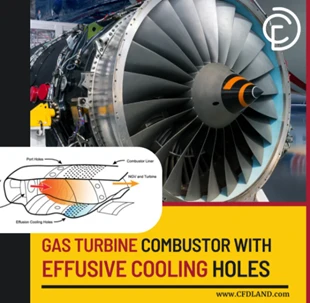
A gas turbine is a marvel of engineering. It powers airplanes and generates electricity in power plants. Inside a turbine, fuel is sprayed into high-pressure air and ignited. This creates a stream of hot gas that spins the blades.
The challenge here is the temperature. The flame is often hotter than the melting point of the metal blades. Engineers use Combustion CFD Simulation to design cooling holes. These small holes blow cool air over the blades to protect them. The simulation helps engineers ensure the flame is stable and does not blow out, which would cause an engine failure.
- Industrial Furnaces and Boilers
Big factories use massive boilers to create steam or melt metals. These furnaces burn huge amounts of fuel. Even a 1% improvement in efficiency can save millions of dollars and reduce pollution.
In these systems, the simulation helps with flame length and heat distribution. If the flame is too long, it might damage the back wall of the furnace. If the heat is not even, the metal might melt unevenly. CFD helps engineers place the burners in the right spots to get a perfect, even heat.
- Internal Combustion Engines (ICE)
Cars and trucks use pistons that move up and down. This makes the simulation very complex because the shape of the chamber changes constantly. (Note: This is a perfect spot for your existing link regarding Dynamic Mesh or FSI if you have it).
Engineers use simulation to see how the fuel spray mixes with the air as the piston moves. They want the fuel to burn completely to get the most power. They also want to avoid “knock,” which is when the fuel explodes too early and damages the engine.
- Safety and Fire Suppression
Not all combustion is on purpose. Sometimes, accidents happen. Engineers use CFD to simulate accidental fires in buildings, tunnels, or oil rigs. They can predict how smoke will move and where the fire will spread. This helps architects design safer buildings with better escape routes and sprinkler systems.
The Science: How the Simulation Works
To run a good simulation, you need to choose the right models. ANSYS Fluent offers many different tools for combustion. Understanding these tools is key to getting the right results. Before a fire can start, the fuel and the oxidizer (usually air) must mix. If they don’t mix well, the fuel won’t burn. In CFD, we need to track these different ingredients.
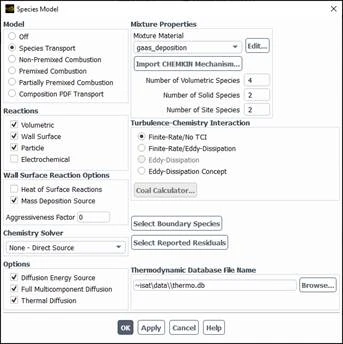
We use specific models to track the concentration of each gas. This is often done using the Species Transport model. This model solves an equation for every chemical species in the system. It tracks where the methane goes, where the oxygen goes, and where the carbon dioxide is created. If you are new to this, it can be tricky to set up the properties for each gas. You have to define the density, viscosity, and molecular weight for the mixture. To learn exactly how to set this up, you can check our Species transport module tutorials. These guides show you step-by-step how to define the mixture and reactions properly.
Fire is almost always turbulent. Imagine stirring milk into coffee. The swirling motion mixes the liquids faster. The same happens in a flame. Turbulence mixes the fuel and air so they can burn.
In ANSYS Fluent, we use turbulence models like k-epsilon or k-omega SST. These models predict the strength of the swirls. In combustion, we also need to know how the turbulence affects the flame. We use “Turbulence-Chemistry Interaction” models.
- Eddy Dissipation Model (EDM): This assumes the chemical reaction is very fast. The burning speed is limited only by how fast the turbulence mixes the fuel and air. This is good for large industrial fires.
- Finite Rate Model: This calculates the actual speed of the chemistry. It is more accurate but takes longer to compute.
 Have you ever stood near a bonfire? You feel the heat on your face, even though you are not touching the flame. That is radiation. In Combustion CFD, neglecting radiation is a big mistake. The flame is very bright and hot, and it sends energy to the walls. We use models like the P1 model or the Discrete Ordinates (DO) model to calculate this energy flow. Without these models, your temperature results will be wrong.
Modern engineering is not just about power; it is about being clean. Governments have strict rules about pollution. The two biggest concerns are NOx (Nitrogen Oxides) and Soot (Smoke).
- NOx: This is formed when air gets very hot. Nitrogen and Oxygen in the air react to create harmful gases. Simulation helps us find “hot spots” in the flame and eliminate them to reduce NOx.
- Soot: This happens when fuel doesn’t burn completely. It creates black smoke. Simulation helps us ensure there is enough oxygen everywhere so the fuel burns fully.
Step-by-Step: Doing the Simulation
Creating a Combustion CFD Simulation follows a specific path. Here is a simplified look at the workflow.
- Geometry and Meshing First, you draw the burner or the engine. Then, you divide it into small pieces called a mesh. For combustion, the mesh is very important. You need small mesh cells where the flame is, because the temperature changes very quickly there. If the mesh is too big, you will miss the flame front.
- Setup and Physics This is where you choose your models in ANSYS Fluent.
- Turn on the Energy Equation.
- Select a Turbulence Model (like k-epsilon).
- Select the Species Transport or Non-Premixed Combustion model.
- Define your materials (Fuel, Air, Steel).
- Set your Boundary Conditions (how fast is the fuel entering? What is the temperature?).
- The Solution Strategy Combustion simulations are “stiff.” This means they are hard to solve because chemical reactions happen fast, but fluid flow happens slow. It is often best to start the simulation without reactions (cold flow). Once the flow is stable, you “light the fire” by patching a high temperature in the domain. This helps the solver find a stable flame without crashing.
- Post-Processing This is the fun part. You create colorful pictures and graphs. You look at:
- Temperature Contours: To see the shape of the flame.
- Velocity Vectors: To see recirculation zones where the flame stabilizes.
- Species Fractions: To see where the fuel is going and where the CO2 is leaving.
How It Works: Key Combustion Models Explained
How do computers predict something as wild as fire? In Combustion CFD, engineers use specific mathematical models. These models tell the software how to calculate the chemical reactions. Every fire needs three things: fuel, air (oxidizer), and heat. In a simulation, we must define these inputs clearly. We tell the software what kind of fuel we are using, like methane or hydrogen. This is often done using a CHEMKIN Mechanism, which is a file that contains all the chemical rules for that fuel. There are different ways to burn fuel, so there are different models in software like ANSYS Fluent Combustion module.
- Species Transport Model: This is the most detailed method. It tracks every single chemical as it moves and reacts. It calculates how fast the fuel turns into products. This is great when you need to know exactly what is happening in the chemical kinetics.
- Non-Premixed Combustion: Imagine a candle or a diesel engine. The fuel and air come from different places and mix while they burn. This model uses the Eddy Dissipation Model (EDM). It assumes that the reaction happens as soon as the fuel and air mix. It is very fast and useful for industrial furnaces.
- Premixed Combustion: Imagine a gas stove where the fuel and air mix before they reach the flame. This model focuses on the flame speed and where the flame front is located. It is essential for studying flame stability to make sure the fire doesn’t blow out.
Real flames are rarely smooth. They are messy and turbulent. A key part of the simulation is the Turbulence-Chemistry Interaction. This calculates how the swirling air affects the flame, and how the hot flame changes the air movement. Getting this right is the secret to an accurate Combustion CFD Simulation.
The Role of CFDLAND
Learning Combustion CFD takes time. There are many buttons and settings in the software. It is easy to feel lost.
At CFDLAND, we bridge the gap between theory and practice. We do not just give you the software; we show you how to use it. Our library includes many examples of combustion. You can see how to set up a methane burner, a coal furnace, or a hydrogen combustor. We provide the geometry, the mesh files, and step-by-step videos. This allows you to practice on real-world problems. You can compare your results with ours to make sure you are doing it right.
Conclusion
Combustion CFD Simulation helps engineers solve some of the hardest problems in the world. It turns the dangerous and unpredictable power of fire into something we can control and understand. By using these tools, companies can design systems that are safer and cleaner.
Whether you are designing a gas turbine, optimizing an industrial burner, or researching new hydrogen fuels, simulation is the key. It allows you to test ideas without the high cost and risk of physical experiments. You can predict combustion efficiency and solve problems before they happen in real life.
Mastering these tools requires patience. You need to understand the flow, the chemistry, and the software. But the reward is worth it. You get the power to design the engines of the future. At CFDLAND, we provide the resources and tutorials you need to master these complex skills. We help you understand the physics behind the fire.