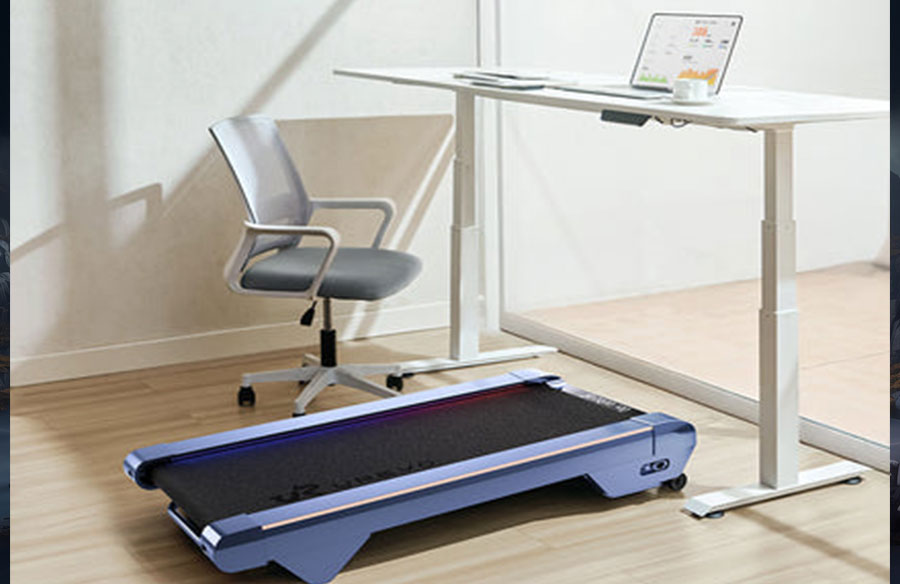
In today’s digital age, many of us find ourselves caught between maintaining an active lifestyle and spending long hours at our desks. The traditional office setup has become a health challenge, with extended periods of sitting taking a toll on our well-being. Enter the innovative solution: the under desk treadmill, a game-changing device that transforms static workstations into dynamic fitness zones.
These compact exercise machines are revolutionizing how we approach workplace wellness, offering a practical way to incorporate movement into our daily routines without sacrificing productivity. By combining work and walking, under-desk treadmills help combat the negative effects of sedentary behavior while maximizing limited space in homes and offices.
This comprehensive guide will walk you through everything you need to know about selecting, setting up, and maximizing your under-desk treadmill experience. From choosing the right model to maintaining your equipment, we’ll cover essential strategies to help you create an effective walking workstation that enhances both your health and work efficiency.
Why Fitness Enthusiasts Choose Folding Under Desk Treadmills
Space-conscious fitness enthusiasts increasingly turn to folding under-desk treadmills as an innovative solution for maintaining active lifestyles in compact living environments. These versatile units efficiently address the challenge of limited space in modern homes and offices, transforming any workstation into a dynamic exercise area without sacrificing valuable square footage.
The health benefits of these compact treadmills extend far beyond convenience. Regular movement throughout the workday helps prevent the risks associated with prolonged sitting, including cardiovascular issues, muscle tension, and poor posture. Walking while working increases blood circulation, strengthens core muscles, and promotes better spinal alignment, leading to improved overall physical well-being.
Research shows that light physical activity during work tasks enhances cognitive function, boosting creativity, focus, and problem-solving abilities. Users report increased energy levels and improved mood, creating a positive cycle of productivity and wellness. The gentle movement helps maintain alertness during long work sessions without disrupting concentration on important tasks.
The portability advantage of folding treadmills adds another compelling benefit. Users can easily relocate their walking workstation to different rooms, adapt to changing workspace configurations, or store the unit when not in use. This flexibility ensures that maintaining an active lifestyle remains practical and sustainable, regardless of living space constraints or evolving work arrangements.
Selecting Your Ideal Compact Treadmill
Critical Features for Under Desk Use
When choosing an under-desk treadmill, height clearance is paramount. Look for models with a deck height under 5 inches to ensure comfortable walking without raising your desk excessively. Popular options like the UREVO under-desk treadmill feature advanced noise-reduction components, including shock-absorbing cushioning and brushless motors, keeping sound levels below 50 decibels for minimal workplace disruption.
Top Models Comparison
Leading compact treadmills offer distinct advantages in folding mechanisms and storage efficiency. Premium models feature single-motion folding systems that collapse to under 6 inches in height, while economy options may require two-step folding processes. Motor power typically ranges from 1.5 to 2.5 HP, with quieter models utilizing DC motors and multi-layer belt designs for smooth operation.
Control accessibility varies significantly between models. Advanced units feature both physical console buttons and smartphone app integration, allowing seamless speed adjustments while walking. Entry-level treadmills often include basic remote controls or handlebar-mounted buttons. Consider models with raised side rails for safety and easy dismounting during work sessions.
Belt dimensions should accommodate natural walking stride, typically 16-20 inches wide and 45-50 inches long. Weight capacity ratings between 220-300 pounds ensure stability during extended use. Look for models with emergency stop features and auto-pause sensors for additional safety during multitasking scenarios.
Step-by-Step Setup Process
Workspace Preparation Guidelines
Before installing your under-desk treadmill, carefully measure your workspace dimensions. Ensure your desk height allows 5-6 inches clearance above the treadmill deck while maintaining proper ergonomic arm positioning. Create a minimum 2-foot buffer zone around the unit for safe mounting and dismounting. Check that your floor surface is level and stable, avoiding thick carpets that could impede airflow or movement.
Assembly & Calibration Walkthrough
Start the setup by placing the folded unit in its designated position. Release the safety lock mechanism slowly, supporting the deck as it unfolds to prevent sudden drops. Most models feature hydraulic assist systems – allow these to control the descent rate. Once unfolded, adjust the leveling feet at each corner until the unit sits perfectly stable with no rocking motion.
Before first use, perform essential calibration steps. Plug the unit into a dedicated circuit – avoid sharing with high-draw appliances. Power on the system and let it complete its initial diagnostic sequence. Test the emergency stop function and verify the belt tracking. If the belt isn’t centered, use the adjustment bolts on the rear roller to align it properly. Finally, confirm the control panel or remote responds accurately to speed adjustments before beginning your first walking session.
Effective Usage Techniques for Home Workouts
Work-Walking Integration Strategies
Begin your walking workstation journey by establishing structured pacing schedules that align with your daily tasks. Reserve slower speeds (0.5-1.0 mph) for detail-oriented work like writing or data entry, while increasing to 1.5-2.0 mph during conference calls or content consumption. Position your monitor at eye level, approximately arm’s length away, and angle it slightly upward to maintain proper neck alignment while walking. Keep your keyboard at elbow height with wrists neutral to prevent strain.
Fitness Progression Framework
Start with 15-minute walking sessions at 0.5 mph, focusing on maintaining balance and proper posture. Gradually increase duration by 5 minutes every few days until reaching 30-45 minute sessions. As comfort improves, incrementally raise speed by 0.2 mph weekly, working toward a sustainable pace of 1.5-2.0 mph for regular work tasks.
Track your progress using smart fitness apps or built-in treadmill metrics. Many modern units integrate with health platforms to monitor daily step counts, distance covered, and calories burned. Create weekly movement goals that steadily increase activity levels while maintaining work quality. Consider using time-blocking techniques to schedule dedicated walking periods during less demanding tasks, ensuring consistent daily movement without compromising productivity.
Experiment with interval patterns by alternating between standing and walking throughout the day. This variation helps prevent fatigue and maintains engagement. Advanced users can incorporate micro-workouts during brief breaks, such as brief speed bursts or incline adjustments, to enhance cardiovascular benefits while maintaining professional workflow.
Maintenance Protocols for Portable Treadmills
Regular maintenance ensures optimal performance and longevity of your under-desk treadmill. Start each workday by wiping down the belt surface with a dry microfiber cloth to remove dust and debris that could affect smooth operation. Pay special attention to the edges where particles tend to accumulate. After each walking session, use a slightly damp cloth to clean any sweat or dirt from the control panel and handrails, avoiding direct moisture on electronic components.
Monthly maintenance should focus on belt lubrication, a critical task for preventing premature wear. Apply manufacturer-approved silicone lubricant between the belt and deck, following the specific amount recommended for your model. Test belt tension by lifting its edge – it should raise about 2-3 inches. If looser or tighter, adjust the rear roller bolts equally on both sides using quarter-turn increments until achieving proper tension.
Inspect the folding mechanism’s locking pins and hinges quarterly for signs of wear or loosening. Verify that safety latches engage fully and smoothly. When storing the treadmill, keep it in a climate-controlled environment away from direct sunlight and moisture. Use a treadmill mat underneath to protect both the unit and flooring, ensuring proper ventilation around the motor housing.
Troubleshooting Common Issues
When your under-desk treadmill develops uneven belt movement, first check the belt tension on both sides. If one side feels looser, gradually tighten the rear roller bolt on that side using quarter turns until the belt tracks centered. Watch the belt movement for several minutes after adjustments to ensure proper alignment. For persistent tracking issues, inspect the walking platform for debris that could be affecting belt movement.
Unexpected shutdowns often stem from electrical issues or safety sensor activation. Verify your power connection uses a dedicated circuit and meets the unit’s voltage requirements. Clean the safety sensors with compressed air, as dust accumulation can trigger false stops. If shutdowns persist, check for loose wire connections at the console and motor housing, ensuring all cables are properly seated.
To minimize operational vibrations, confirm all leveling feet make solid contact with the floor. Install a high-density rubber treadmill mat to absorb excess movement. Tighten any loose frame bolts identified during visual inspection. If vibration increases suddenly, examine the front roller bearings for wear and contact manufacturer support for replacement guidance. For issues beyond basic troubleshooting, document the specific error codes or behavior patterns before reaching out to technical support for warranty service.
Transform Your Workspace with Active Living
Under-desk folding treadmills represent a powerful solution for modern professionals seeking to maintain their health while managing demanding work schedules. These innovative devices maximize limited space while delivering substantial health benefits, making them an ideal investment for anyone looking to combat the effects of a sedentary lifestyle.
Success with an under-desk treadmill depends on careful attention to key factors: selecting a model that fits your space and noise requirements, proper setup with correct ergonomics, and consistent maintenance routines. By following the guidelines for gradual progression and integrating movement naturally into your workday, you can transform sedentary office hours into opportunities for improved fitness and enhanced productivity.
Take the first step toward a more active worklife by incorporating an under-desk treadmill into your daily routine. Start with short walking sessions, maintain your equipment properly, and steadily build your walking workstation habits. Your body and mind will thank you as you join the growing community of professionals who have successfully merged wellness with workplace efficiency.