
You don’t need a studio or a silky-smooth voice to make a great audiobook—just your words and a few innovative tools.
Audiobooks open doors. They help people with visual impairments, support multitaskers, and make content more inclusive across the board. But for solo creators, educators, and indie authors, producing a narrated version of written content often feels out of reach. Recording takes time. Editing takes patience. And hiring voice talent? That takes a budget.
Luckily, CapCut Web offers an easier path. With text to audio free tools, anyone can turn a story, article, or lesson plan into expressive audio—without recording a single word. It’s fast, free, and beginner-friendly.
Why audiobook-style narration matters
Listening isn’t just a convenience—it’s a necessity for many. Whether someone is driving, cooking, managing a visual impairment, or just learning better through sound, audio helps content travel further and resonate more deeply.
Narrated versions of your content let you connect with new audiences, increase accessibility, and breathe new life into existing writing. The best part? You can do it all from your browser, thanks to CapCut Web.
Add character and creativity with CapCut’s voice changer
Want your audiobook to sound more immersive, fun, or dramatically on-brand? With CapCut Web’s voice changer, you can instantly reshape any narration—whether you recorded it yourself or generated it using AI. From robotic to cartoonish to cinematic, the voice effects library lets you inject the right tone, personality, or mood into your audio content—no reshoots required.
Step 1: Upload your narration audio
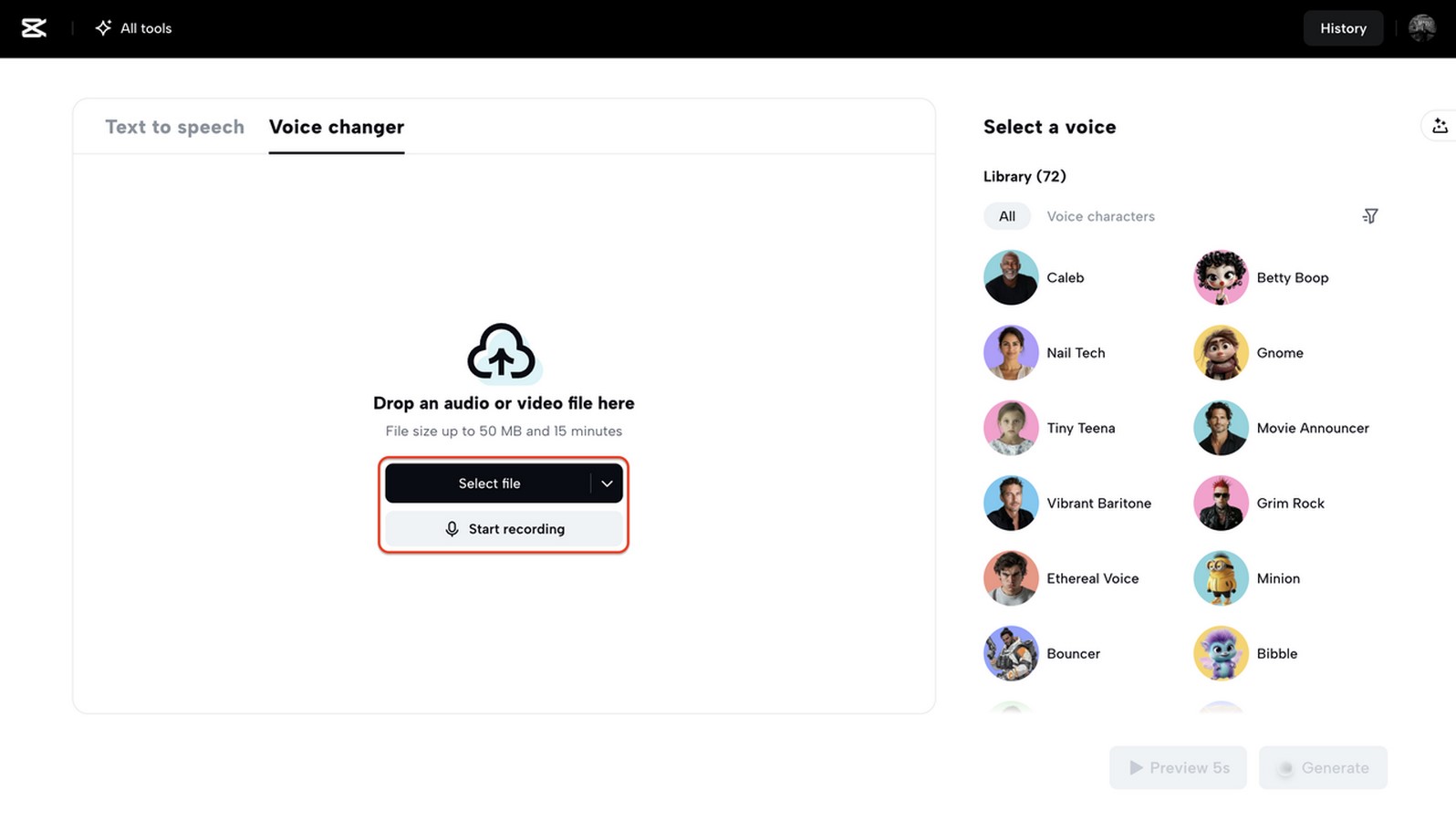
Already have a narration clip ready? Open the Voice Changer on CapCut Web and upload your file by dragging it in or clicking “Select file.” If you haven’t recorded anything yet, click “Start recording” to voice your script directly in the tool—no external mic or software needed.
 Step 2: Investigate voice styles and preview
Once your audio has been uploaded, you will explore CapCut’s entire library of voice effects on the right-hand panel. You’ll discover a wide range of tones that can be incorporated into audiobook content. These may include more profound and more mysterious tones for thrillers, light and playful ones for children’s stories, and robotic and echo-like ones for sci-fi narration.
Would you like to get a feel for the vibe? Just click “Preview 5s” in each effect to test and play with the sound. After you experimented with the voice effects as previews, you can then make your final selection.
 Step 3: Generate and export your enhanced narration
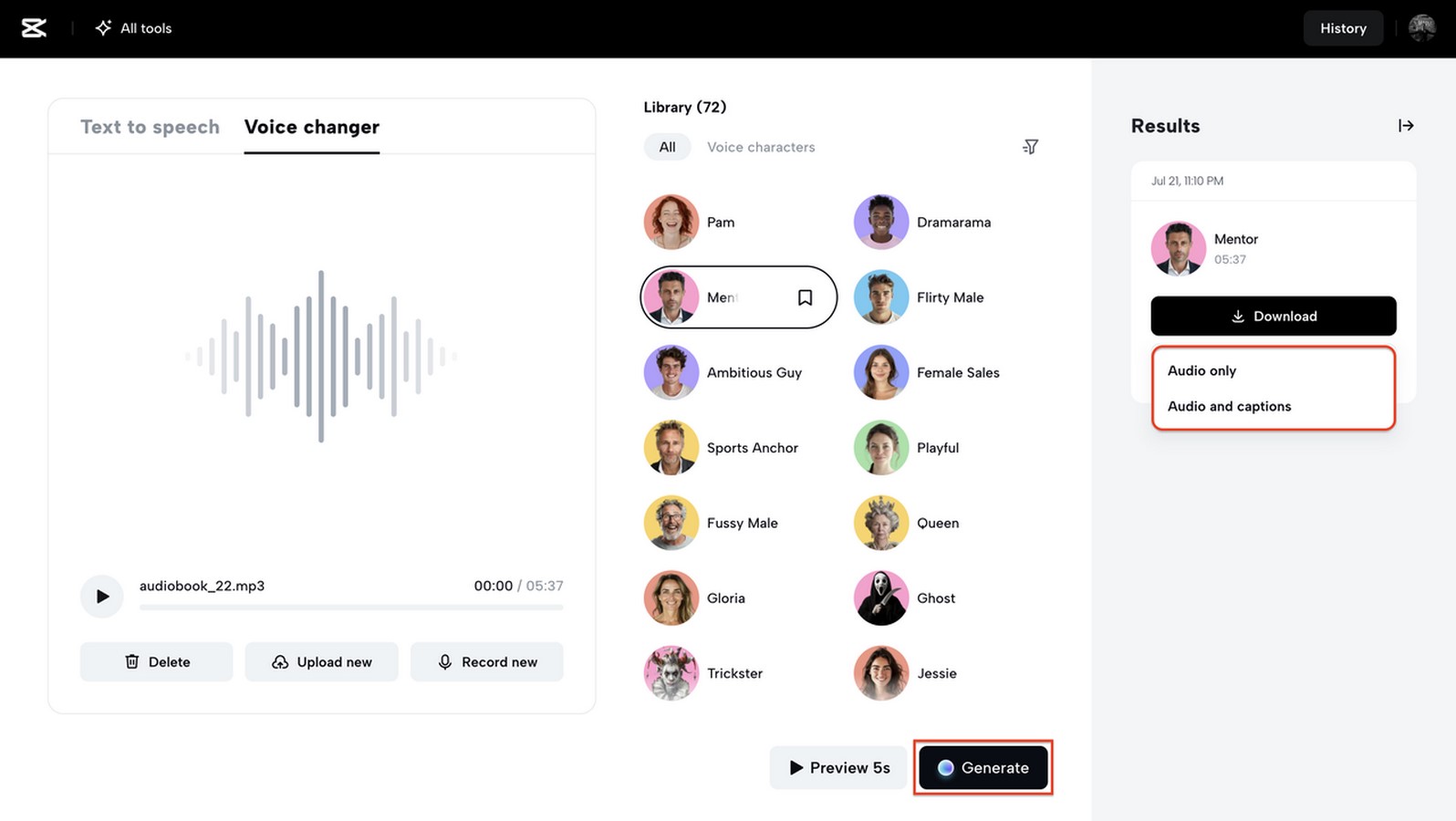
When you’ve found the voice style that complements your story, click “Generate” to apply it. CapCut will process your clip with the chosen filter, ready for publishing or post-editing.
To finalize, download the audio or choose “Edit more” to open it in CapCut’s video editing panel, where you can add subtitles, images, or background music.
Need accessibility? Select “Audio with captions.” Just want the voice file? Go with “Audio only.”
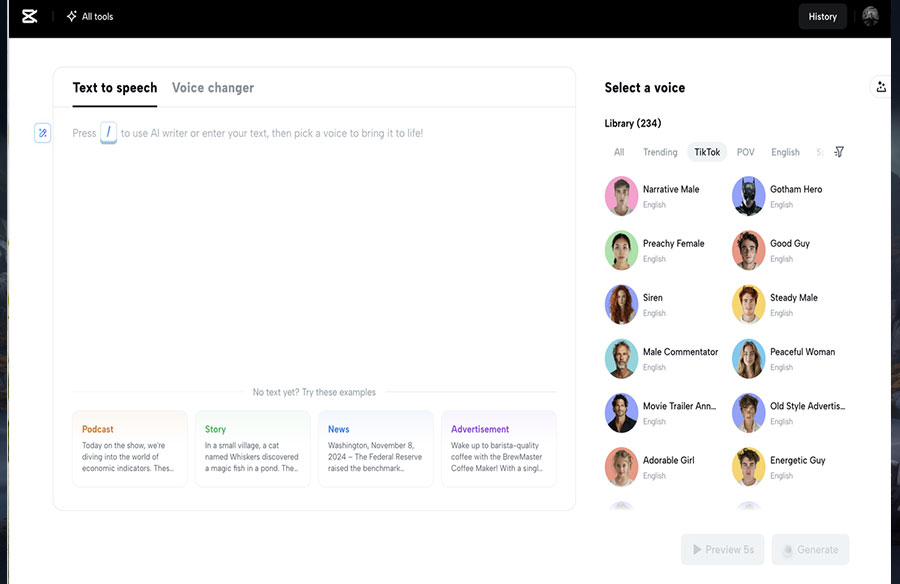
 Create your narration effortlessly with our free text-to-speech feature
If you haven’t recorded your script yet, there is no need to worry—CapCut Web’s text-to-speech free tool helps you generate studio-quality voiceovers without speaking a single word.
Paste your script into the tool—whether it’s a chapter, educational explainer, or even a short story. Then, choose from a wide selection of AI-generated voices. These are sorted by tone, language, and emotion, allowing you to find the one that best suits your message.
Once you’ve selected a voice and previewed the result, click “Generate voice.” The tool will convert your text into a transparent, natural-sounding audio file, which you can then enhance further using the Voice Changer to match your creative intent.
Ideas for using narrated audio beyond audiobooks
Audiobooks are just the beginning. You can use this narration workflow to:
- Repurpose blog posts into short-form podcast clips
- Create narrated lesson plans for e-learning platforms
- Convert official documents into accessible formats
- Add engaging narration to YouTube, TikTok, or Instagram videos
- Voice children’s books, graphic novels, or comics for young audiences
With CapCut’s intuitive tools, your written content can reach people wherever they listen.
Why creators are switching to AI narration
Creating professional-sounding audiobooks used to be a complex and costly process. Now, with CapCut Web’s AI tools, anyone can produce polished narration quickly and easily—no experience required.
- Skip the voice actor: One of the most significant advantages is that you don’t need a voice actor. With CapCut Web’s voice library, you can try out different tones, languages, and accents—instantly. There’s no need to hire talent or worry about scheduling voice sessions. You stay in control of both cost and creative direction.:
- No recording gear required: There’s also no need for recording equipment. If you’ve ever tried setting up a mic, dealing with background noise, or fixing audio glitches, you know how frustrating it can be. CapCut eliminates that. Just paste your script, generate audio, and you’re done.
- Edit everything in your browser: Everything happens right in your browser, so you don’t have to install complex software or juggle multiple apps. From text generation to audio editing, it’s a streamlined, all-in-one solution that works on any computer.
- More creative freedom with voice effects: The range of voice styles and effects is a significant plus. Whether you’re looking for something funny, professional, or cinematic, CapCut’s voice changer adds the flair that keeps listeners engaged. This flexibility lets you tailor each project to your exact audience or brand.
- Bring it all together with the AI video editor: If you’re adding visuals, subtitles, or background music to your audio, CapCut’s AI video editor enables you to create complete multimedia content in one place. It’s ideal for turning voiceovers into polished audiobook trailers, tutorials, or shareable social videos—no extra tools required.
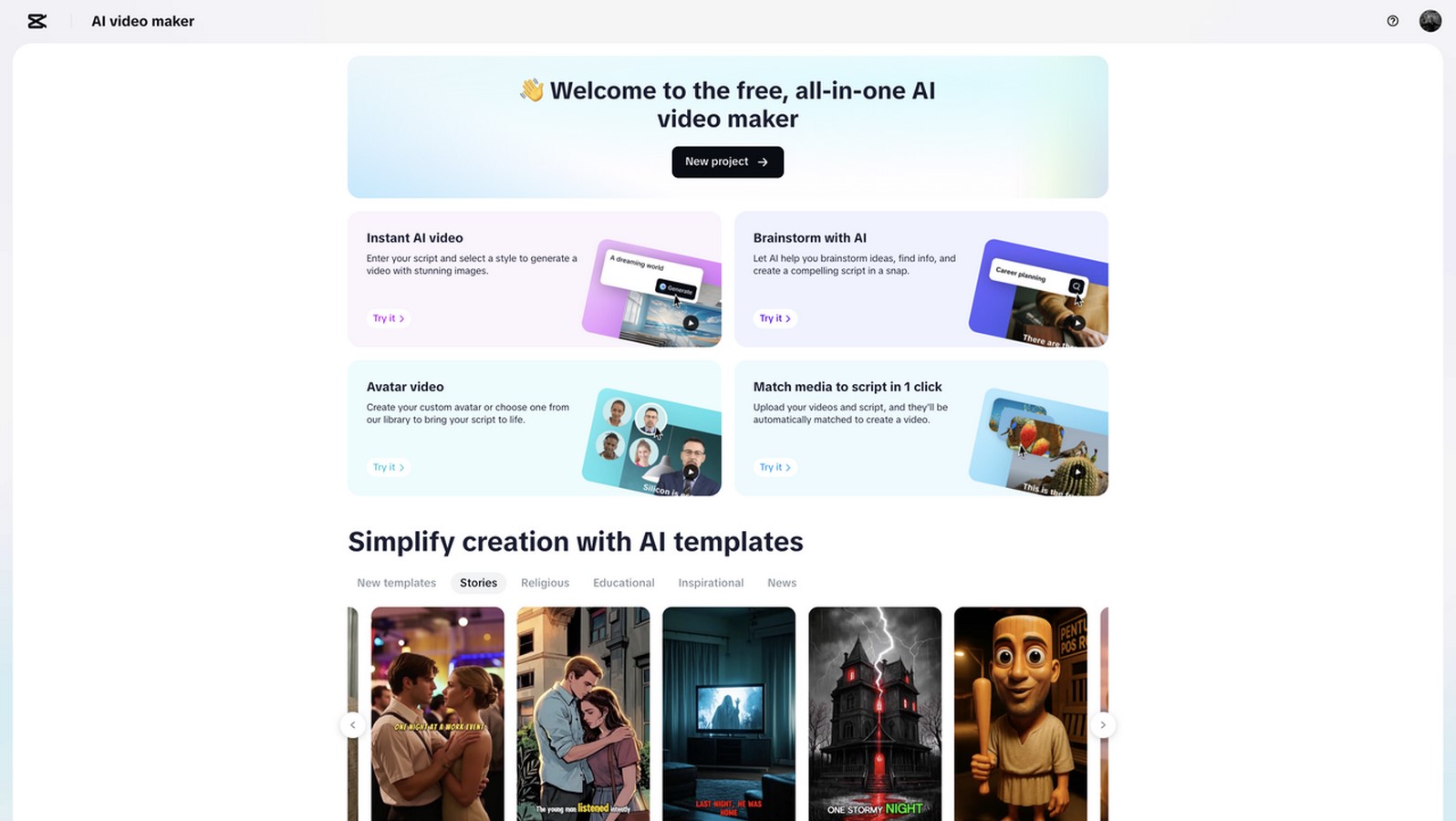
- Free, fast, and scalable: And perhaps best of all—it’s completely free to use. You can experiment, revise, and publish without any upfront investment. That’s a game-changer for independent creators and small teams working on a budget.
Final thoughts: Give your writing a second life
Creating narrated content used to be a complicated process. But now, with CapCut Web, it’s become something anyone can do—from indie authors to educators, marketers, and accessibility advocates. By pairing the text-to-audio free tool with the expressive power of the voice changer, you can turn plain text into rich, vibrant storytelling. And if your content needs visuals or captions, the AI video editor brings everything together in one smooth, professional package.
Whether you’re narrating your next ebook, turning a blog into a voiceover, or creating content for a broader, more inclusive audience—CapCut helps you do it faster, better, and brighter. With no mic, no budget, and no barriers, your words are finally ready to be heard.
Try CapCut Web today and give your story the voice it deserves.