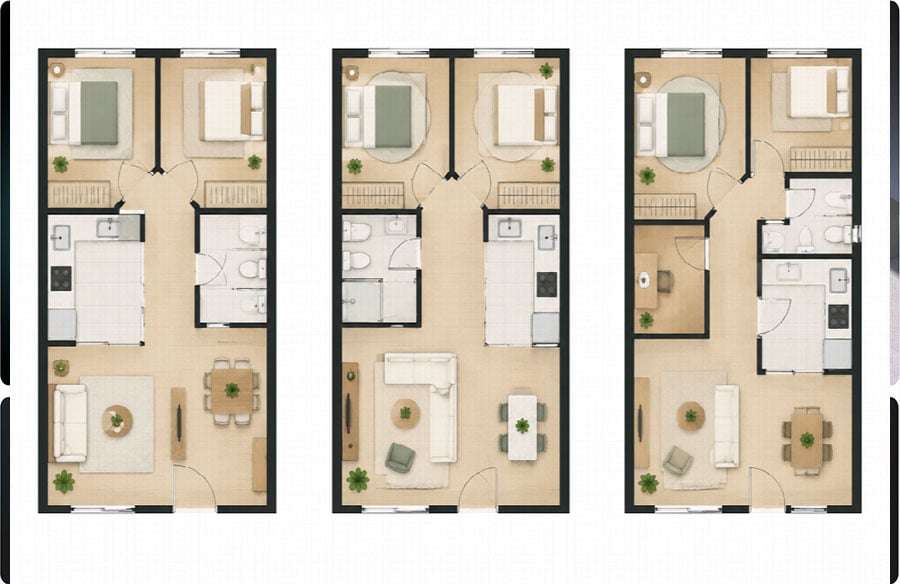
Every architecture student learns the same early ritual. Before a single wall is drawn, you list the spaces, note which ones need to be near each other, and draw them as loose bubbles on trace paper. The bubbles get pushed around, merged, stretched into rectangles, and eventually firm up into something that resembles a plan. It is slow on purpose. The slowness is where the thinking happens.
Generative tools have now arrived at exactly this stage. Type “two-bedroom apartment, open kitchen facing the balcony, study nook near the entrance” into an AI floor plan tool and you get a dimensioned, labeled plan back before you’ve finished sharpening a pencil. For a profession that has always treated the schematic phase as its core intellectual work, that is either a threat or a gift, depending on how you use it.
After a year of testing these tools in studio teaching and on small residential projects, my view is that they are most useful when you are honest about which step they replace.
What the bubble diagram was actually for
It helps to remember what the early diagrams were doing. A bubble diagram is not a drawing of a building. It is a way of externalizing relationships: this room needs daylight, that one needs privacy, these two share plumbing, this one should be the first thing a visitor sees. Adjacency matrices do the same thing in tabular form.
The value lies in making the designer state the brief clearly before committing to geometry. A student who skips that step usually produces a plan that looks resolved but answers the wrong question, with a beautiful living room in the spot that gets no evening light, or a guest bathroom that opens onto the dining table.
That matters, because generative tools are very good at producing geometry and entirely dependent on you for the relationships.
What AI tools do well in the schematic phase
The real strength of a generative plan tool is the number of options it can produce. In a conventional workflow, testing four genuinely different arrangements of the same footprint takes hours of drafting, so most people test one or two and refine those. With a tool such as FloorAI, you can describe the same brief and get several plausible layouts in minutes, then compare them side by side.
That changes the kind of question you ask. Instead of “is this plan good?”, you start asking “why is the second option better than the third?” Comparison exposes trade-offs that a single drawing hides: the kitchen that gains a window but loses its link to the dining table, or the corridor that disappears in one version and quietly eats a bedroom’s wardrobe wall in another.
The tools are also useful on the existing-conditions side. Renovation and interior projects often start from a photo of an old drawing, a sales brochure or a hand sketch. Turning that into a clean, editable plan used to be a tedious redrawing exercise. A free AI floor plan generator can do the redraw in a minute or two, and you then correct dimensions against site measurements. It doesn’t remove the need to measure. It removes the hours of retracing.
Some tools go a step further and let you revise an existing plan through text. FloorAI’s optimizer, for example, takes an uploaded plan plus a plain-language instruction, such as “merge the kitchen and dining, keep the structural wall by the stair, keep the entrance where it is”, and returns a revised layout. Running the same instruction again gives an alternative. Used this way, the tool behaves less like a designer and more like a tireless junior who drafts every variation you can think of.
What they skip
The limits are just as clear, and pretending otherwise is how these tools get a bad reputation in studios.
They don’t know the site. A generated plan has no idea that the neighbor’s wall blocks morning light, that the street side is noisy, or that the best view is diagonal across the plot. Orientation, context and climate still have to come from the designer, either written into the brief or applied afterwards.
They follow the brief literally. If the brief is thin, the plan will be generic. “Three bedrooms, two bathrooms” produces a three-bedroom apartment that could be anywhere. The more specific the relationships you describe, the more the output resembles a considered response rather than a catalogue layout. In that sense, the tools reward exactly the discipline the bubble diagram was meant to teach.
They don’t do regulation or structure. Fire egress, accessibility clearances, local building codes and structural spans are not things to delegate to a layout generator. The output is a planning sketch, not a permit drawing.
They have no point of view. The most memorable plans usually break a convention for a reason: a kitchen placed at the center of the house, a corridor widened into a gallery, a bedroom that turns away from the obvious view. Generators trained on conventional layouts tend to reproduce convention. If the project needs an idea, the idea is still yours.
A workflow that respects both
The approach that has worked best for me, and for the students I’ve taught, keeps the human thinking first and uses AI to widen the options:
- Write the brief as relationships, not just a room list. Which spaces need daylight, privacy, adjacency, separation. This is the bubble diagram in sentence form.
- Generate several layouts from that brief, deliberately varying one constraint each time: kitchen position, entrance sequence, bedroom orientation.
- Critique them as you would a classmate’s work. Walk the circulation, check the daylight, ask what each one sacrifices.
- Pick a direction and take it back into your own drawing tools for proper development, where site, structure and code come in.
- Use a 3D cutaway to test the feel before presenting to a client. A plan that reads well flat can feel cramped in volume, and clients understand an isometric view far faster than a line drawing.
Used this way, the AI handles the step that was always more labor than thought, which is drafting the fourth and fifth variation, and leaves the designer more time for the step that was always more thought than labor: deciding which one is right and why.
The trace paper isn’t going anywhere
There is a reasonable worry that students who grow up with instant plans will never learn to think spatially. I share it, which is why I still ask for hand-drawn diagrams before any tool comes out. But the same worry was raised about CAD, and later about parametric modeling, and the profession absorbed both by redefining what the designer’s real contribution was.
Generative floor plans are another step in that direction. They make producing a plan cheap. That makes judging a plan, and writing a brief worth answering, more valuable than ever.
Clara Whitmore is an architect and design tutor who writes about residential planning and the changing tools of early-stage design.