You can draw a plan and still read it wrong.
A student studies a drawing. The room in their head? Nothing like the one on the page, not even close. That gap is where the real learning happens. A desktop printer closes it in a single lesson. The drawing becomes an object. Something you can pick up and turn over. Space stops being abstract, which is the whole battle.
Ask an architecture tutor which students read plans fastest.
The ones who built models early. A model does not let a bad proportion hide. Not for a second.
Why Students Still Need to Hold the Model
A drawing hands you one viewpoint. Frozen. A model hands you all of them. Turn it over, crouch down, and there is the corner the drawing never showed you. Students who only work on screen get scale wrong the same way. The corridor looks generous on a monitor. Printed? You could barely push a shoulder bag through it. If you have built one, you know that shock. It is physical.
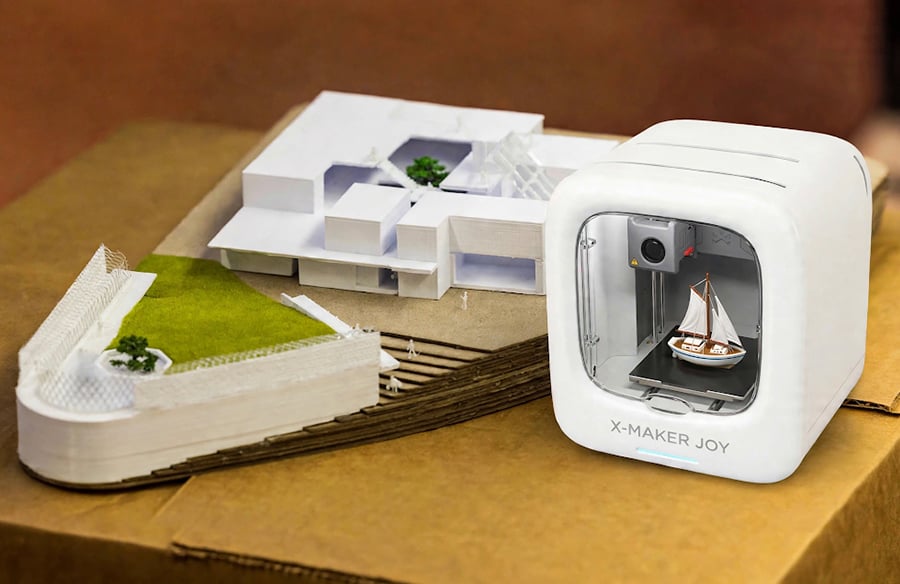
Research has linked 3D-printed models to stronger spatial perception, and the reason is simple once you see it. The printed object shows mistakes the drawing hides. Hold a printed massing model and you see it immediately. The courtyard. Too narrow for daylight to reach the lower floors. Nobody marked that up. The student saw it herself.
So here the model is not a presentation piece. It is a check. It checks the idea, not only the drawing.
Three Studio-Style Exercises for Younger Students
The projects that hold up have three things. A brief. Something you can measure. A review at the end.
That is the design studio, made to fit a timetable. Three exercises fit.
First, the scale model of a room. Students measure their classroom, pick 1:50, and build walls, door openings, furniture. Proportion meets tolerance here. A desk a few millimeters too wide will not fit between the printed walls. The fix? Not a nicer drawing. Measuring again. Properly this time. One group measured their door three times. It still came out two millimeters too narrow.
Second, the load-test bridge. Each team gets a fixed span. Limited filament. Then they design, print, and pile on weight until it breaks.
It will break. Every single one does. A collapsed bridge teaches structure no diagram can, because the failure has a location. You can point to the exact joint where the thickness or bracing was too thin, and the whole team sees it at once.
Third, floor plan to 3D. A hand-drawn plan goes in. Printed walls come out, with thickness and openings for doors and windows. Reading a plan and building from one are different skills. Completely different. The first wall too thin to print sends the student back to the drawing. That is when dimensions start to matter. Really matter.
No teacher has to invent this from nothing. Most start by adapting published 3D printer classroom activities to their timetable and age group, then write original briefs once the class has the hang of it. A shared library of activities gets the first term moving. After that, the students start inventing their own.
Expect the First Print to Fail
Almost nobody gets it right on the first version.
A test print makes that normal instead of embarrassing. The print warps off the build plate. Or the snap-fit joint comes out too tight. Or a thin wall gives up under its own weight. Each failure is small. Specific. Cheap. Our first print was a tiny chair with one leg missing. It sat on the teacher’s desk for the rest of the term. A failed print costs almost nothing. You can see what went wrong by looking at it.
The object stops being a result to defend. It becomes a draft to change. What did this version show? What changes next time? Architects run this loop with study models and spend weeks on it. The printer compresses it into hours. Hours.
Give it a term and the class changes. Students stop expecting version one to survive. They start planning version two before version one is even finished. That habit lasts longer than the printer. Longer than the class, too.
Picking Hardware a Classroom Can Actually Live With
The teaching matters more than the machine.
That said. The wrong machine can wreck a lesson before it starts. For younger classrooms, three features matter most. An enclosed build area. It keeps hot, moving parts behind a shell. App-based control. It removes the hardest part, because students send a print from a tablet instead of dealing with slicer settings. Short print times. They keep feedback fast. Start a print, talk through the decisions, look at the result together. All before the bell rings.
Enclosed, app-controlled machines for younger students fit this brief well. The machine stays out of the way. Attention stays on the design. That is the whole point.
Conclusion
Done well, this is not a technology lesson. It is design education.
You imagine. You model. You print. You look at what came out. Then you revise.
A student who has argued over a printed room layout carries it into every plan. A student who has watched a bridge fail does not forget where it broke, ever. Ideas get better when you can touch them. The profession has worked that way for centuries. The printer just lets that happen earlier. Much earlier.
For schools choosing hardware for younger students, the AOSEED range is one example of classroom-ready printers that combine an enclosed build area with app-based controls.