TL;DR: Modern access control has moved past the metal key and the paper sign-in sheet — credentialed entry, camera-verified visitor screening, and cloud-managed permissions now protect offices, retail spaces, and mixed-use buildings without slowing down the people who work there. When these systems are planned into a building’s design or a renovation instead of bolted on afterward, security becomes invisible to tenants and obvious only to the people trying to get in who shouldn’t be there.
For decades, “secure office” meant a front-desk guard, a sign-in clipboard, and a ring of keys that someone eventually lost or forgot to collect from a departing employee. That approach doesn’t scale past a handful of doors, and it leaves a paper trail that’s useless the moment an incident actually happens. What replaces it isn’t more guards — it’s smaller, smarter hardware that ties every door, camera, and visitor badge into one system a property manager can see on a phone.
What Is Access Control for a Commercial Building?
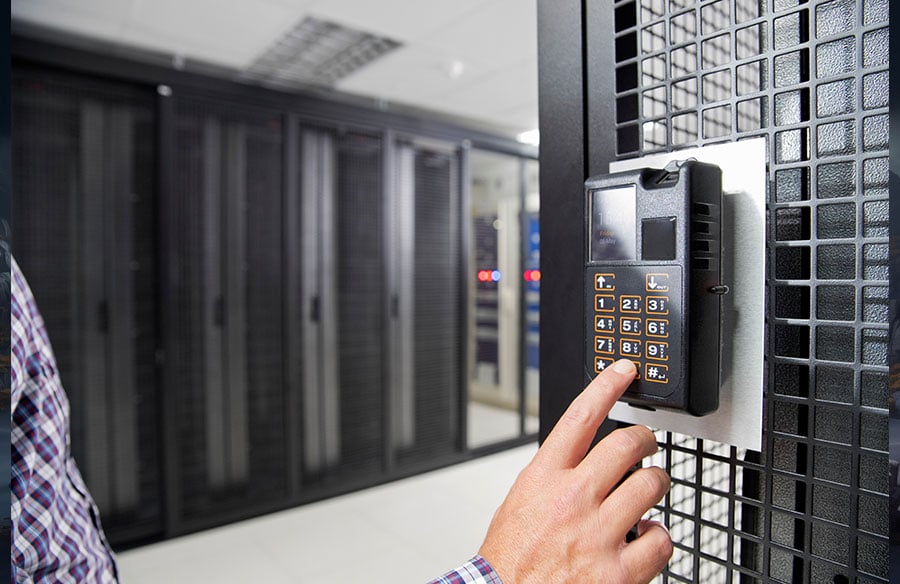
Access control for a commercial building is a system of credentialed entry points — key fobs, mobile credentials, or PIN pads — combined with software that logs who unlocked which door and when, so an office, retail space, or multi-tenant building can grant or revoke entry without ever re-keying a lock. Instead of one master key that opens everything, each employee, contractor, or tenant carries a credential scoped to exactly the doors and hours they need. Lose the fob or fire the employee, and revoke access from a dashboard in seconds rather than with a locksmith visit.
Why It Matters for Business Owners and Property Managers
Commercial leases and insurance policies increasingly assume this kind of system is already in place, not something a tenant will get around to eventually:
- Liability and insurance pressure. Landlords and businesses handling cash, inventory, or client data are finding it harder to get favorable liability coverage without a documented access log and monitored entries.
- Multi-tenant coordination. Office buildings with shared lobbies need a way to let each tenant manage their own suite’s access without touching anyone else’s — something a shared brass key never solved.
- Employee and client expectations. Badge-in entry and visitor screening now read as standard professionalism, not extra security theater, especially for client-facing offices.
- Retrofit cost. Buildings wired for access control during a renovation avoid the far more expensive process of fishing new low-voltage cable through finished walls and ceilings later.
Property managers deploying commercial access control systems in nyc have been especially quick to adopt them in Downtown Brooklyn, where older loft and warehouse conversions get leased to office tenants who expect keyless entry from day one, not a landlord promising to “look into it.”
How Access Control Systems Work
Credentialed Entry and Employee Flow
At the core of most systems is a reader at each controlled door — a fob scanner, keypad, or mobile-credential reader — tied to software that assigns permissions by person, not by physical key. A receptionist can grant a contractor access to the loading dock and utility closet for exactly the three days of a project, then have that access expire automatically without anyone walking around collecting a badge. Multi-door lockdown works the same way in reverse: one signal from a front-desk panel can secure every interior door in the suite during an emergency.
Visitor Management and Camera Integration
Cameras are the piece employees and clients notice first, and the piece that’s easiest to get wrong if placement isn’t planned around how people actually move through a lobby. A reception camera that only shows the counter misses the elevator bank and stairwell exits where most incidents actually occur. For office lobbies, retail floors, and parking structures, many commercial installers favor a modern camera lineup for its low-light performance and NVR integration, which lets one monitoring feed cover an entire building rather than a dozen disconnected cameras nobody actually watches.
Cloud-Based Permission Management
The shift from local server panels to cloud-hosted platforms is what makes multi-location businesses manageable. A regional retailer or a company with several office branches can set access rules once and push them everywhere, see every door’s activity log from one screen, and revoke a terminated employee’s credential at every location simultaneously instead of calling each site manager individually.
Practical Steps for Implementing Access Control
- Audit your doors before choosing hardware. Map every entry point — including loading docks, stairwells, and roof access — not just the front door.
- Decide who needs what, by role and by hours. Cleaning crews, contractors, and full-time staff should never share the same access profile.
- Plan for revocation, not just entry. The real value of the system shows up the day someone leaves the company and access needs to disappear instantly.
- Integrate cameras with door events, so a forced-door alarm or an after-hours entry automatically pulls the matching video clip instead of requiring a manual search.
- Budget for ongoing management, not just installation — someone on staff needs to own the credential list, or it drifts out of date within months.
Common Mistakes in Commercial Access Control
- Treating it as “install and forget.” A system nobody updates when staff turnover happens is just an expensive lock that’s always slightly wrong.
- Securing the front door and ignoring the rest. A hardened lobby means little if a loading dock or stairwell door gets propped open for deliveries.
- Mixing personal and business credentials. Letting employees use the same mobile app credential across unrelated buildings makes revocation and auditing far messier than it needs to be.
- Skipping the walkthrough with staff. The best system fails if front-desk staff haven’t been trained on how visitor screening and lockdown actually work in practice.
Access Control Approaches Compared
| Approach | Best For | Relative Cost | Management Overhead |
| Cloud-managed multi-door system | Offices, retail chains, multi-tenant buildings | Moderate upfront, low ongoing | Low — managed from one dashboard |
| Local standalone panel per door | Single-location small businesses | Lowest upfront | Higher — each door managed separately |
| Traditional lock-and-key | Very small offices with minimal turnover | Lowest initial cost | Highest long-term — re-keying after every loss |
FAQ
Do small businesses need access control, or is it just for large offices? Any business with more than a couple of employees benefits, mainly because re-keying locks after staff turnover gets expensive fast. Even a single-door system removes that recurring cost.
Can access control work in a building with multiple tenants? Yes. Cloud-managed systems let each tenant control their own suite’s permissions independently while sharing the building’s main entry infrastructure.
What happens to access when an employee is terminated? Their credential is revoked instantly from the management dashboard — no locksmith visit and no risk of a returned key that was actually copied.
Do access control systems require rewiring an existing office? Often minimally. Wireless and Power-over-Ethernet readers can retrofit most interior doors without the extensive conduit runs a wired system from decades ago would have needed.
How does access control work alongside video surveillance? The two systems typically share a platform, so a door event — like an after-hours entry — automatically pulls the matching camera clip instead of requiring a manual review of separate logs.
Conclusion
The best-run commercial buildings today don’t rely on a guard checking a clipboard — they rely on systems that quietly log who came through which door and revoke that access the moment it’s no longer needed. Getting there doesn’t require ripping out existing infrastructure; it requires planning entry points, camera coverage, and permission management as one connected system rather than three separate afterthoughts. Businesses that make that shift stop thinking about security as a recurring cost and start treating it as infrastructure that just works.