Designing coloring pages has been a costly task, particularly for parents, teachers, and hobbyists. iColoring AI is an artificial intelligence tool that enables users to turn both text and images into beautiful coloring pages instantly. You want to use words to describe a certain scene or upload a favorite photo, iColoring AI allows you to produce a high-quality line art, with zero drawing capabilities.
This tool offers opportunities to express creativity, support the educational process, and even explore commercial opportunities through the features of Text to Coloring Page and Image-to-Coloring. It targets adults, children, educators, and hobbyists, offering a free and easy-to-use platform to go all out in creativity.
iColoring AI Explained: Turn Ideas into Coloring Pages
iColoring AI is an advanced form of generative AI, that is being developed to transform textual descriptions and pictures into printable coloring sheets. Its platform uses advanced AI algorithms to produce quality line art.
The tool functions through either typing a text prompt or uploading a picture. In the case of text prompts, the AI deciphers your description and creates an extensive coloring page. In the case of images, it transforms the photograph into clear line art to be colored. The interface of Image to Coloring Page is user-friendly, needs no registration, and gives answers in real-time; thus, it is accessible to all.
iColoring AI has several styles like classic sketches, cartoon lines, and pencil art, and can be downloaded in either PNG or PDF format. Its speed, quality, and flexibility make it an outstanding option for any person who requires developing digital art, coloring books, or printable sheets without any effort.
How Text Becomes Art: The Text-to-Coloring Feature
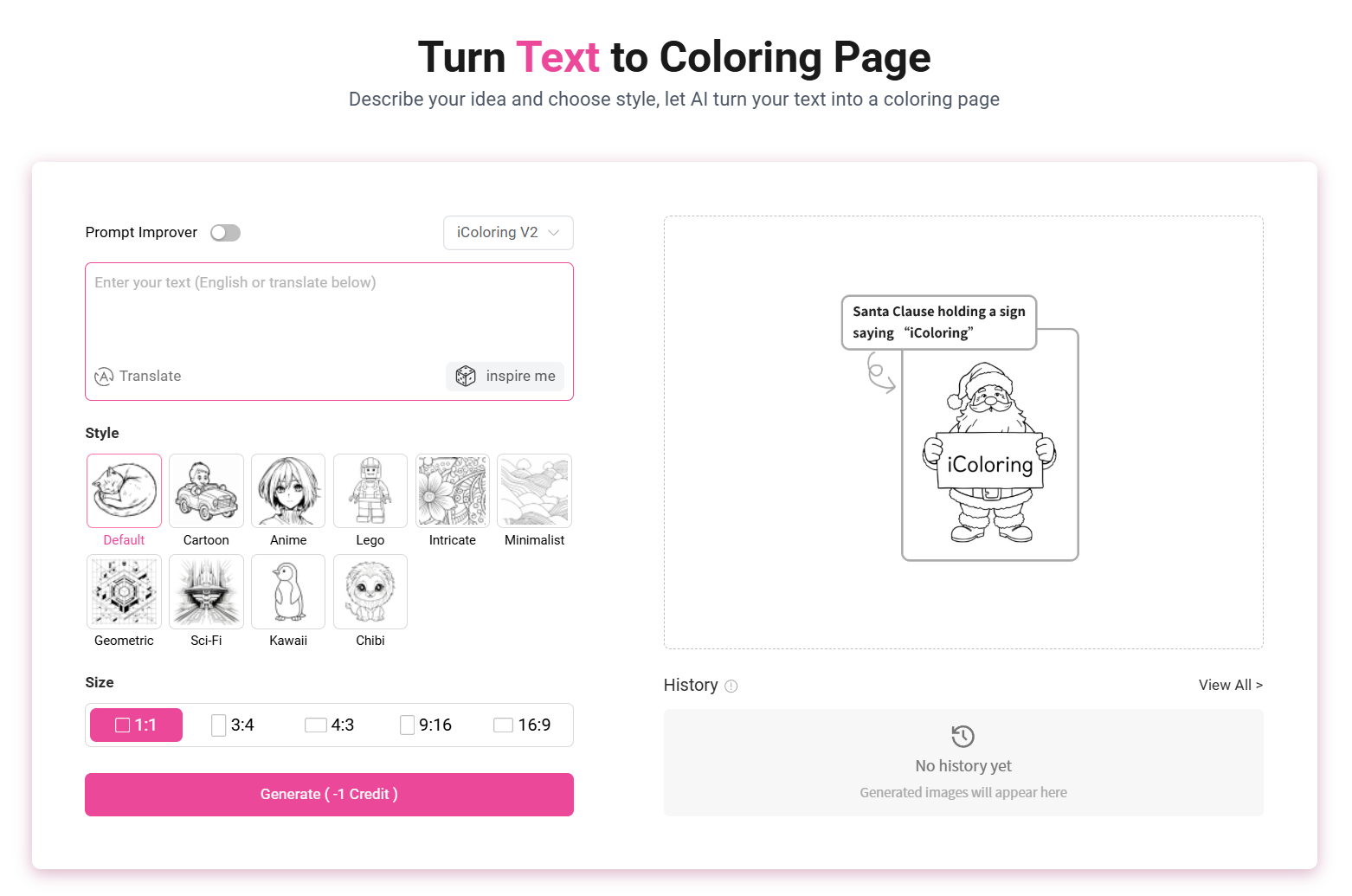 Step 1: Access the Tool
Go to the Text-to-Coloring Page created to begin the design.
Step 2: Enter Your Description
Write elaborately on what you wish to see in your coloring page in the form of a description of the scene or characters. Add details such as background, objects, or feelings.
Step 3: Style and Composition
Choose between various styles, like classic, cartoon, or pencil sketch. Composition and negative prompts could also be made to fine-tune the outcome.
Step 4: Generate and Download
Click on create and the AI will make your coloring page. After it is finished, preview and download your picture in PNG or PDF.
Tips for Best Results
- Streamline requests using descriptive language.
- Select the kind of style based on your vision.
- Select better options to print.
User Benefits
- Any creativity is enabled but not attracting talents.
- Ideal to be used in learning sheets, worksheets, and classroom assignments.
- Good for relaxing and coloring perfectly for adults and children.
Image-to-Coloring Made Simple: Upload, Style, Download
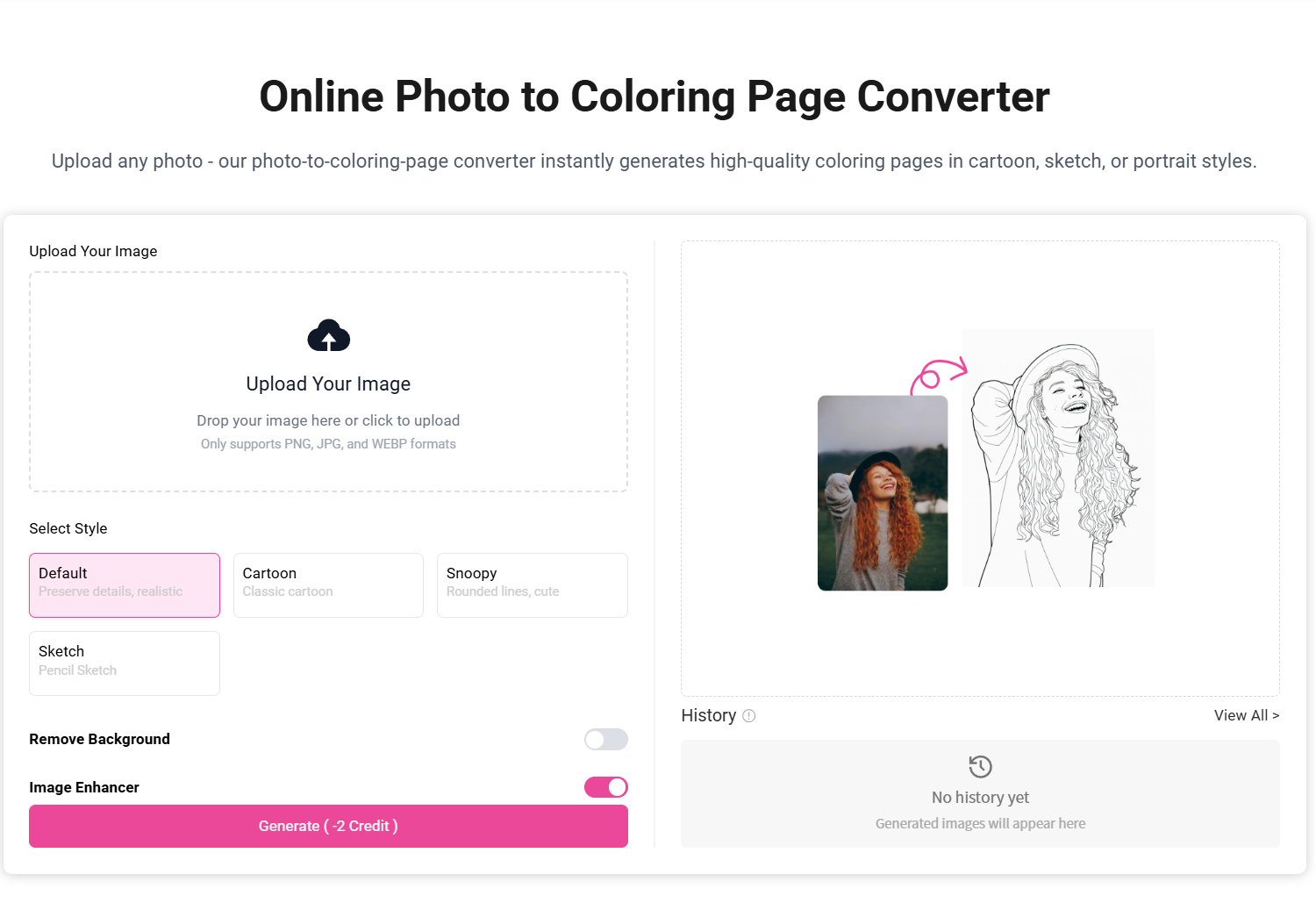 Step 1: Access the Tool
Use the Image-to-Coloring Page feature to upload your photo.
Step 2: Upload Your Image
Select an attractive picture of what you would wish to capture for example, a scenery or even an animal or family image.
Step 3: Choose a Style
Select the traditional, cartoon or pencil drawing types in order to determine the preferred impact of the coloring.
Step 4: Generate and Download
Click on create to transform your photo into line art. When done, preview and save as PNG or PDF.
Tips for Best Results
- Take high-resolution photos, which are more understandable.
- Cropping the picture puts emphasis on the subject.
- Select the style that matches your desired output, be it printing or digital coloring.
User Benefits
- Turns personal images into coloring paper.
- Perfect for making special gifts or craft works.
- Promotes artistic leisure, self-help books, and learning.
Why iColoring AI Stands Out: Benefits for Everyone
To teachers and parents, the site offers a simple means of creating educational coloring pages that can be used to help children achieve creative learning. They are able to design worksheets, lesson activities, or themed coloring pages that go with study goals.
For adults, iColoring AI is a tremendous stress reliever and source of creative relaxation. The platform is also affordable, since all these features are offered absolutely free, removing the need to obtain costly software or a professional designer.
Also, iColoring AI can be used commercially. Artists and amateurs are able to create pages for digital coloring books, printable sheets, or craft projects. It is very quick and easy to use, and anyone can create high-quality line art with its fast and easy-to-use interface.
iColoring AI takes into account several styles, immediate personalization, and the possibility of downloading instantly, which contributes to a high level of compatibility with creative work of any nature: education, recreation, and work projects.
Limitations and Considerations of AI-Generated Coloring
Though iColoring AI is a very great and versatile tool, it also has certain limitations that the user should be aware of. The disadvantages are that the artwork of the coloring pages that AI can make may lack detail and in particular, this is not as detailed as a hand-drawn one or that produced by a professional artist.
Another factor that has to be considered is image quality. To maximize the output, users are recommended to post high-quality pictures or informative prompts because low quality may result in less clear or blurred final products.
Moreover, although iColoring AI is free and simple to operate, not all users might trust or feel safe in terms of the storage and processing of uploaded pictures. There are also images that are sensitive or copyrighted, and even though the platform is fast in processing the images, users should be aware of such limitations.
How iColoring AI Outshines Other AI Coloring Tools
iColoring AI stands out from other coloring tools due to a number of unique features:
- Dual Functionality: Supports both Text-to-Coloring and Image-to-Coloring pages.
- Free and Fast: Results are immediate and downloadable without registration, unlike paid counterparts.
- Various Styles: Multiple styles, including classic, cartoon, and pencil sketches, accommodate all users.
- Flexible Prompts: Allows detailed entry and negative prompts to narrow down outputs.
Conclusion
iColoring AI is an efficient and free AI program that enables any person to attempt changing text descriptions and photos into quality coloring pages with minimal effort. The flexibility it offers with its ability to transform any text into a colored work or an image into one makes it unique with its two-fold capabilities of Text-to-Coloring and Image-to-Coloring.
iColoring AI is punctual, creativity-enhancing, and convenient. It helps users to save time and experience various styles, immediate downloads, and a straightforward interface. Although AI-created art could have slight constraints, the application is a great option among children, adults, teachers, and designers.
Begin to make your own special coloring pages and find out how simple it is to bring imagination to life. Create pages from your ideas or photos within minutes: Free, fast, and fun!