Architecture • Field Communication • Project Information
A contractor photographs a wall junction on site and sends it to the project group with a short message: “Please check this.”
The architect asks which floor it is on. A consultant replies that the installation may conflict with a service route. Someone marks up the image. Another person says they will review the drawing.
For the people involved at that moment, the exchange makes sense.
Two weeks later, it may not.
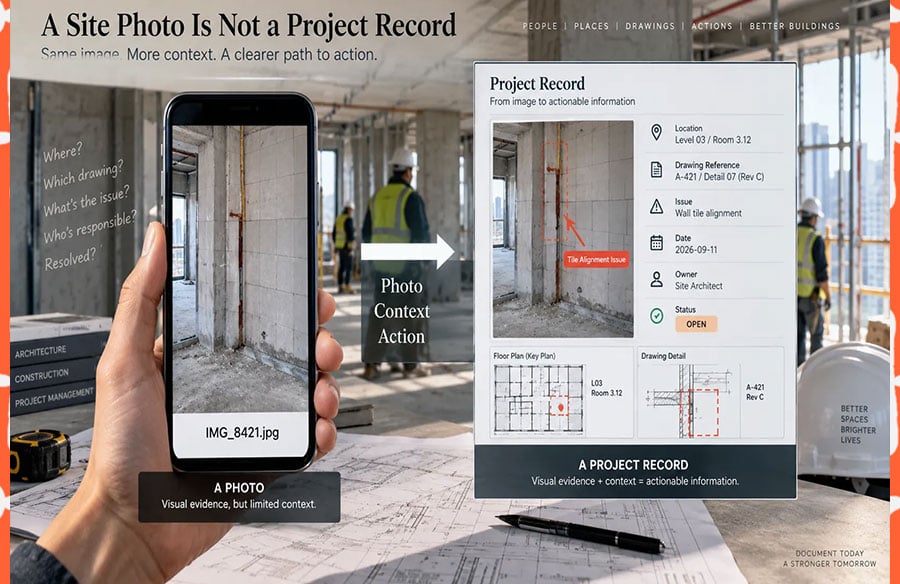
The photograph is still there, but the surrounding project knowledge has become harder to reconstruct. Which room was it taken in? Which drawing revision was current? Was an RFI raised? Who took responsibility for the issue? Was it resolved on site or incorporated into a later drawing revision?
Construction teams produce enormous quantities of visual information, particularly once a project moves from design coordination into site work. The difficulty is no longer capturing evidence. Smartphones have made that almost effortless. The harder task is preserving enough context for the evidence to remain useful after the original conversation has passed.
A site photograph can support a project record. On its own, it rarely is one.
Site Photos Need More Than Visual Clarity
A photograph may show a construction problem more effectively than several paragraphs of description.
It can reveal a misaligned finish, a damaged component, an unexpected opening, a service conflict or an installation that does not match the intended detail.
What the image does not necessarily reveal is equally important.
- where the photograph was taken;
- which drawing or specification applies;
- when the photograph was captured;
- whether the condition is temporary or complete;
- what action is required;
- who is responsible for the response;
- whether the matter remains open.
That missing information becomes more important as the project grows.
On a small residential project, the architect may remember a particular wall from a photograph alone. On a large project involving consultants, contractors, subcontractors and several hundred rooms, relying on personal memory is far less reliable.
The longer an image needs to retain value, the more deliberately its context should be recorded.
Establish a Minimum Information Set for Field Images
Not every image needs a formal report. General progress photographs, material references and informal design discussions can remain lightweight.
Images that record an issue, instruction, approval question or construction discrepancy deserve more structure.
A simple field message might include:
| LOCATION | Level 03, Room 3.12 |
| REFERENCE | A-421, Detail 07, Rev C |
| ISSUE | Wall tile alignment at column |
| DATE | 11 September 2026 |
| OWNER | Site architect |
| STATUS | Open |
The value is not in the formatting itself. It is in making the photograph understandable to someone who was not standing beside the person who took it.
Location is particularly important. “Third floor” may be adequate during a conversation between two people on site, but it becomes ambiguous once several zones, rooms or cores are involved.
Drawing references provide another layer of traceability. If the image relates to A-421 Rev C, that information should travel with the discussion rather than depend on someone remembering which drawing was open at the time.
File Names Should Survive Outside the Messaging Thread
Mobile devices commonly generate filenames such as IMG_8421.jpg.
Inside a live conversation, this causes little difficulty because the image is surrounded by messages explaining what it shows.
Once the file is downloaded, copied into a report or moved into a shared project folder, much of that context disappears.
A filename such as L03_R312_TileAlignment_2026-09-11_01.jpg is more useful because it still communicates something after leaving the chat.
A practice does not need an elaborate naming standard for every casual photograph. It does, however, benefit from having a consistent method for images that may later support an RFI, snag item, site report or design decision.
This is especially important on projects where several people photograph the same issue at different stages.
Group Structure Helps, but It Does Not Create Information Discipline
Messaging groups are often organised around the way a project works: site coordination, design review, materials, consultants or general project discussion.
That separation can reduce noise, but it does not solve poor information habits.
A well-organised group can still fill up with unlabeled photographs, screenshots without drawing references and decisions that are never recorded anywhere else.
On projects involving teams in Hong Kong or Taiwan, groups may also operate across English and Traditional Chinese working environments. Teams already using Telegram for routine project coordination may find a 紙飛機群組使用指南 useful when agreeing on basic group structure and permissions. The platform setup, however, is only the container. The more important project rule is how visual information is identified, referenced and eventually closed out.
That distinction matters because communication tools are very good at keeping a conversation moving. They are less reliable as the sole location for information that may need to be retrieved months later.
Link the Image Back to the Project
An important site photograph should point to something more durable than the message that introduced it.
Depending on the project, that could be:
- a drawing number;
- an RFI;
- a room or zone reference;
- a snag item;
- a specification clause;
- a BIM issue;
- an inspection record.
The purpose is not to turn every message into formal documentation.
It is to create a path back to the controlled project information when the issue has consequences beyond the immediate conversation.
Without that path, a messaging platform gradually becomes a second, unofficial project database.
That is where problems begin.
The formal issue register may say an item is closed while the group still contains an earlier photograph showing it as unresolved. A drawing may have moved to Rev D while screenshots circulating in the chat were taken from Rev B. A contractor joining the project later may not know which version reflects the current decision.
Fast communication and controlled information can coexist, but they should not compete as separate versions of the truth.
“Latest” Is Not a Drawing Revision
Architectural communication often becomes less precise when teams are under time pressure.
“Use the latest drawing.”“See the PDF from this morning.”“I sent the updated one yesterday.”
These descriptions are convenient during an active exchange, but they age badly.
The same applies to filenames such as:
final.pdf
final-new.pdf
final-2.pdf
Project information should rely on the project’s revision system rather than conversational memory.
“A-204 Rev C” remains identifiable after the message has disappeared from view.
“The file I sent this morning” does not.
This becomes particularly important when site photographs contain drawing markups. A screenshot of a detail may be perfectly clear, but if nobody records whether the markup was based on Rev B or Rev C, its value declines as soon as another revision is issued.
Keep Informal Discussion and Formal Decisions Connected
Messaging is effective precisely because it is informal.
A contractor can raise a problem immediately. An architect can respond from another location. A consultant can comment without waiting for the next coordination meeting.
Trying to formalise every sentence would slow the process unnecessarily.
The distinction should happen when the conversation produces an outcome that affects the project.
If a discussion changes a dimension, material, detail, approval, programme item or construction instruction, the agreed result should move into the relevant controlled system.
That might mean updating:
- an RFI response;
- an issue register;
- a BIM coordination platform;
- a drawing;
- a specification;
- a meeting record;
- a project management system.
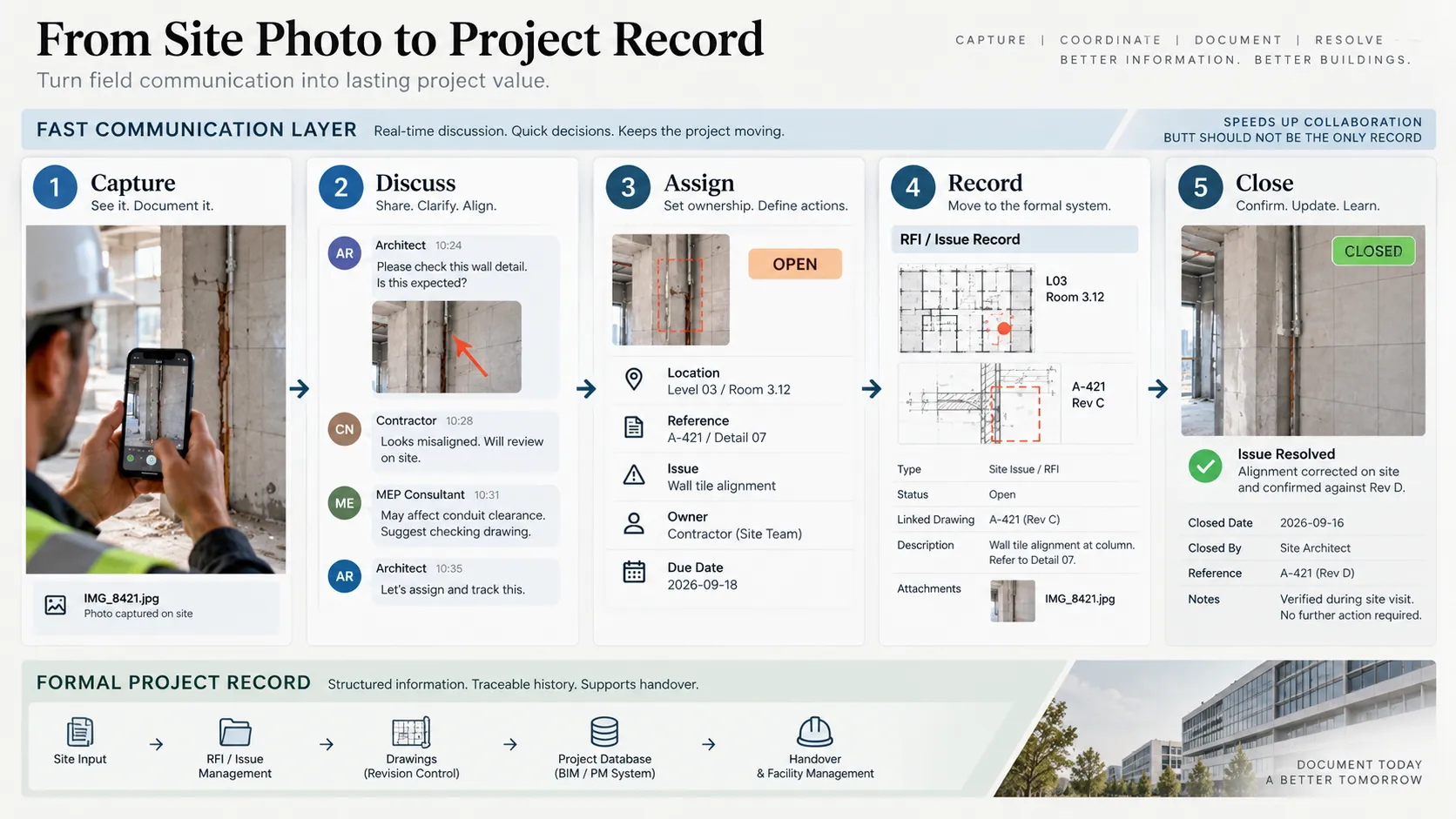
A useful workflow is therefore:
Capture → Discuss → Assign → Record → Close
The chat supports the first three steps very well. The formal project environment becomes important once the decision needs to survive beyond the conversation.
Markups Need Their Source
Screenshots and markups are among the fastest ways to communicate architectural information.
Someone opens a drawing, circles an area, draws an arrow and sends the image to the team.
The problem arises when the screenshot becomes detached from the source drawing.
A markup should therefore include enough information to identify what was marked up.
For example:
A-412 Rev C — ceiling coordination at Room 3.12
This takes seconds to add and can prevent significant confusion later.
The same principle applies to renderings, reflected ceiling plans, service coordination screenshots and details taken from BIM models.
A markup is most useful when the team can trace it back to the information from which it was created.
Ask One Clear Question at a Time
Visual communication often becomes difficult when someone uploads a sequence of images and adds a single caption:
“Thoughts?”
The recipient must then work out which image requires a decision and what decision is being requested.
If several photographs relate to one issue, number them and state what each one is intended to show.
For example:
- Ceiling alignment at corridor junction
- Sprinkler position relative to bulkhead
- Door clearance after revised wall build-up
Now the consultant can respond to “Image 2” without creating another round of clarification.
The improvement is small, but these small improvements accumulate across hundreds of project exchanges.
Close Issues in the Same Place They Were Raised
Project groups often contain many issues that appear to remain unresolved simply because nobody returned to the original conversation after the work was completed.
Status labels help.
OPEN REVIEWING APPROVED REJECTED CLOSED
When an item is resolved, a short update such as:
CLOSED — alignment corrected on site and checked against A-421 Rev D.
gives the conversation an ending.
The formal record should still live in the appropriate project system where required, but closing the loop in the messaging thread prevents old problems from appearing current when someone searches the history later.
Treat Site Photography as Project Information
Construction photographs can contain more sensitive information than teams realise.
An apparently ordinary image may include:
- client names;
- project addresses;
- access-control equipment;
- security layouts;
- staff badges;
- computer screens;
- residential interiors;
- floor plans pinned to a wall.
Before an image is shared broadly, the sender should consider whether the entire frame is necessary and whether the chosen communication channel is appropriate.
Cropping may be enough in some cases. Other images may belong only in a controlled project environment.
The speed of mobile communication should not override confidentiality requirements.
Create a Clear Handoff From Message to Record
The strongest project workflows do not try to force every piece of site communication into a formal platform at the moment it is created.
They define what happens next.
A practical sequence might look like this:
- Capture — A site team member records an issue.
- Discuss — The architect, consultant and contractor establish what the image shows.
- Assign — One person becomes responsible for the next action.
- Record — If the issue affects formal project information, it enters the relevant RFI, BIM, snagging or project-management workflow.
- Close — The final outcome is recorded, and the original conversation receives a brief resolution update.
This keeps field communication fast without asking a messaging history to perform the job of a common data environment or issue-management system.
 Test Whether the Information Still Works After Two Weeks
One of the simplest ways to assess a project’s visual communication is to test retrieval rather than creation.
Select ten site photographs from two weeks earlier and give them to a team member who did not originally send them.
Ask whether they can establish:
- where each photograph was taken;
- which drawing or issue it related to;
- what required attention;
- who owned the action;
- whether it was resolved;
- where the final project record can be found.
If the answers depend on calling the original sender, the project is relying heavily on personal memory.
That may work while a team is small and stable. It becomes fragile when staff rotate, consultants leave, packages change hands or a project extends over several years.
A Simple Field Communication Template
A useful template does not need to be complicated:
| LOCATION: |
| REFERENCE: |
| ISSUE: |
| ACTION NEEDED: |
| OWNER: |
| DUE: |
| STATUS: |
| PHOTO / MARKUP: |
Teams can shorten or expand it depending on project scale.
What matters is that the essential context is captured while it is still obvious to the person standing on site.
Architectural projects will continue to generate more photographs, screenshots and visual exchanges. The practical challenge is ensuring that this material remains connected to the decisions, drawings and responsibilities that give it meaning.
A photograph can record what happened at a moment in time.
Good information management records what that moment meant to the project.