Architectural visualization often starts with something rough: a hand sketch, a simple massing model, a material idea, or a quick view from a design study. The hard part isn’t producing an image; it’s producing enough useful options to decide what a project should look like, then presenting that direction clearly to a client.
Two categories of generative AI tool now sit inside that process: image generators, which turn early design inputs into visual alternatives, and image to video tools, which take a selected image and add movement, useful when a client needs to understand atmosphere, scale, or the feeling of moving through a space. They’re related, but they solve different problems, and studios that treat them as interchangeable tend to waste time on the wrong one.
Adoption is moving faster than the hype suggests it should. NBS 2025 Digital Construction Report found that 49% of architecture professionals now use AI tools in some form, up from under one in ten in 2020. That shift is less about choosing between tool categories and more of a day-to-day workflow decision.
Two Different Jobs
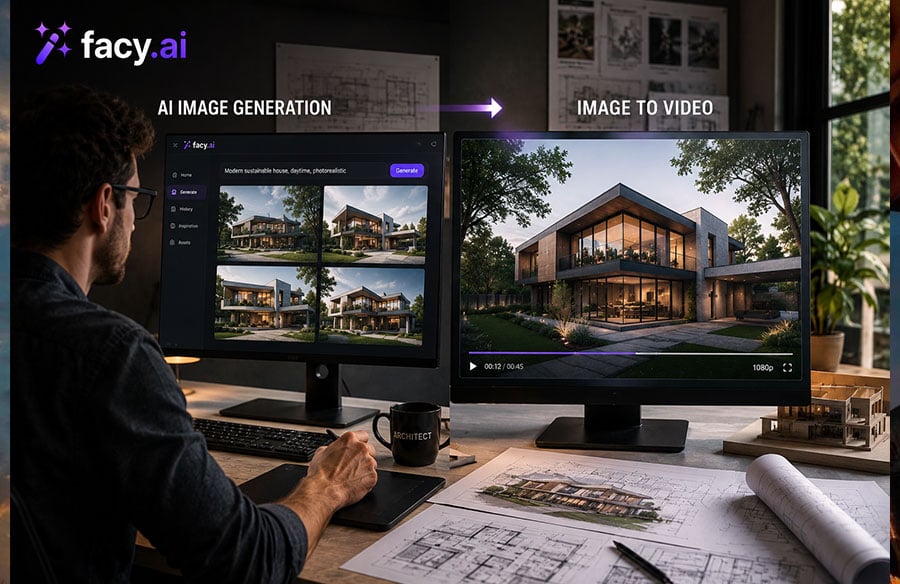
An image generator creates a still architectural visual from a prompt, sketch, reference image, or similar input. Text-to-image tools such as Midjourney, Stable Diffusion, and DALL-E popularized the category; browser-based, architecture-specific tools have since followed the same underlying approach. An image-to-video tool starts with a visual and creates a sequence in which the scene changes over time.
For an architect, the practical distinction is simple: image generation is about exploring how a project could look; image-to-video is about showing how that look might feel in motion. A studio might use an image generator to compare a facade in warm timber and stone against a version in exposed concrete and glass. Once a direction is chosen, image-to-video can turn that still into a slow approach toward the entrance, with trees moving lightly in the background.
Which Tool Fits the Task
| What are you trying to do? | Best fit |
| Explore a facade direction or massing option | AI image generation |
| Compare materials, lighting, or landscape treatments | AI image generation |
| Turn a sketch into a client-facing still | AI image generation |
| Show how a space feels when you move through it | Image to video |
| Add atmosphere to an already-approved visual | Image to video |
| Build a short presentation clip | Image to video |
| Develop a concept, then present it in motion | Both, in that order |
Where Image Generation Fits in the Design Process
Image generation is most useful while the design is still being explored. A detailed 3D model isn’t necessary for the first conversation about materials, mood, or facade character.
- Test massing ideas. A simple SketchUp block model or hand sketch can become a visual starting point, comparing, for instance, “brutalist concrete with climbing ivy” against “sleek parametric glass and steel” before committing to a direction.
- Explore materials and atmosphere. The same building concept can be tested in timber, stone, concrete, or metal, under different lighting and landscape treatments.
- Create visual options for a client conversation. Several clearly different images tend to make an early design discussion more concrete than a single polished render that leaves little room for comparison.
Browser-based generators, such as the Facy AI image generator, fall into this category and can be evaluated alongside other tools at the concept stage. Workflow fit matters more than any single tool’s feature list.
From Still Render to Spatial Story
Once a visual represents the design direction, motion can add another layer to the presentation. The goal isn’t to make every part of the building move: a restrained camera movement and a little environmental activity are usually enough.
- Give the camera a clear job. A prompt like “slow camera push toward the main atrium” helps communicate the scale and importance of an entrance.
- Add movement around the architecture, not to it. Wind through trees, subtle water movement, people walking, or shifting daylight make a still scene feel occupied without touching the building itself.
- Keep the building as the anchor. The source image should remain the reference point. The more movement introduced into the architecture itself, the higher the risk of unwanted changes.
A Workflow That Keeps Architects in Control
- Start with something real. Use a sketch, massing model, viewport, or other project input so the generated image has a clear design reference.
- Explore before polishing. Generate a small set of meaningful alternatives rather than dozens of random variations, and compare them against the design intent.
- Choose one visual anchor. Once the team agrees on a direction, refine that image before moving into animation.
- Animate selectively. Use image to video for camera movement and environmental detail that adds meaning, and skip motion that doesn’t improve the presentation.
- Check the result against the design. A generated image or video can support a presentation, but the architectural model and drawings remain the reference when accuracy matters.
Where AI Visuals Can Lose Architectural Accuracy
Generative visuals can look convincing while still changing details that matter. That’s a real risk when a concept image starts to be read as a literal representation of the proposed building.
- Geometry can drift. Straight walls, windows, columns, balconies, and repeated facade elements may shift between generations or frames.
- Materials can become inconsistent. A material may look convincing in one area and change texture, color, or reflectivity elsewhere in the same image.
- People and objects can change. Cars, furniture, vegetation, and people may render differently from frame to frame.
- A polished image can create false confidence. A beautiful render is not proof the underlying design is technically correct. AI visuals work best for communication and exploration, not as construction documentation.
FAQ
What is an AI image generator for architects?
A tool that creates or transforms architectural visuals from prompts, sketches, or reference images, useful for exploring form, materials, lighting, and presentation direction.
Can AI create concept renders from sketches?
Yes. A sketch or simple model can provide a starting point for generating concept alternatives, though the output should still be checked against the original design intent, especially where geometry matters.
Should architects create the still image before the video?
Usually. When composition and design direction matter, starting with a refined still gives the team more control. That image then becomes the visual anchor for the animation.
Can AI video preserve architectural geometry?
It can preserve much of the appearance when the source image is strong, and the movement is restrained. See Facy image to video for an example of a workflow built around that constraint. But generated video can still introduce changes, and it shouldn’t be treated as a guarantee of technical accuracy.
Can AI replace traditional architectural rendering?
No. It speeds up concept exploration and some presentation work, but accurate modeling, documentation, coordination, and construction information still require dedicated professional tools.
The Bottom Line
Give each tool a clear job. Use image generation when you’re exploring what a project could look like. Use image-to-video once you have a strong visual and want to communicate movement, atmosphere, or scale. Keep the architectural model, drawings, and design decisions as the source of truth: AI-generated visuals are most valuable when they help a team explain an idea faster and give clients a clearer sense of the design before it reaches final visualization.